How to Connect Content Data to Your CRM (And What Changes When You Do)
Connecting content data to a CRM means syncing the engagement signals your content generates, such as which pages a prospect read, how long they spent, and whether they forwarded a document to a colleague, directly into your CRM's contact, lead, and opportunity records. This turns content interactions into actionable deal intelligence that reps can see and act on inside the tools they already use.
CFO forwards it to their IT Director and their head of procurement. All three spend time on the pricing section. The rep has no idea any of this happened. On Monday, they send a generic follow-up asking if the CFO had a chance to review. The CFO says they'll circle back. The deal stalls for six weeks.
That gap, between what buyers do with content and what reps know about it, is where deals slow down and pipelines lose accuracy. What is content tracking? and how does it close that gap? The answer is the connection between your content platform and your CRM. When you connect content data to your CRM, every content interaction, a single read, a multi-stakeholder forward, a buyer returning to a document three days later, flows into your deal record as a signal a rep can act on. This guide covers what that connection involves, why it changes how revenue teams work, and how to set it up in practice.
What Is Content Data and Why Does It Belong in Your CRM?
Content data in a CRM refers to the engagement signals generated when a rep shares an asset with a buyer: which pages were read, how long they spent on each section, whether the document was forwarded to additional contacts, and whether the buyer returned to it on a later date. When connected to a CRM, these signals appear on the relevant contact, lead, and opportunity records as deal intelligence reps can act on in real time.
Most revenue teams are working with two data streams that never touch: their CRM, which captures what reps do (emails sent, calls logged, meetings booked), and their content platform, which captures what buyers do (which sections they read, how long they stayed, whether they shared the document internally). The first stream records activity. The second records behavior. Behavior is the harder signal to fake and the more useful one for forecasting.
Content data, in the context of connecting it to a CRM, is specifically the behavioral fingerprint a buyer leaves on shared sales content. It's distinct from marketing analytics (web traffic, blog views, campaign clicks) and from standard CRM activity data. It's what happens between the moment a rep hits send and the moment the buyer picks up the phone.
The Two Signal Types That Matter
Not all content signals carry equal weight at the deal level. Two categories are worth separating:
- Explicit signals: which asset was shared, viewed, downloaded, or forwarded; timestamps for each event. These answer 'did they look at it?'
- Implicit signals: time-on-section (which part of the document drew the most attention), return visits (the buyer came back without being prompted), forwarding behavior (the document was shared internally, surfacing new contacts). These answer 'what did they do, and what does it mean?'
The explicit signals confirm delivery. The implicit signals reveal intent. A CRM integration that captures both gives reps something they can act on; one that only logs 'document opened' gives them something they can acknowledge but not use.
The other reason content data belongs in the CRM, not a separate analytics portal, is adoption. A dashboard that requires a separate login produces reports nobody consistently looks at. When engagement events appear inline on a Salesforce opportunity record or trigger a notification in a rep's Gmail workflow, they change behavior at the moment of action. That's the difference between data that sits in a report and data that closes deals.
For a broader view of how this fits into managing sales content: Sales Content Management Guide.
Why the Content-CRM Gap Is Costing Revenue Teams More Than They Realize
Content data should connect to CRM because without it, reps follow up blind, pipeline forecasts miss buying committee activity, and marketing has no way to prove which content actually influences deals. Each of these three gaps carries a direct revenue cost.
The gap between content engagement and CRM visibility tends to be invisible until someone tries to close a deal that stalled without warning, or until marketing has to defend its budget using download metrics that nobody trusts. Here's what the gap looks like in practice.
Reps Follow-Up Blind
When a rep sends content without engagement data flowing back, every follow-up is a guess. Did the prospect read it? Did they skip it? Did they share it with someone whose name the rep doesn't know yet? The generic 'just checking in' email on day five is a symptom of this gap. Reps default to cadenced outreach because they have no behavioral signal to time their follow-up against.
When engagement data reaches the CRM, 'just checking in' becomes something else entirely: 'I noticed you spent time on the pricing section, I thought it might be helpful to walk through our volume model.' That's a different conversation. It's more likely to get a response, and it's more likely to move the deal.
Pipeline Forecasts Miss Buying Committee Activity
Most CRM records show one primary contact per deal. Most B2B purchases involve three to seven stakeholders. When a rep shares a document and the primary contact forwards it internally, two or three new buying committee members start consuming content and forming opinions without the rep knowing they exist. The deal looks like a one-contact conversation in the CRM while it's actually a committee evaluation in reality.
When forwarding data reaches the CRM as new contact records linked to the opportunity, the rep learns the committee has formed before the prospect mentions it. They can map the account correctly, reach out proactively, and avoid being surprised in a late-stage call by stakeholders who've never heard of them.
Marketing Can't Prove Content ROI
Marketing produces content. Sales uses or doesn't use content. Without a data connection between what gets shared and what deals close, marketing has no way to demonstrate which assets actually influence pipeline. They measure content by downloads and page views, which are proxy metrics at best.
When content engagement data flows through the CRM to closed-won records, the question 'which content drives revenue?' has a specific, defensible answer: this case study appeared on 23 closed-won opportunities last quarter. That one-pager about compliance appeared on zero. That's the content ROI conversation that gets budget renewed and investment redirected.
Why Sales Reps Overlook Marketing Content and How to Fix It covers the upstream side of this problem. And Content Hub Operations: Strategies for Managing Effectively explains how governance connects to the visibility layer.
How to Connect Content Data to Your CRM (Step by Step)
Connecting content engagement data to a CRM involves five steps: deciding which data points to sync and at what CRM level, choosing an integration method (native, API, or middleware), mapping engagement events to specific CRM fields, configuring rep-facing alerts for high-signal events, and building attribution reports that connect content to closed-won deals.
Here is the practical sequence, ordered from the decisions you make before touching any settings to the reports you build after the data is flowing.
Step 1: Define What Content Data You Want in the CRM
Before touching any integration settings, decide which data points actually need to be at the deal level. The full scope of what can sync is large; without prioritization you end up with cluttered records nobody trusts. The minimum useful set for most B2B sales teams:
- Asset shares: which document was sent, to which contact, from which rep, and when
- View events: was it opened, and when
- Section-level engagement: which pages or sections received the most time
- Return visits: the buyer came back without being prompted
- Forwarding events: new contacts at the account have viewed the document
Decide upfront whether you're syncing at the contact level, the lead level, or the opportunity level. Most teams want all three, but the opportunity-level sync is where content attribution to deals lives. Start there if the team is new to this setup, and expand once adoption is established.
Step 2: Choose Your Integration Method
Three approaches exist, ordered by complexity and depth:
Native integration. Your content platform has a pre-built connector for your CRM. This is the fastest path and the one most teams should start with. A native integration handles field mapping, authentication, and event routing without custom development work. For Salesforce, this typically means installing a Chrome extension, authenticating with CRM credentials, and configuring which engagement events flow through. Setup is measured in hours, not weeks.
API integration. For teams that need custom field mapping or bidirectional data flows beyond what a native connector provides, direct API integration gives full control. Most enterprise CRMs (Salesforce, HubSpot, Microsoft Dynamics) expose API endpoints that accept enrichment writes from external tools. This requires RevOps or engineering involvement to configure and maintain, but enables the deepest integration possible.
Middleware (Zapier, Make, n8n). For teams using a content platform without a native CRM connector, middleware tools can pipe engagement events to CRM fields via trigger-action workflows. Less elegant than a native integration but functional for basic event logging. Suitable for smaller teams validating the use case before investing in a native connector.
Step 3: Map Engagement Events to CRM Fields
Once the integration method is chosen, define the field mapping: which content engagement event maps to which CRM field or activity record. Here's a practical mapping:
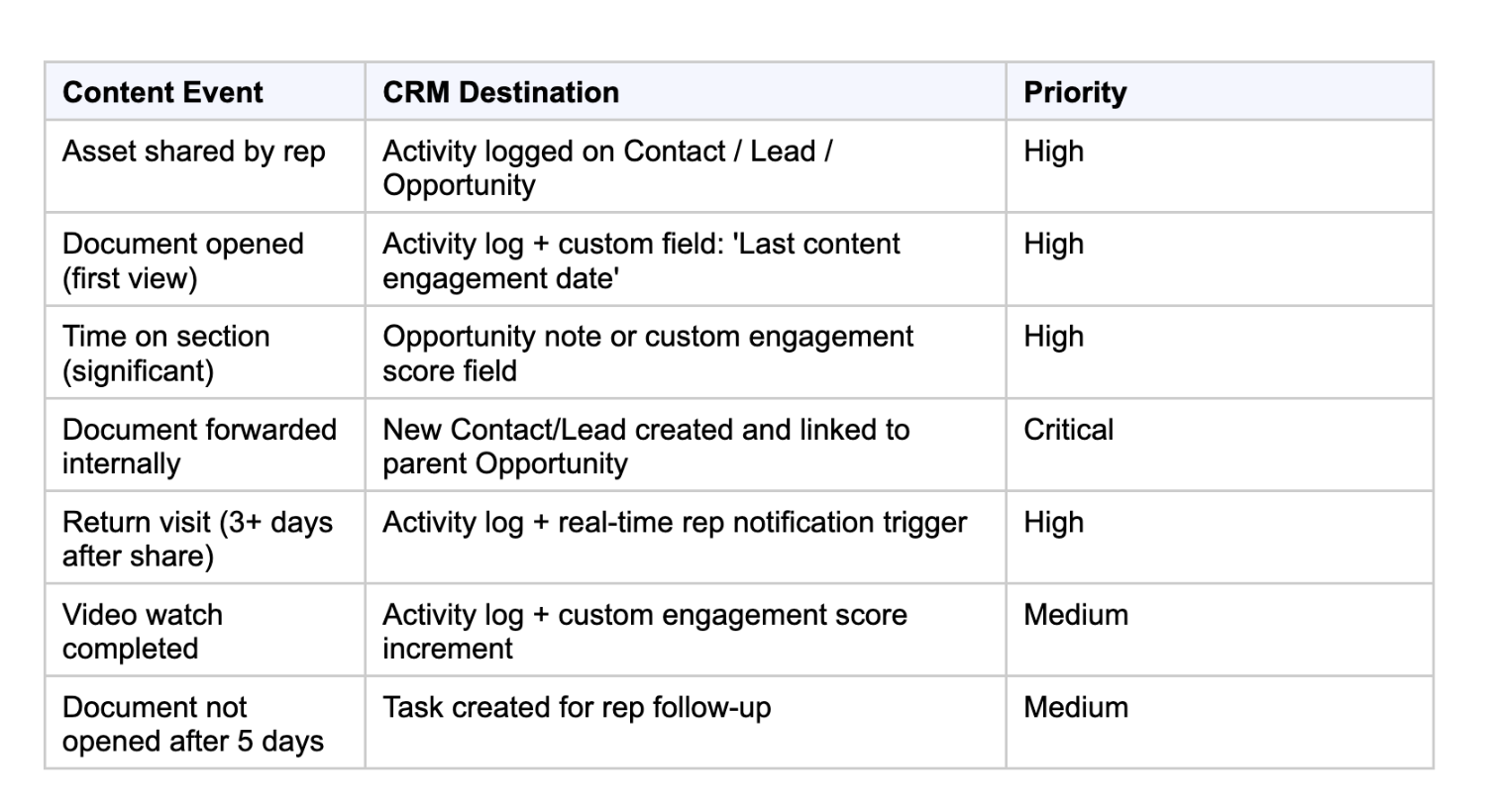
The forwarding event to new contact creation is the highest-value mapping in the table. It surfaces buying committee members automatically, without any rep action required. Confirm explicitly that your integration handles this specific event, because it's also the one most commonly misconfigured or skipped entirely.
Step 4: Configure Rep-Facing Alerts
Data in a CRM field nobody checks produces the same outcome as data that never arrived. The integration is only valuable if it changes rep behavior in the moment.
Configure real-time notifications that fire when high-signal events occur: a buyer spending significant time on the pricing section, a document being forwarded internally, a buyer returning after several days of silence. These alerts should appear inside the rep's primary workflow, inside Salesforce, inside Gmail or Outlook, or in Slack. The closer to the rep's natural work environment, the higher the adoption rate. A notification buried in a separate analytics tool is functionally invisible.
Signal-to-noise discipline matters here. An alert for every document open in every deal sends reps to ignore the notification feed within a week. Configure alerts for threshold events only: forwarding to new contacts, return visits after 3+ days, time-on-pricing above a meaningful threshold. Start narrow and add alert types only after reps are consistently acting on the baseline set.
Step 5: Build Attribution Reports for Marketing
Once content engagement data is flowing into the CRM at the opportunity level, connect it to deal outcomes reporting. The two reports that matter most:
- Content influenced closed-won: which assets appear most frequently on opportunities that closed? This shows marketing which content investments are directly connected to revenue.
- Content by deal stage: which assets appear at which stage? This reveals whether the library is serving awareness, evaluation, or decision conversations, and where the gaps are.
These two reports replace download metrics with revenue-connected proof, and give marketing a data-backed basis for deciding which assets to build next, update, or retire.
For how CRM integrations fit into a broader HubSpot stack: HubSpot Integrations for Sales and Marketing. And for Salesforce-specific stack decisions: 8 Must-have Salesforce Integrations for Sales and Marketing.
What Changes When Content Data Is in Your CRM
When content data flows into a CRM, four things change in practice: reps follow up with context rather than cadence, pipeline forecasts incorporate actual buyer engagement rather than rep judgment, marketing can prove content ROI against closed-won deals, and buying committees become visible before they surface in a sales conversation.
These aren't abstract improvements to 'alignment.' They're specific behavioral changes that show up in deal outcomes.
Reps Follow Up With Context, Not Just Cadence
A rep who receives an alert that the prospect returned to the proposal on day three, spent time on the security section, and then forwarded it to a new contact doesn't send a 'checking in' email. They reach out to the new contact. They acknowledge the security question before it's raised. They do it on day three rather than day five. The content data changed the timing, the message, and the contact list for that follow-up. That's three variables that determine whether a follow-up moves a deal or gets ignored.
Forecasting Accuracy Improves
A deal stuck in 'proposal sent' for two weeks looks the same in a traditional forecast whether the prospect has ignored it or read it twelve times. When content engagement data flows into the opportunity record, stage probability can reflect actual buyer behavior, not just rep judgment. A prospect who has returned to a document three times and forwarded it to procurement is further along than their CRM stage suggests. Surfacing this in the forecast gives leadership a more accurate picture of what's real versus what's hoped for.
Marketing Learns Which Content Is Actually Worth Building
When content engagement connects to closed-won data, the report is specific: this case study appeared in 23 closed-won opportunities last quarter. That one-pager on compliance appeared in zero. Marketing now has a prioritization signal that's more reliable than download counts, and a budget justification that finance can verify rather than question.
Buying Committees Become Visible Before They Surface in a Call
This is the most underestimated benefit of connecting content data to CRM. When a rep shares a document and three new contacts at the account open it via forwarding, those three contacts appear as new CRM records linked to the opportunity. The rep now knows the committee has formed before the prospect mentions that 'other stakeholders will need to be involved.' They can reach out proactively, map the account correctly, and avoid being surprised in a late-stage call by people who've never heard of the product.
Related: What is Content Discovery and why do you need it? for how content discoverability connects to what gets shared in the first place.
Common Implementation Mistakes (And How to Avoid Them)
Most content-to-CRM integrations work in a technical sense within a few hours. Most fail to change rep behavior within a few weeks. Here are the four failure modes that account for the gap.
Mistake 1: Syncing too much data without prioritizing what reps need. A CRM record flooded with every minor content event becomes noise. Reps stop looking at it. Start with the five signals that actually change rep behavior: views, section-level engagement, return visits, forwards, and video completions. Add more only after reps are consistently acting on the baseline set. The principle: if an alert doesn't change what the rep does next, it shouldn't exist.
Mistake 2: One-way sync only, with no bidirectional data flow. The most valuable configurations are bidirectional: content engagement data flows into the CRM, and CRM deal context flows back to the content platform to inform content recommendations. When a content platform knows the deal stage, the product being sold, and the vertical of the prospect, it can surface the most relevant assets for that specific deal. A one-way integration captures the behavioral signal but misses the intelligence layer that makes the next content share better than the last one.
Mistake 3: Alert fatigue from misconfigured notifications. Real-time alerts only work if they're filtered to high-signal events. An alert every time anyone opens any document trains reps to ignore the notification feed within a week. Configure alerts for threshold events: document forwarded (new contact discovered), buyer returns after 3+ days of silence, buyer spends more than a defined threshold of time on pricing or technical sections. Start narrow, measure which alerts reps actually act on, and tune the thresholds from there.
Mistake 4: Not mapping forwarding events to new contact creation. This is the most commonly missed configuration and the highest-value one. If the integration logs view events but doesn't detect forwarding to new contacts, the buying committee visibility benefit disappears entirely. Confirm explicitly that your integration creates new CRM contacts when a document is forwarded to an unrecognized email address, and links those contacts to the parent opportunity. This is not a default setting in most integrations; it needs to be configured deliberately.
How Paperflite Connects Content Data to Your CRM
The five steps above describe the integration in platform-agnostic terms. Here's how Paperflite handles each one in practice, across Salesforce and HubSpot, the two CRMs where most B2B sales teams live.
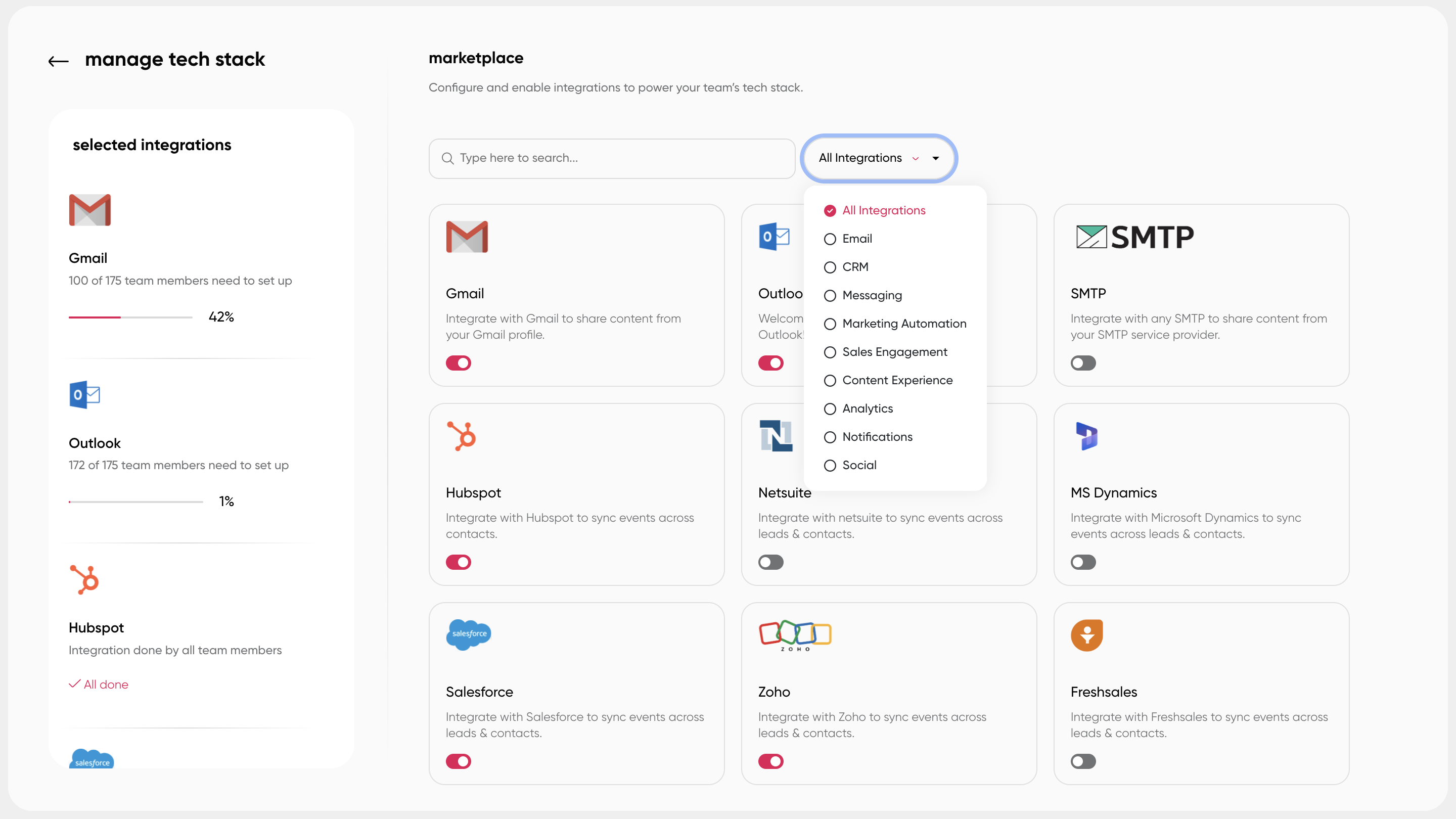
Native Salesforce Integration
The Paperflite-Salesforce integration surfaces the full Paperflite platform inside Salesforce, embedding content search, sharing, and engagement tracking directly in the CRM workflow. A rep can find, share, and track content without leaving Salesforce. Content engagement events (views, section reads, forwards, returns) log automatically to the relevant Salesforce objects: contact, lead, account, and opportunity. There's no separate portal login and no tab-switching required.
On the bidirectional side, Paperflite's AI uses CRM deal context (stage, product, vertical, account history) to surface relevant content recommendations inside the Salesforce opportunity record. The integration works in both directions: content data enriches the CRM, and CRM data improves which content surfaces next.
Native HubSpot Integration
Paperflite's HubSpot integration captures and logs content engagement data from Paperflite directly into HubSpot contact, deal, and activity records. Triggers fire in HubSpot when a lead downloads content or when new engagement events occur, enabling timely rep follow-up from within the CRM workflow. Content sharing activity initiated by leads is tracked and logged for targeted nurturing sequences. The integration also supports personalized content recommendations within HubSpot based on prospect content interactions.
Additional CRM and Workflow Integrations
Paperflite integrates with Pipedrive, Freshsales, Salesloft, Outreach, Gmail, Outlook, Slack, and LinkedIn, enabling content sharing and engagement tracking across the tools reps already use. The depth of the integration varies by platform; Salesforce and HubSpot have the most complete native connections for engagement data logging and bidirectional intelligence flow.
Content Revenue Intelligence
Paperflite's Content Revenue Intelligence connects asset-level engagement data to pipeline and closed-won outcomes. Marketing can run reports showing which specific assets appeared in closed-won deals, how often, and at which deal stage, providing a revenue-connected content ROI metric rather than download counts. This is the output of Step 5 in the integration sequence above, and it's the report that changes how marketing decides what to build next.
Pricing
Paperflite pricing starts at $30 per user per month (the 'I Got Wings' plan, minimum 5 users), with the entry point post-trial at $150/month for a 5-user team. The Professional plan ('I Believe I Can Fly') runs $50/user/month, adding CRM integrations, white labeling, SSO, and a dedicated Customer Success Manager. The Advanced plan ('Touch The Sky') is $60/user/month. See how Paperflite connects your content engagement data to Salesforce and HubSpot. [Book a demo]
See also: Organize B2B Marketing Content in 8 Simple Steps for the library governance layer that determines what gets shared through the integration.
Conclusion
Connecting content data to your CRM is not a technical project for engineering to own. It's a workflow decision for revenue teams: which engagement signals do reps need to see, where should those signals appear, and what should happen automatically when a high-signal event fires. When those decisions are made clearly, the integration closes a gap that costs most B2B sales teams real deal visibility.
Buyers who have been actively reviewing content, forwarding it internally, and returning to specific sections are further along than their CRM stage suggests. The behavioral data to know this is already being generated every time a rep sends a document. Connecting it to the CRM is what turns that data from a log nobody checks into a signal that changes what reps do next.
Sales Content Management Guide covers the full content lifecycle that feeds into this integration. And What is Sales Enablement? places content data in the broader enablement framework where it creates the most value.
Ready to connect your content engagement data to your CRM? [Start your free Paperflite trial]
Frequently Asked Questions
What is content data in a CRM?
Content data in a CRM refers to the engagement signals generated when a sales rep shares an asset with a buyer: which pages were read, how long they spent on each section, whether the document was forwarded to additional contacts at the account, and whether the buyer returned to it on a later date. When connected to a CRM, these signals appear on the relevant contact, lead, and opportunity records as deal intelligence that reps can act on in real time, rather than sitting in a separate analytics portal nobody consistently checks.
Why should content engagement data connect to a CRM?
Content engagement data only creates value if it reaches the rep at the moment they need it, inside the tool they're already working in. When engagement events appear inline on a CRM opportunity record or trigger a real-time notification, they change rep behavior: follow-ups become better timed, more relevant, and targeted at the right people, including buying committee members the rep wouldn't otherwise know exist. Without the CRM connection, engagement data sits in a separate platform that reps rarely visit, and the deal intelligence it contains goes unused.
How does content engagement data flow into Salesforce?
Content engagement data flows into Salesforce through a native integration between your content platform and your CRM. For Paperflite, this involves installing the Paperflite Chrome extension, authenticating with Salesforce credentials, and configuring which engagement events sync to which Salesforce objects (contacts, leads, accounts, opportunities). Once configured, engagement events log automatically to the relevant records without any manual input from the rep. The Paperflite Salesforce integration also surfaces a full embedded Paperflite instance inside Salesforce opportunity records, so reps can find, share, and track content without leaving the CRM.
What content engagement events are most valuable to sync to a CRM?
The highest-value events to sync are: document forwarding to new contacts (surfaces buying committee members as CRM records automatically), return visits after several days of silence (indicates a deal warming back up), significant time on specific sections like pricing or security (reveals which arguments resonate), and video completion rates. These events change rep behavior in specific, actionable ways. Basic 'document opened' events are useful context but lower priority than the behavioral signals that indicate active evaluation.
What is content attribution in CRM, and how does it help marketing?
Content attribution in CRM is the process of connecting specific content assets to deal outcomes by tracking which assets appeared on opportunities that closed. When content engagement data flows through the CRM to closed-won records, marketing can run reports showing which case studies, decks, or one-pagers appeared most frequently in winning deals. This replaces vanity metrics (downloads, page views) with revenue-connected proof of content ROI, and gives marketing a data-backed basis for deciding which assets to invest in, update, or retire.
Can content data from HubSpot and Salesforce be used bidirectionally with a content platform?
Yes. The most valuable configurations are bidirectional. Content engagement data flows from the content platform into the CRM, enriching deal records with buyer behavioral signals. CRM deal context flows from the CRM back to the content platform, enabling AI-powered content recommendations based on the deal stage, product being sold, and buyer industry. This two-way flow means the integration improves both the rep's follow-up intelligence and the relevance of the content they share on the next interaction.
What is the difference between connecting content data and standard CRM activity logging?
Standard CRM activity logging captures what the rep did: emails sent, calls made, meetings booked. Connecting content data captures what the buyer did: which pages they read, how long they stayed, whether they forwarded the document internally, and whether they returned. Both are valuable, but buyer behavioral data is harder to manufacture and more predictive of deal outcomes. A rep can log a call that went to voicemail as a 'touch.' A buyer who returns to a proposal three times and forwards it to procurement is showing intent that no rep input can simulate.
What CRMs does Paperflite integrate with for content data sync?
Paperflite has native integrations with Salesforce and HubSpot for content engagement data sync, with the Salesforce integration surfacing a full embedded Paperflite instance inside Salesforce opportunity records for the deepest native-CRM experience. Paperflite also integrates with Pipedrive and Freshsales as CRM options, and with workflow tools including Salesloft, Outreach, Gmail, Outlook, Slack, and LinkedIn for rep-facing notifications and content sharing. The Salesforce and HubSpot integrations support the fullest bidirectional intelligence flow.