How to Auto-Tag Sales Content (And Why Manual Tagging Always Breaks Down)
To auto-tag sales content:
1) Choose a platform like paperflite with AI that reads document text, not just filenames
2) Define your tagging taxonomy before upload - persona, buying stage, industry, content type, and use case;
3) Let the AI generate tags on upload, then review and correct the first batch to calibrate accuracy
4) Map custom field values to your taxonomy so tags are searchable from the CRM and content library
5) Audit quarterly to retire stale content surfacing in search results.
Introduction:
The marketing team runs a tagging sprint. Everyone agrees which persona tags to use. A shared spreadsheet tracks the taxonomy. Three weeks later, the library looks clean. Six months later, eighty new assets have been uploaded. Sixty of them have no tags. The ten that do have tags were tagged by whoever uploaded them using whatever terms felt right that day. The sprint didn't fail because the team was careless. It failed because consistent metadata at scale requires sustained human attention that content teams simply don't have.
Manual tagging breaks at scale. It always has. The problem isn't motivation or process - it's that tagging is a repeated, interruptive task that competes with every other content operation, and it loses every time. For B2B sales and marketing teams specifically, the consequence of broken tagging is invisible to leadership but visible to every rep who opens the content library, searches for a CFO-stage case study, and gets back three results with no clear indication of which is current, which applies to their vertical, or which stage of the deal it was designed for. This guide covers how to fix that with AI auto-tagging - specifically for the sales content case: text-based documents, decks, one-pagers, and case studies that need to be tagged by persona, buying stage, industry, and use case so reps can find the right asset in under 30 seconds.
The organizational foundation: Organize B2B Marketing Content in 8 Simple Steps.
Why Manual Tagging Always Breaks Down (The Root Cause)
Manual content tagging fails at scale for sales teams for three specific reasons: tagging competes with every other priority and loses (assets get uploaded without metadata during busy weeks), no one owns the ongoing cleanup so the library degrades invisibly one untagged upload at a time, and taxonomy conventions drift without enforcement so different team members apply different terms for identical concepts. The result is a library that's complete by file count and useless by search quality.
The failure isn't sudden. It's accumulative. One untagged asset on a Monday. Another on Wednesday. A dozen more over the following month. The library degrades before anyone notices, and by the time the problem is visible, the remediation required is a full-time project that nobody has bandwidth for.
Cause 1: Tagging Competes With Every Other Priority and Loses
New content gets uploaded during a busy week. The uploader knows they should add tags - persona, stage, industry, use case - but they're late for a call, so they add the filename and move on. Multiply this by twenty people uploading content over twelve months and you have a library that's complete by file count and useless by search quality. The intention to tag is universal. The follow-through is not.
Cause 2: No One Owns the Ongoing Cleanup
Content libraries don't degrade dramatically in a day. They degrade invisibly, one untagged upload at a time, until the day a rep tries to search for "enterprise security case study" and gets back twelve results with identical thumbnails and no metadata to distinguish them. By that point, the cleanup required is a full-time project that nobody has time for, so it gets added to the Q3 roadmap and the cycle repeats.
Cause 3: Taxonomy Conventions Drift Without Enforcement
Even teams that run successful tagging sprints find that their taxonomy drifts over time. One person tags content "mid-funnel," another uses "evaluation stage," a third uses "consideration." Three terms for the same stage. Searching any one of them misses two thirds of the assets it should return. Controlled vocabularies only work when they're enforced at the moment of upload. Manual processes can't do this consistently. AI can.
The Downstream Consequences
Bad tagging produces three specific failures visible to the team: search results that don't reflect what's actually in the library, outdated assets that keep surfacing because they're not flagged as stale, and rep improvisation where people stop trusting the library and build their own decks from memory. Every consequence of poor tagging ultimately costs selling time.
Why Sales Reps Overlook Marketing Content and How to Fix It goes deeper on the rep-trust problem that broken tagging creates.
What Metadata Actually Matters for Sales Content
The five tag dimensions that matter for sales content findability are: persona (who is this for - CFO, IT Director, Champion), buying stage (Awareness, Consideration, Evaluation, Decision), industry or vertical (HealthTech, FinTech, Enterprise SaaS), content type (Case Study, Battle Card, One-Pager, Demo Video), and use case or topic (competitive displacement, security objection, pricing justification). These five dimensions answer the questions a rep has before every touchpoint - and they're the five dimensions AI auto-tagging should apply to every asset on upload.
Most auto-tagging articles discuss metadata in abstract terms. For sales content specifically, the question is: which tag dimensions make an asset findable by a rep who has 30 seconds before a call and knows what kind of buyer they're talking to, what stage the deal is at, and what the conversation is likely to be about? Here's what actually answers those questions.
1. Persona / Audience
The single most important dimension. Determines which asset to send to which stakeholder. A rep who knows they're presenting to a CFO needs to filter immediately for CFO-stage content. Without persona tagging, they scroll through everything and use their best guess. With persona tagging, they find the right case study in one search and go into the call confident.
2. Buying Stage
Ensures early-stage buyers get awareness content and late-stage buyers get closing material. Sending a detailed technical spec to a buyer who's still comparing categories creates confusion. Sending a capabilities overview to a buyer ready to sign wastes a closing window. Stage tagging makes the right content obvious at the right moment.
3. Industry / Vertical
Peer-industry content converts better. A HealthTech buyer engages differently with a HealthTech case study than with a generic enterprise case study, even if the use case is identical. Industry tagging makes vertical-specific content discoverable when it matters most and ensures reps aren't sending FinTech evidence to a Manufacturing prospect.
4. Content Type
Format affects consumption and timing. A battle card is a live-call reference tool. An ROI calculator is a mid-cycle CFO tool. A case study is early-to-mid-cycle social proof. When a rep knows they need a specific format, type tagging lets them filter immediately rather than opening multiple assets to see what they are.
5. Use Case / Topic
This is the dimension that makes the library useful in a live conversation rather than a post-call email attachment. A rep who hears a security objection should be able to search "security objection" and find the relevant battle card, case study, and third-party validation in one result set. Use case tagging maps the library to the language of live sales conversations, not the language of the content creator.
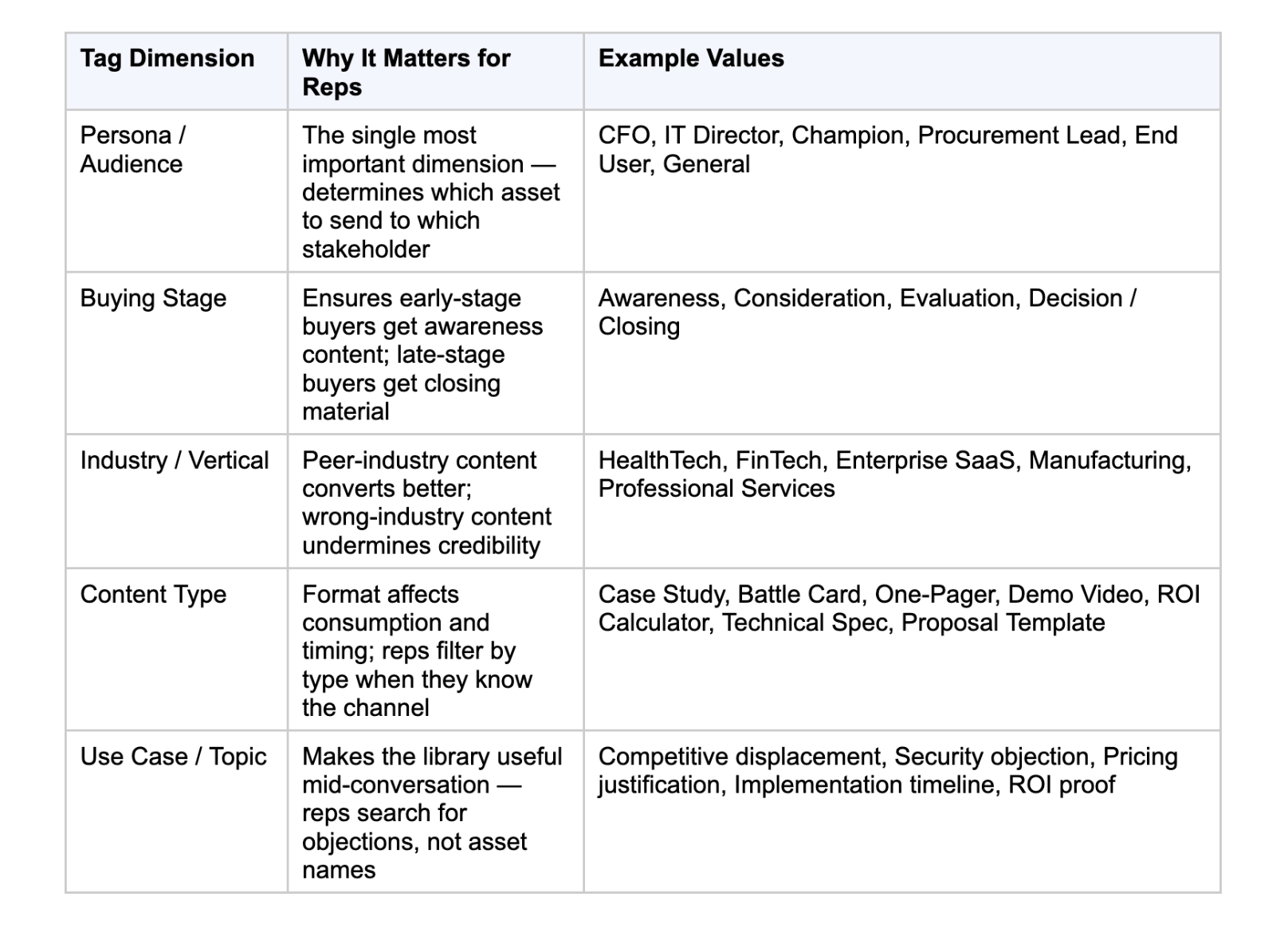
The five dimensions at a glance:
What the AI needs to generate good tags: For AI auto-tagging to produce accurate tags across these five dimensions, the taxonomy must be defined before the AI starts tagging. The AI reads the content and maps what it finds to the vocabulary defined. If the team hasn't defined what "Evaluation Stage" means in their context, the AI has no frame of reference for that dimension.
Content Hub Operations: Strategies for Managing Effectively for the governance layer that keeps taxonomy definitions consistent over time.
How AI Auto-Tagging Works for Sales Content
AI auto-tagging for text-based sales content reads the content inside the document - the text in a PDF, the copy in a slide deck, the paragraphs of a one-pager - and applies tags based on what the content actually says, not what the filename claims. It uses natural language processing and semantic classification to map the content to a predefined taxonomy. This is different from image auto-tagging (which uses computer vision on photos). For documents and decks, the input is text; the output is structured metadata covering topics, personas, stages, and use cases.
Traditional search indexes filenames and whatever metadata a human has added. AI auto-tagging reads the content itself - the text inside a PDF, the copy in a slide deck, the headers and paragraphs of a one-pager - and generates tags from that content, not from the filename. A file named "Final_v3_Updated_March.pptx" gets tagged with its actual content: competitor intelligence, enterprise, closing stage, pricing objection. The filename is irrelevant. The content is the metadata.
Why This Is Different From DAM Image Tagging
Nearly 80% of DAM (digital asset management) offerings with AI include auto-tagging - but almost all of it is built for image and video libraries. Computer vision identifies objects, scenes, colors, and faces in photographs. That's a different technology and a different problem from the one B2B sales content teams have. Sales content is text-heavy: PDFs, PowerPoint decks, Word documents, one-pagers. Auto-tagging for this content requires natural language processing and semantic classification, not image recognition. The application is specific to the content type.
The Four Outputs Paperflite Auto Tagging Generates on Upload
When a text-based asset is uploaded to Paperflite, Auto Tagging reads the full content and generates four things simultaneously - all before anyone on the team has manually reviewed the file:
- Tags reflecting what the asset actually covers: topics, themes, competitive context, and timeframe
- Custom field values: industry, persona, buying stage, and use case mapped directly to the team's existing field structure
- Internal descriptions for the team: what the asset covers, who it's for, and when to use it
- External descriptions for buyers: how the asset is positioned for the people it's being shared with
No one decides what the asset is about. No one checks whether tagging conventions were followed. The library gets richer with every upload rather than dirtier. (Source: Paperflite blog, "How to Fix Your Disorganized Content Library in 2026," May 2026.)
The Human-in-the-Loop Layer
Even the best AI auto-tagging produces some tags that miss the nuance of a specific organization's context. The right workflow is: AI generates tags on upload, a content manager reviews and corrects the first batch, and the system learns from those corrections to improve accuracy over time. The goal isn't zero human involvement. It's reducing human involvement from "tag every asset manually" to "review and correct AI-generated tags for edge cases." That's a fundamentally different time commitment - and one that actually gets done.
How to Set Up Auto-Tagging for Your Sales Content Library
Five steps to set up auto-tagging for a sales content library: first, define your taxonomy before enabling auto-tagging (persona, stage, industry, content type, use case values); second, audit and clean the existing library using the ROT framework to remove redundant, outdated, and trivial assets; third, enable auto-tagging on upload and review the first 20-30 tagged assets to calibrate accuracy; fourth, map custom fields to your CRM and search layer so tags connect to the tools reps already use; fifth, assign a named content owner to maintain tag quality through quarterly audits.
Step 1: Define Your Taxonomy Before Turning On Auto-Tagging
The single most important step. AI maps content to your vocabulary - it doesn't invent the vocabulary for you. Define the controlled list of values for each of the five tag dimensions before a single asset goes through the auto-tagger. Fifteen persona values, ten industry values, five buying stage values, twelve content types, and twenty use cases is a reasonable starting point for most B2B sales content libraries. The list should be exhaustive enough to cover actual content but specific enough that each value is meaningfully distinct from the others.
Step 2: Audit and Clean Your Existing Library First
Running auto-tagging on a library that contains outdated, duplicate, and stale content produces well-tagged versions of content that shouldn't be in the library at all. Before enabling auto-tagging, run a content audit using the ROT framework: flag every asset as Redundant (duplicates), Outdated (no longer current or accurate), or Trivial (created for a one-off purpose with no ongoing use). Archive or delete what doesn't belong. Auto-tagging works best on a clean starting set.
Step 3: Enable Auto-Tagging on Upload and Review the First Batch
Most platforms with AI auto-tagging apply it at the moment of upload, so the asset enters the library with tags already populated. Review the first 20-30 assets the AI tags before relying on them for rep-facing search. Correct what's wrong. Note the patterns: which tag dimensions does the AI get right consistently, and which ones does it miss? Use that knowledge to refine either the taxonomy definitions or the correction workflow.
Step 4: Map Custom Fields to Your CRM and Search Layer
Tags that don't connect to the CRM deal context or the content search interface are tags that nobody uses. Ensure tag dimensions - especially persona, stage, and industry - map directly to how reps search for content inside the tools they already use. A rep who searches "FinTech CFO closing stage" inside their Salesforce opportunity record should get back the same result as if they searched from the content library directly. The taxonomy has to be consistent across both surfaces.
Step 5: Assign Ownership for Tag Quality Over Time
Auto-tagging maintains quality at upload. It doesn't automatically retire content that becomes stale or correct tags that drift as the taxonomy evolves. Assign a named owner for tag quality - typically the enablement manager or marketing ops lead - who reviews the library quarterly, updates tags when the taxonomy changes, and flags content whose tags no longer reflect current positioning. One person with a quarterly calendar invite keeps the library trustworthy indefinitely.
Sales Content Management Guide for the full content management lifecycle that auto-tagging is one component of. And Sales Asset Management: What, Why and How for the governance structure that makes step 5 work.
How Paperflite Auto Tagging Works in Practice
The five steps above describe the auto-tagging setup process in platform-agnostic terms. Here's how Paperflite handles each one in practice.
Auto Tagging on upload - four outputs, before the file is reviewed. The moment a text-based asset is uploaded to Paperflite, Auto Tagging reads the full content and applies metadata automatically. It generates tags covering what the asset actually covers (topics, themes, competitive context, timeframe), custom field values for industry, persona, buying stage, and use case mapped to the team's existing field structure, an internal description for the team explaining what the asset covers and when to use it, and an external description positioning the asset for buyers. No one decides what the asset is about. The library gets richer with every upload, not dirtier.
SEEK: AI-powered natural language search across auto-tagged content. Once assets are tagged, SEEK provides LLM-based generative AI search across the content library. A rep who searches "FinTech CFO case study, evaluation stage" inside their Salesforce opportunity record gets back the right asset. SEEK works across more than 30 attributes, including the tags, custom fields, in-document text, and descriptions that Auto Tagging populates. The tagging makes the search work; the search is what makes the tagging visible to the rep.
Content discovery that uses auto-tag data for recommendations. Paperflite's AI-driven content tag recommendations automatically categorise content and surface it based on usage patterns and deal context. Content alerts notify reps of new, relevant assets based on their history and current deal stage - without requiring any manual curation by marketing. The tags created at upload become the inputs for every downstream discovery and recommendation.
What the Enterprise Alternatives Look Like
Highspot and Seismic, which announced a merger in February 2026, include AI content tagging as part of their broader enterprise enablement suites. For large organizations with dedicated content operations teams, these platforms provide sophisticated tagging alongside training, coaching, and conversation intelligence. For growing B2B teams that need auto-tagging working from day one without a months-long implementation, Paperflite's Auto Tagging deploys at the point of upload with no configuration overhead. Adobe Experience Manager Assets offers enterprise-grade smart tagging for image and video-heavy asset libraries - the right tool for brand and creative content, not the text-based sales document use case.
Pricing
Paperflite pricing starts at $30/user/month (Starter plan, minimum 5 users), placing the entry point at $150/month for a 5-user team. The Professional plan is $50/user/month, adding CRM integrations (Salesforce, HubSpot, Pipedrive, Freshsales, Microsoft Dynamics). The Advanced plan is $60/user/month, adding digital deal rooms, predictive Deal Insights, and AI-powered content recommendations. Enterprise pricing requires a custom quote.
Content Hub Tools: What Are They and Why Do You Need Them? and What is content tracking? Types, Techniques, and Tools for the broader content operations layer auto-tagging sits within.
See how Paperflite Auto Tagging keeps your sales content library organized - automatically, from the moment each asset uploads. [Book a demo]
Conclusion
Manual tagging breaks at scale not because teams don't try, but because sustained attention at the point of upload is exactly what content teams don't have. AI auto-tagging removes that dependency. For sales content specifically, the five dimensions that matter are persona, buying stage, industry, content type, and use case - and an AI that reads document text can apply all five consistently, from the moment of upload, without interrupting any workflow.
The library that results from properly implemented auto-tagging is one reps actually trust and use, because what they search for is what they find. That's the outcome manual tagging was always trying to produce and could never consistently deliver.
What is Content Discovery and why do you need it? for how auto-tagged content becomes the foundation for AI-powered content discovery. And 13 Most Important Types of Sales Enablement Content for the content types that benefit most from consistent auto-tagging.
Ready to remove manual tagging from your content operations entirely?[Talk to the team]
Frequently Asked Questions
What is auto-tagging for content?
Auto-tagging is the process of automatically assigning descriptive metadata to digital content using AI, rather than requiring someone to manually categorize each asset. For sales content specifically, AI auto-tagging reads the text inside documents, decks, and one-pagers and applies tags based on a predefined taxonomy - persona, buying stage, industry, content type, and use case - so reps can find relevant assets without navigating folder hierarchies or remembering filenames.
Why does manual content tagging always break down for sales teams?
Manual tagging fails at scale for three reasons: tagging competes with every other priority and loses (assets get uploaded without tags during busy weeks), no one owns the ongoing cleanup so the library degrades invisibly one untagged upload at a time, and taxonomy conventions drift without enforcement so different team members use different terms for the same concepts. The solution is to remove the dependency on sustained human attention by automating tagging at the point of upload.
What metadata should I tag sales content with?
The five tag dimensions that matter most for sales content findability are: persona or audience (who is this for - CFO, IT Director, Champion, Procurement); buying stage (Awareness, Consideration, Evaluation, Decision); industry or vertical (HealthTech, FinTech, Enterprise SaaS, Manufacturing); content type (Case Study, Battle Card, One-Pager, Demo Video, ROI Calculator); and use case or topic (competitive displacement, security objection, pricing justification). These five dimensions answer the questions a rep has before every touchpoint.
How does AI auto-tagging work for sales documents and decks?
AI auto-tagging for text-based sales content reads the content inside the document - the text in a PDF, the copy in a slide deck, the paragraphs of a one-pager - and applies tags based on what the content actually says, not what the filename claims. It uses natural language processing and semantic classification to map the content to a predefined taxonomy. A file named 'Final_v3_March.pptx' gets tagged with its actual content: competitive intelligence, enterprise, closing stage, pricing objection. The filename is irrelevant. The content is the metadata.
What tools auto-tag sales content automatically?
Paperflite's Auto Tagging is purpose-built for text-based sales content. On upload, it reads the full document and generates four outputs simultaneously: tags covering topics, themes, and context; custom field values for industry, persona, stage, and use case; an internal description for the team; and an external description for buyers. For enterprise organizations managing primarily image and video assets, Adobe Experience Manager Assets offers Smart Tagging with business-context training. Highspot and Seismic (merging since February 2026) include AI content tagging within broader enterprise enablement suites. Content Camel offers AI auto-tagging at a lower price point ($15/user/month) for smaller teams.
How do I set up auto-tagging for a sales content library?
Five steps: first, define your tagging taxonomy before enabling auto-tagging (persona, stage, industry, content type, use case values); second, audit and clean the existing library using the ROT framework to remove redundant, outdated, and trivial assets; third, enable auto-tagging on upload and review the first 20-30 tagged assets to calibrate accuracy; fourth, map custom field values to your CRM and search layer so tags connect to the tools reps actually use; fifth, assign a named content owner to maintain tag quality through quarterly reviews. Without step 5, the library gradually drifts back toward the state it was in before auto-tagging was enabled.
What happens to search quality when sales content isn't tagged?
Poor tagging produces three specific failures: search returns results that don't reflect what's actually in the library (because assets are indexed by filename, not content); outdated assets keep surfacing because they're not flagged as stale; and reps stop trusting the library and build their own materials from memory. The downstream consequence is identical to having no content library at all - reps improvise, messaging drifts, and the investment in content creation produces no return at the deal level.
How does auto-tagging connect to AI-powered content search?
Auto-tagging is the input that makes AI-powered search work. When every asset has structured metadata covering persona, stage, industry, type, and use case, a natural language search query like 'FinTech CFO evaluation stage case study' returns the right asset in one search rather than a list of filenames to scroll through. The tagging makes the content findable; the search makes the tagging visible to the rep under time pressure. Without consistent tagging, even the best AI search returns incomplete or irrelevant results.