Which Platforms Support Natural-Language Content Search? (And What to Look for Before You Choose)
You are on a call. The prospect just said something that triggers an objection you have the perfect case study for. You open the content library. You type "healthcare." Nothing useful. You try "case study healthcare." Three outdated PDFs from 2022 surface. The prospect is still talking. You move on without the asset.
Platforms that support natural-language content search include Paperflite (Seek), Seismic with Aura AI, Showpad, GTM Buddy (Ask Buddy), and Spekit (AI Sidekick). Each lets reps describe what they need in plain English instead of guessing file names or tags. They differ in how deep the semantic understanding goes, how quickly teams can deploy them, and how much they cost.
That is a search problem, not a content problem. Natural-language content search exists to close that gap letting reps type what they actually mean and get what they actually need, regardless of how files were named or tagged. This guide covers which platforms have built this capability, what separates genuine semantic search from rebranded keyword matching, and what to verify before committing to any one tool.
Sales reps spend up to 43 hours per month searching for content, according to widely cited industry data. At a loaded cost of roughly $80 per rep-hour in B2B sales organizations, that is over $40,000 per rep per year spent not selling. The fix is not creating more content. It is making what already exists findable. That is where good
Good sales content management starts with search that actually works.
Why Keyword Search Fails Sales Teams
Keyword search does one thing: it looks for literal string matches in file names, tags, and descriptions. It does not understand what the rep means. A rep searching for "implementation risk for CFO" gets zero results if the case study lives in a folder called enterprise_deployment_Q4_v3_FINAL.pdf. The intent is clear. The file name is opaque. That is the whole problem.
The failure modes compound. Files get named by the person who created them, not the person who will search for them six months later. Tags are applied inconsistently or not at all. Search returns zero results when a near-match exists one synonym away. And reps, rational as they are, stop using the library. They Slack colleagues. They ask in the team channel. They use whatever came up in the last search, even if it is not the best option. Marketing's content gets bypassed. The same questions get answered differently by different reps.
Keyword search fails sales teams because it matches words, not meaning. A rep searching for "implementation risk for CFO" gets nothing if the case study is filed as enterprise_deployment_Q4_v3_FINAL.pdf. The intent is clear; the file name is opaque. Natural-language search closes that gap by understanding what a rep means, not just what they typed.
Think of it like a filing cabinet versus a librarian. You can ask a librarian: "I need something for a CFO who is worried about switching vendors and wants proof this works for companies our size." She knows exactly what shelf to go to. The filing cabinet waits for you to remember the right drawer label. Most sales content platforms are still filing cabinets with a search bar painted on.
This is why content discovery and overload is the more precise way to describe the problem reps are not missing content, they are missing the ability to surface it.
What Natural-Language Content Search Actually Means
Natural-language content search lets users describe what they need in plain English "give me a mid-market healthcare case study for an objection about implementation" and the platform surfaces the right assets based on intent. It uses large language models and semantic indexing to understand meaning, not just match keywords.
The mechanism behind it involves three layers working together, though you do not need to understand the engineering to evaluate whether it works. The first is semantic understanding: the system maps the meaning of your words, not just the words themselves. "Reduce onboarding time" matches content about "accelerated ramp" and "faster time-to-value" because the semantic space overlaps even though no keywords match.
The second is entity recognition: the system identifies named concepts in your query (industries, roles, deal stages, competitors) and cross-references them against the content library. A query about "fintech compliance" pulls assets tagged with financial services, regulatory topics, or risk frameworks, whether or not those exact words appear in the query.
The third is intent inference: the system infers what kind of asset you probably need based on context. A query like "something for a hesitant CFO before renewal" is not just a keyword string. It is a signal that you need an executive-friendly document, probably an ROI summary or a case study, not a technical spec. Platforms that have built this layer return useful results even on vague queries. Platforms that have not return nothing.
For teams building a proper content hub strategy, the quality of search determines whether the hub ever gets used at all.
The Three Levels of Search Sophistication and How to Tell Them Apart
Not every platform that claims AI-powered search has built the same thing. There are three distinct levels, and the differences matter when reps are mid-call.
Level 1 is keyword matching with improvements: synonym lists, basic fuzzy matching, maybe some tag inference. It handles common variations but falls apart on queries that describe a situation rather than naming a file. Most CMS platforms and older sales tools are here.
Level 2 is vector or semantic search: the system maps queries and content into a shared conceptual space and returns results based on meaning, not word overlap. "Onboarding" matches "ramp time." "Pricing objection" matches "total cost of ownership." Results improve substantially, but the system still needs fairly explicit queries to work well.
Level 3 is LLM-powered intent search: the system interprets the situational context behind a query. A rep typing "something for a skeptical CFO before renewal" surfaces objection-handling content, executive summaries, and ROI frameworks without any of those words appearing in the query. The system reasons about what the rep probably needs based on the scenario they described.
The test you can run before buying anything: type a search query that describes a situation using zero keywords that appear in your content library. What comes back? Level 1 tools return empty. Level 2 tools return something useful only if your phrasing accidentally overlaps with a tag. Level 3 tools return the most contextually relevant asset they can find, even when nothing matches at the word level.
Which Platforms Support Natural-Language Content Search
Here are the platforms that currently support natural-language content search for sales and marketing teams, as of mid-2026:
- Paperflite (Seek) LLM-powered intent search across all content types and connected sources; surfaces assets based on situational context, not keyword matching.
- Seismic with Aura AI (now merged with Highspot) Generative AI assistant for content discovery and rep coaching; enterprise-grade; built for large organizations.
- Highspot (Nexus AI) Natural-language search across content organized in "Spots"; merging into Seismic under the Seismic brand (announced February 2026).
- Showpad AI-assisted content search within its combined platform post-merger with Bigtincan (October 2025); search maturity varies during integration.
- GTM Buddy (Ask Buddy) Co-pilot that answers natural-language questions from within Gmail, Salesforce, and other tools; lightweight and fast to deploy.
- Spekit (AI Sidekick) Contextual in-workflow search that surfaces content and process guidance based on what a rep is currently doing in their CRM.
The table below breaks down how these platforms differ on the dimensions that actually matter when you are making a buying decision:
All five platforms let reps search in plain English. The differences that actually matter in practice: how deep the semantic understanding goes, what happens when the query returns no exact matches, how quickly the platform deploys without a multi-month implementation project, and what visibility marketing gets into what sales is searching for and not finding.
The Seismic-Highspot merger (announced February 2026, subject to regulatory approval) is worth flagging for anyone mid-evaluation. Both products continue operating independently during the process, but combined under one PE-backed entity, roadmap priorities and pricing dynamics are shifting. Teams with upcoming renewal decisions should factor that uncertainty into their timeline. And if you care about the sales enablement landscape more broadly, our overview of sales enablement tools, functions, and resources covers the category context.
For a deeper look at how content types map to different stages of the sales process, the breakdown of the 13 Most Important Types of Sales Enablement Content is worth reading alongside this comparison.
How to Evaluate Natural-Language Search Before You Buy
Vendors will tell you they have AI-powered search. Almost all of them will say that now. The question is not whether they claim it it is whether the search is deep enough to handle the queries your reps actually run. Here is a practical framework for finding out before you sign anything.
To evaluate natural-language search in a content platform, test it with a query that has no matching keywords in your content library. Strong platforms return the most contextually relevant result. Weak ones return nothing. Also ask vendors to show search analytics specifically what reps have searched for that returned zero results. That data exposes your content gaps.
Five tests worth running before you commit:
- Run the no-keyword test. Type a description of a sales situation "something for a CFO nervous about switching vendors" not a file name or topic. A platform with genuine natural-language search returns relevant objection handlers, ROI documents, or executive summaries. A platform without it returns nothing or requires the exact words.
- Test with your actual content mix. If your library has PDFs, slide decks, videos, and web pages, run queries against all of them. Some platforms index only certain file types. Find this out before signing, not after.
- Ask for search analytics. The most useful data in a content platform is not usage analytics it is search-failure analytics. What did reps search for and not find? Ask vendors specifically: "Can you show me the queries that returned no results last month?" That data tells marketing what to build next.
- Test cross-source search. If your content lives in SharePoint, Google Drive, and the platform itself, does the search reach all three? Or only what was uploaded natively? Cross-source coverage determines whether the rep gets one pane of glass or still has to check three places.
- Measure time to first useful result. Count how many query attempts it takes before a rep finds what they need. Two or fewer is the target. More than three means the search is not doing its job and reps will revert to Slack.
The Questions to Ask During a Demo
These four questions separate platforms with genuine semantic search from platforms that have rebranded their keyword matching:
- "Show me what happens when I search for something with no matching tags in our library." A confident platform does not hesitate.
- "Can you show me your search analytics specifically queries that returned zero results?"
- "Does your search work across content I haven't uploaded directly like files in our SharePoint or Google Drive?"
- "What happens when two reps search for the same thing using completely different words?" (This tests synonym and intent handling.)
If the vendor needs to set up a special demo environment to answer any of these, the search is not production-ready. The best platforms can answer all four in the live system, with your own test queries, before the sales call ends.
A well-run content team uses this data as their editorial brief. Every failed search is a request from sales that marketing has not answered yet. When you combine the
Sales Content Management Guide framework with search analytics, you can finally answer "what content should we create next?" with data instead of instinct.
What Natural-Language Search Actually Costs
Pricing for these platforms varies significantly, and the sticker cost understates the actual investment for the enterprise tier. Here is what publicly available data shows as of 2026 :
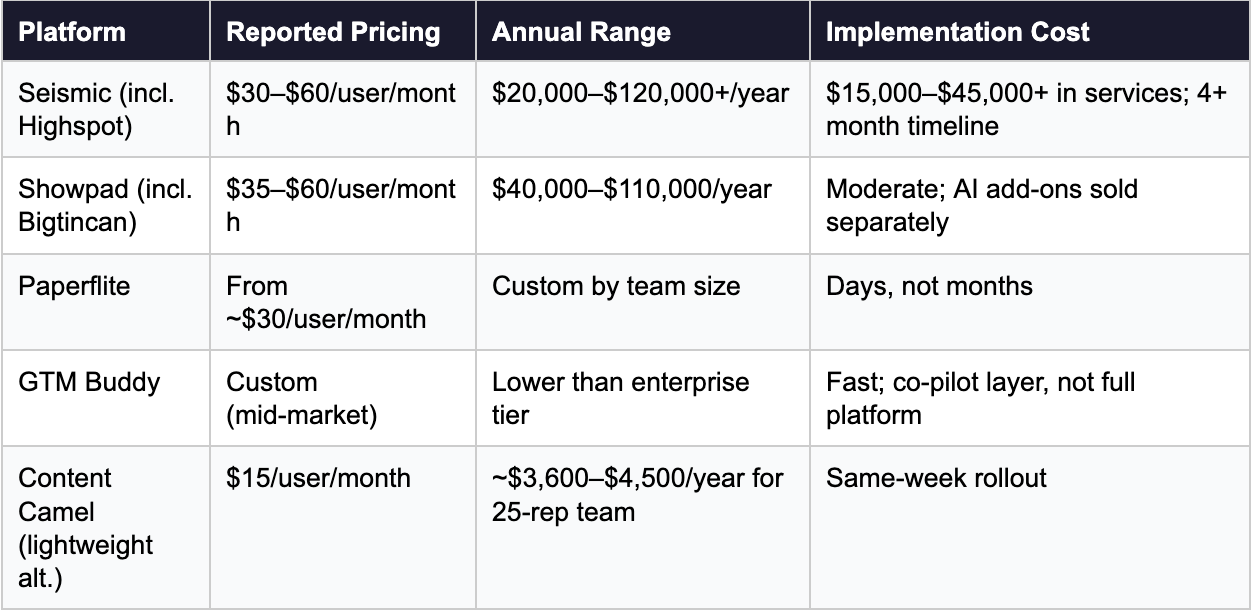
The table above covers what the feature costs. It does not cover implementation burden, adoption lag, or the organizational cost of a 4-month deployment while reps continue working around the tool. For teams under 100 reps without a dedicated enablement function, platforms built for enterprise governance typically exceed both budget and organizational appetite.
The Seismic-Highspot PE consolidation and the Showpad-Bigtincan merger both signal that the enterprise enablement tier is moving toward pricing power. Less competition between the major players means less leverage for buyers at renewal. Understanding the broader
sales enablement benefits you are actually buying not just the feature list is the better frame for the decision.
Several platforms offer trials; verify availability directly with vendors before assuming. All pricing data in this section reflects publicly reported figures from vendor sites and review platforms. Readers should confirm current pricing directly with vendors before making purchasing decisions.
How Paperflite Approaches Natural-Language Content Search
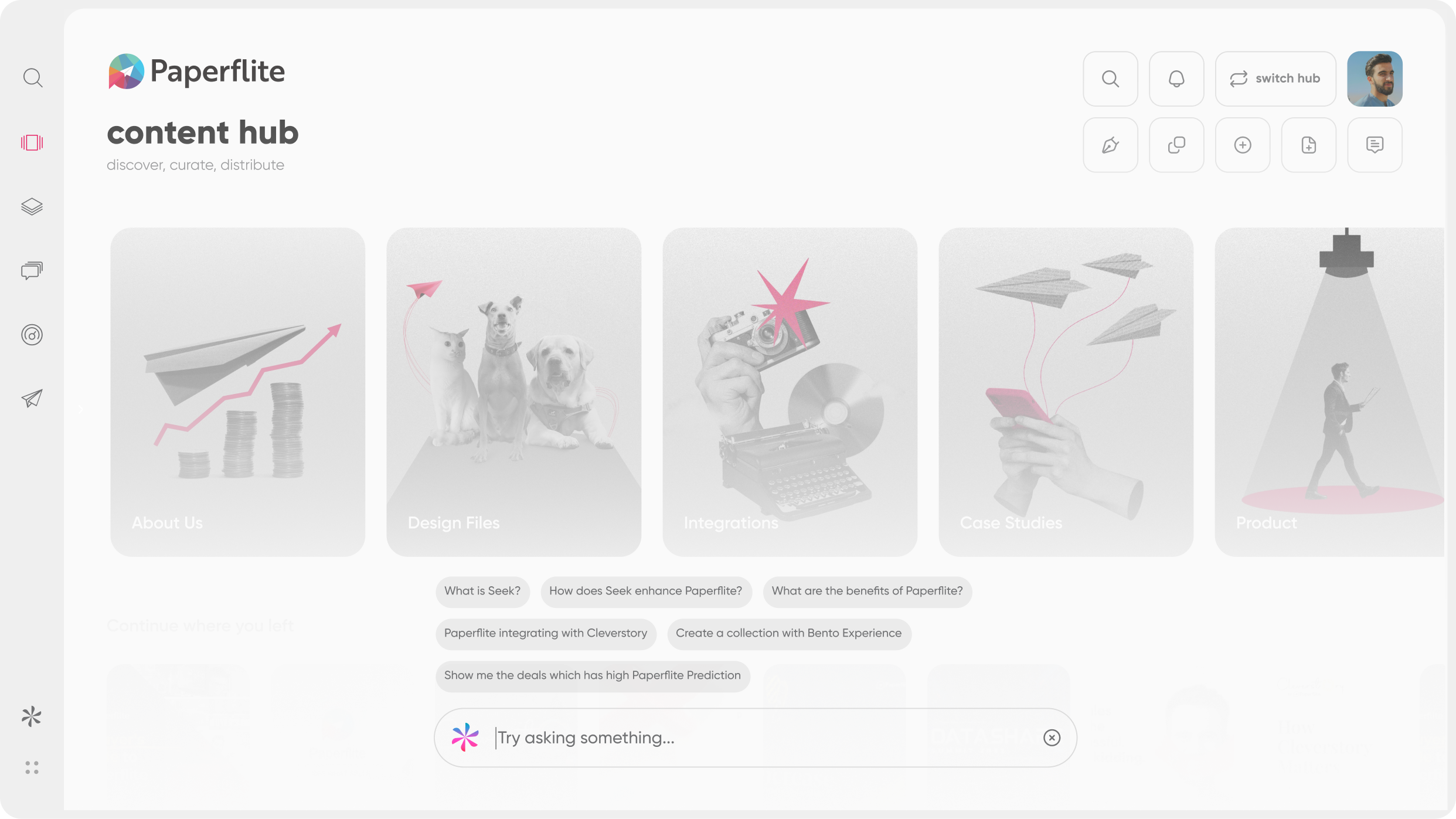
Paperflite's Seek is an LLM-powered content search engine built for sales teams. It understands the intent behind a query not just the words and surfaces relevant assets from across all connected content sources, including SharePoint, Google Drive, and Paperflite's native library, without requiring exact keyword matches. It also tracks what reps search for and what returns nothing, giving marketing the content gap data they rarely otherwise get.
Here is what that looks like in practice. Your rep types: "something to help a hesitant CFO justify this to their board." Seek does not scan file names. It reads the situation. It surfaces your most relevant executive summary, your strongest ROI calculator, your sharpest one-page proof from wherever those assets live in seconds. Not because "CFO" appears in a tag. Because the intent behind the query maps to the intent behind the content.
The integration layer matters too. Seek works inside Salesforce, HubSpot, Gmail, and other tools reps already use. No tab switching, no separate login, no "let me go check the content library." The rep finds what they need without leaving the tool they are already in. That is the adoption lever nobody talks about until reps stop using the system: friction at the search moment kills usage faster than any training program can fix it.
And then there is the analytics side. Paperflite shows content administrators not just what was found, but what was searched for and returned nothing. That failed-search data is a direct signal from sales to marketing: "we needed this and it didn't exist." For teams managing
sales enablement collateral at scale, that signal turns the content calendar from a guess into a brief.
For a broader view of how content organization connects to asset findability, the primer on
digital asset management covers the foundational layer that search sits on top of.
Natural-language content search is not a premium differentiator anymore. Several platforms offer it at different price points, depths, and deployment speeds. What remains genuinely different is whether the search is deep enough to handle the queries reps actually run vague, situational, and keyword-free.
The test is simple: take the most common scenario where your reps currently cannot find the right content and run it on any platform you are evaluating. If you need to rephrase the query more than twice to get a useful result, the search is not doing its job. And if the platform cannot tell you what searches failed last month, marketing is flying blind on what content to build next.
For teams that want to solve the search problem without a 4-month implementation, there is a meaningful gap between platforms built for enterprise governance and platforms built around rep experience.
The Organize B2B Marketing Content in 8 Simple Steps guide is a good next read if you are thinking through the organizational layer that sits underneath the search experience.
Frequently Asked Questions
Which platforms support natural-language content search for sales teams?
Platforms that support natural-language content search for sales teams include Paperflite (Seek), Seismic with Aura AI (now merged with Highspot), Showpad (merged with Bigtincan in 2025), GTM Buddy (Ask Buddy), and Spekit (AI Sidekick). Each allows reps to search using plain English descriptions rather than exact file names or tags, though depth of semantic understanding varies significantly by platform.
What is natural-language content search?
Natural-language content search lets sales reps find assets by typing what they need in plain English like "a case study for a skeptical CFO" instead of guessing file names or exact tags. The platform uses AI and semantic indexing to interpret the intent behind the query and surface relevant content, even when no keyword matches exist.
How is natural-language search different from keyword search in a content library?
Keyword search returns results only when the query matches words in a file name, tag, or description. Natural-language search interprets the meaning and context behind a query, surfacing relevant content even when no exact words overlap. A rep can describe a sales situation instead of naming an asset, and the system understands what they need.
What is Paperflite Seek?
Paperflite Seek is an LLM-powered content search engine designed for sales teams. It understands the intent behind a query not just the words and surfaces relevant assets from all connected sources, including SharePoint, Google Drive, and Paperflite's own library. It also provides search analytics showing what reps searched for and what returned no results.
How do I test if a platform has genuine natural-language search during a demo?
Type a query that describes a sales situation using no keywords that appear in your content for example, "something for a CFO worried about switching vendors." A platform with genuine natural-language search returns the most contextually relevant content. A platform without it returns nothing. Also ask vendors to show queries that returned zero results last month.
How much do platforms with natural-language content search cost?
Pricing varies significantly. Seismic typically costs $30–$60 per user per month with enterprise contracts from $20,000 to $120,000 or more per year and 4-plus month implementations. Showpad ranges from $35 to $60 per user per month. Paperflite starts at approximately $30 per user per month. Lightweight alternatives like GTM Buddy and Content Camel offer lower entry points. All pricing should be confirmed directly with vendors, as it changes frequently.
What happened to Highspot did it merge with Seismic?
Seismic and Highspot announced a merger in February 2026. The combined entity operates under the Seismic brand, with both products running independently until regulatory approval closes. For buyers, the merger introduces roadmap uncertainty and reduced competitive pressure on pricing. Teams mid-evaluation should factor renewal risk and implementation timeline into decisions before committing to either platform.
Can small sales teams use natural-language content search, or is it enterprise-only?
Natural-language content search is available at multiple team sizes and price points. Enterprise platforms like Seismic are built for organizations with 500-plus reps and dedicated enablement teams. Mid-market and growing teams are better served by platforms like Paperflite that deploy in days without complex implementation, while still offering LLM-powered search and content analytics
What is the difference between semantic search and keyword search in content platforms?
Keyword search matches the exact words in a query against file names and tags. Semantic search maps the meaning of a query into a shared conceptual space and returns results based on conceptual similarity, not word overlap. "Reduce onboarding time" semantically matches content about faster ramp, accelerated time-to-value, and 30-day implementation even without those exact words appearing in the query.
What should natural-language search return when a query has no matching keywords?
A platform with genuine natural-language search should return the most contextually relevant available content, even when the query contains zero keywords that appear in any file name or tag. It might surface a case study, objection handler, or ROI document based purely on situational similarity. Platforms that return empty results on keyword-free queries do not have true natural-language search.