How to Secure Externally Shared Sales Content (Without Slowing Your Team Down)
Picture this: your sales rep just sent a detailed pricing deck to a prospect. The deal falls through two weeks later. That deck is still live, still accessible, sitting in the prospect's inbox with a download link that never expires. It has your pricing. Your competitive positioning. Maybe a case study your customer did not sign off on sharing.
Nobody noticed. Nobody could.
This is the gap between sharing sales content and securing it. Most teams solve the first problem beautifully and completely ignore the second. This guide covers what securing externally shared sales content actually means, why it matters beyond IT compliance, and the specific controls your team needs to put in place — without adding friction to every deal.
This guide is for sales managers, enablement leads, and marketing ops teams who share proposals, decks, case studies, and collateral with prospects regularly. If you are thinking about tightening up your
sales content management processes, the controls covered here are exactly where to start.
Why Securing Shared Sales Content Is a Business Problem, Not Just an IT One
Most sales teams treat external sharing as "send and forget." A proposal goes out, a link gets clicked, and the conversation moves to the next step. Security is thought of as a compliance checkbox that IT handles somewhere off-screen.
The problem is that the risks here are not abstract. Research has found that 84% of organizations have dealt with security problems caused by employee mistakes around file handling. For sales teams specifically, that figure is not about server breaches. It shows up as a pricing sheet that never stopped being accessible after the deal closed. An expired case study shared without customer approval. A positioning deck forwarded by a well-meaning prospect to someone you would never have given access to directly.
The real risks of sharing
sales enablement collateral externally fall into four categories: prospects forwarding sensitive pricing to competitors, reps sharing internal-only case studies that customers have not approved for external use, outdated content still circulating after a product update, and no visibility into whether a prospect even read the proposal you sent.
The business consequence goes beyond data risk. It is brand risk and deal risk. A prospect who receives outdated information, or who senses that their interaction with your content is not being handled carefully, simply does not move forward. Securing shared content is not a defensive move. It is a trust-building one.
The 3 Most Common Ways Sales Teams Share Content (And Where Each Breaks Down)
Every team evolves through roughly the same stages when it comes to sharing sales content externally. Here is where each approach breaks down, and none of this is a judgment. Everyone starts somewhere.
Email Attachments
An attachment is the fastest way to share something and the fastest way to lose control of it. The moment you hit send, the file is no longer yours. It can be forwarded, downloaded, printed, and passed along without any notification to you. There is no version control, no visibility, no expiry.
Your rep sends "Proposal_v4_FINAL.pdf" on a Monday. By the time the deal closes six weeks later, it is version seven and the pricing has changed. The prospect is working from a document that does not reflect your current offer. Nobody flagged it because nobody could see it.
Generic Cloud Storage Links (Google Drive, Dropbox, OneDrive)
Cloud storage is meaningfully better than attachments for file management, but it is not built for external sales content delivery. Permissions are managed manually, which means they get skipped when a rep is closing a deal at 11pm on a Thursday. These platforms exist for internal collaboration, not for delivering a curated, branded prospect experience.
There is also no engagement tracking. You get no notification when a prospect opens the deck. You do not know which slides they spent time on, whether they forwarded it, or whether they looked at it at all. Following up based on a hunch is not a sales strategy.
Beyond that, sales reps and marketing content often drift to personal cloud accounts when the approved system feels too slow. That creates an entirely different set of security and governance problems.
"Secure" Links Without Controls
This is the most common misconception. Sharing a link is not the same as securing it. A link without a password, without an expiry date, without download restrictions, is just a slightly more organized email attachment. "Anyone with the link" means exactly that: anyone who gets forwarded the link, intentionally or by accident, has the same access you intended for one specific person.
What "Securing" Shared Sales Content Actually Means
HOW DO I SECURE SALES DOCUMENTS I SHARE WITH CLIENTS?
Securing externally shared sales content means applying four layers of control: who can see it (access control), what they can do with it (usage control), how long it stays accessible (time control), and what you can observe about their interaction (visibility control). A purpose-built sales content platform applies all four automatically for every share.
Most teams focus only on the first layer and assume the rest takes care of itself. It does not. Here is what each layer actually covers.
Access control means who can see the content. Password protection, email-gated access, or restricting sharing to a specific named recipient all fall here. A pricing deck shared with password protection and a 14-day expiry cannot be forwarded to someone else and remain useful. The link is dead before it becomes a liability.
Usage control means what they can do with it once they have access. View-only versus download-enabled is the most common toggle, but it has a significant downstream effect. A file that stays in your environment (view-only) means you can update it, revoke it, or track it. A downloaded file belongs to whoever downloaded it.
Time control means how long the link stays active. Link expiration is not just a security feature; it is a discipline. Proposals, pricing decks, and competitive positioning materials should never have indefinite access windows.
Visibility control is what most teams miss entirely.
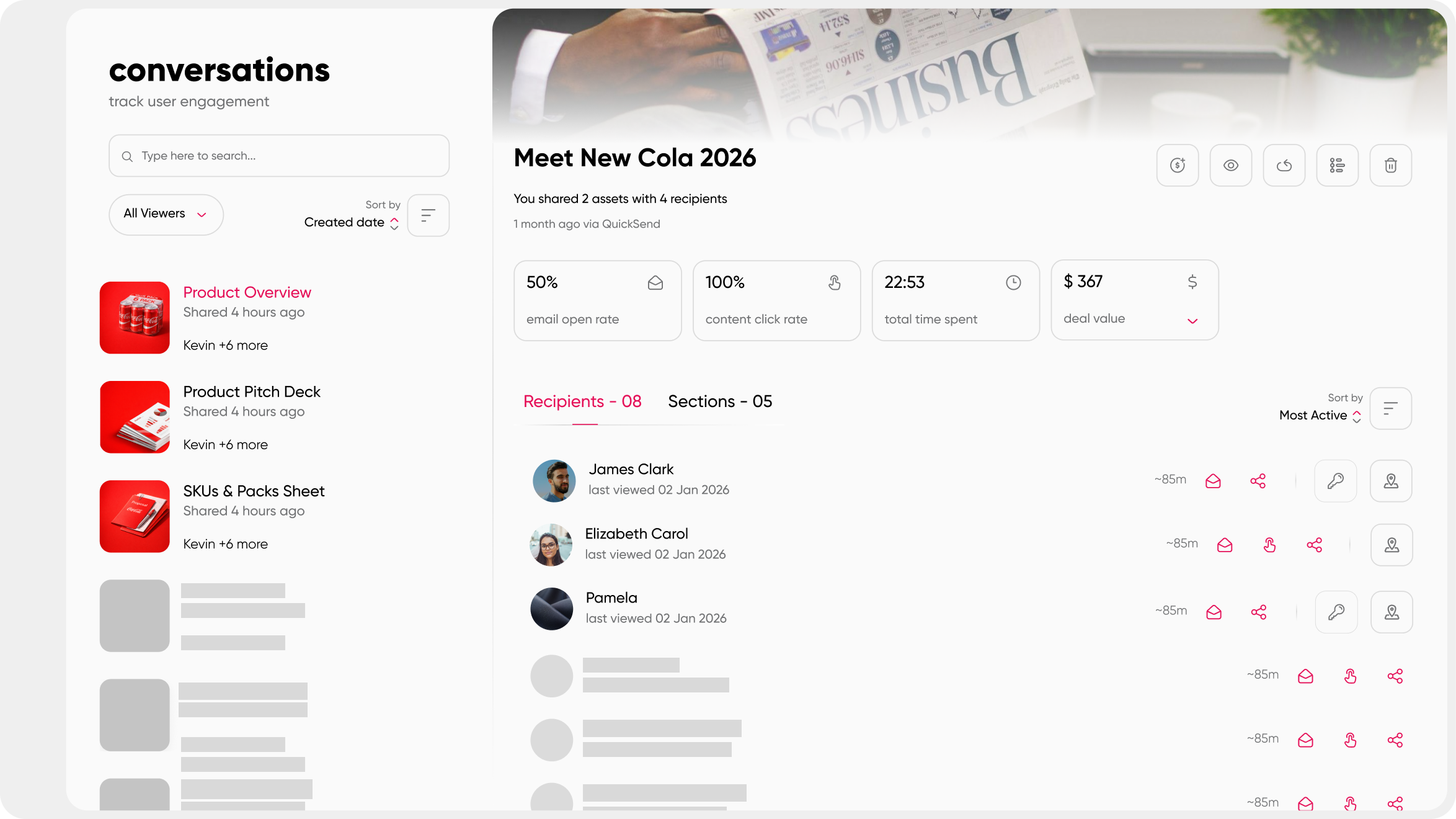
Content tracking gives you real-time information about who opened your content, how long they spent on each page, whether they forwarded it, and whether they came back. This is where security and sales intelligence overlap.
Step-by-Step: How to Secure Externally Shared Sales Content
The steps below are practical and sequential. You do not need to implement all seven at once. Start with the first three and work forward.
Step 1: Centralize Content Before You Share It
You cannot secure what you cannot find. Reps who pull content from personal folders, Slack messages, and their Downloads folder are already operating outside any governance framework. The security question starts before the share, not at the moment of sharing. Start with one source of truth. A content hub or centralized repository ensures only approved, current versions of your content are available to share. When a product price changes, that update cascades to every live share automatically. You do not need to chase 30 reps and ask them to resend.
Step 2: Share via Secure Links, Not Attachments
Attachments detach the content from the sender the moment the email is sent. A secure link keeps the sender in control. You can update what is behind the link, restrict who can see it, and pull access back whenever you need to.
Set the standard clearly: sensitive proposals, pricing documents, and client case studies should never leave your team as email attachments. Every piece of client-facing content goes out as a tracked, controlled link from your approved platform.
Step 3: Apply Password Protection for Sensitive Materials
Not every piece of content needs a password. A general thought leadership PDF is low stakes. A pricing proposal, a client case study, or a competitive positioning deck warrants password protection. A practical best practice: share the password through a separate channel, like a text message or a different email thread. This gives you lightweight two-factor control without requiring an IT setup. It also means that even if the link is forwarded, the password does not automatically travel with it.
Step 4: Set Link Expiration Dates
Proposals have a shelf life. Pricing is subject to change. A link that stays live six months after a deal closes is a liability with no upside. Match your link expiry to the context: an active proposal with time-sensitive pricing should expire in seven to fourteen days. General introductory material can run to thirty days. The discipline of setting expiry dates has a useful side effect: it creates a natural, gentle urgency for the prospect to review the content, without you having to send a pushy follow-up.
Step 5: Restrict Downloads Where It Matters
Before enabling downloads on any share, ask one question: does this prospect actually need a local copy? For most proposals and positioning decks, the answer is no. Default to view-only unless there is a specific reason for the prospect to save a file locally. View-only content stays in your environment. You can update it, track it, and revoke it. A downloaded file belongs to whoever has it. You lose version control, tracking, and any ability to intervene if the context changes.
Step 6: Enable Real-Time Content Tracking
Tracking is not just a security feature. It is a sales intelligence signal. Knowing that a prospect spent seven minutes on your pricing slide and three seconds on everything else tells you exactly where to focus the next conversation. Page-level and viewer-level analytics let you see not just that the content was opened, but by whom, for how long, and whether they reached the important sections. From a security standpoint, if someone you did not authorize accessed the content, tracking surfaces that. You can then revoke access before it goes further.
This is also where the overlap between security and buyer insight becomes most visible. A
digital sales room takes this further by giving the prospect a curated space for all deal-related content, with every interaction tracked and accessible to the seller in real time.
Step 7: Revoke Access When the Context Changes
Deal lost? Revoke the link. Content updated with new pricing? Revoke the old link. Prospect departed the company? Revoke immediately.
Access revocation is the safety net that makes the whole system forgiving of human error. One click and the link is dead, regardless of who has it or who they forwarded it to. It is not a punitive measure. It is the discipline of keeping your content environment clean and current.
Internal vs. External Content: The Labeling Problem Most Teams Skip
Many sharing security failures happen before the link is ever generated. The rep shares a case study that has not been approved for external use because nothing in the system told them it was off-limits. The problem is not intent. The problem is the absence of a labeling framework.
Your content should be tagged at the source with one of three states: internal only, approved for external sharing, or external with restrictions (such as view-only or time-gated access). This is not a manual process that relies on reps remembering a policy document. It is governance baked into the platform itself.
Here are the categories most commonly shared by mistake:
- Unapproved customer case studies. A customer may have consented to the success story without consenting to being named in competitive pitch situations.
- Research data from third-party sources. Licensing often covers internal use only. Redistribution requires a separate agreement that rarely exists.
- Logo slides and partner decks. Some partners explicitly prohibit being included in materials used in competitive situations.
- Internal pricing tiers and margin data. These should never leave your environment under any circumstances.
The distinction between sales enablement content that is internal versus client-facing is not always obvious from the file name. A governance layer in your content platform removes the guesswork. Reps see what they can share and what they cannot, without needing to check with you first.
The solution is not making reps the gatekeepers of every sensitive asset. That creates bottlenecks and delays that cost deals. The solution is a system that enforces the rules automatically so your team can move fast without accidentally crossing a line.
How Paperflite Keeps Externally Shared Sales Content Secure
Most content platforms solve the discoverability problem: helping reps find the right asset quickly. Very few solve the full content security lifecycle across sharing, controlling access, tracking engagement, and revoking when needed. Paperflite is built to do all four.
Here is what that looks like in practice:
- Secure content distribution: Every share goes out as a controlled link with configurable access settings. Passwords, expiry dates, and download restrictions are set from within the same workflow reps already use to find and send content.
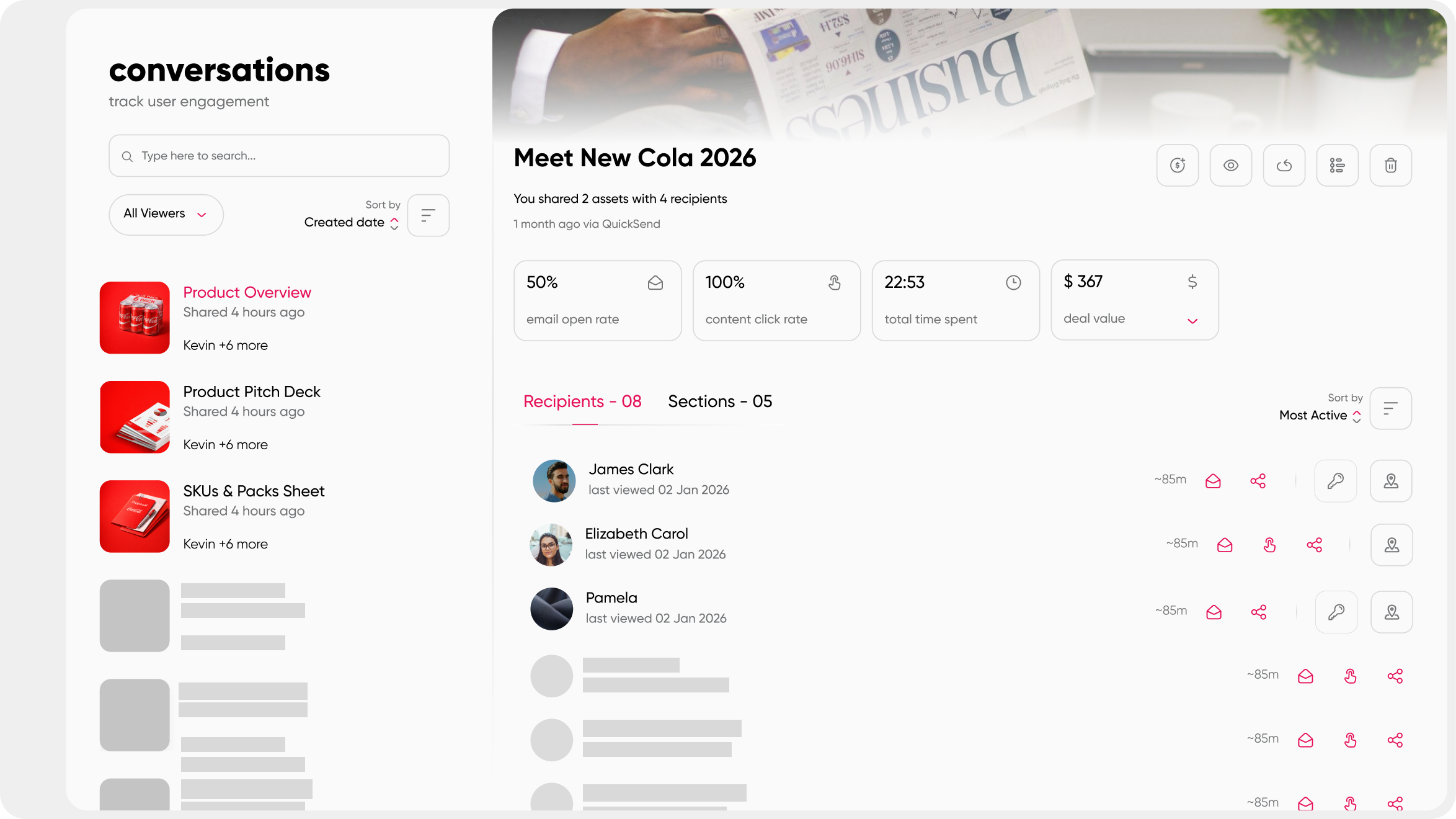
- Analytics Engine: Real-time engagement analytics at the page, viewer, and re-share level. Sales reps receive notifications when content is accessed, including the exact pages viewed and time spent, so follow-ups are contextual rather than speculative.
- QuickSend: Drag-and-drop content sharing with real-time tracking, available from within Gmail or any email environment. No context-switching between platforms.
- FliteView and Content Microsites: Branded prospect experiences rather than bare links. The content lives in Paperflite's environment, not in the prospect's download folder. Every interaction is tracked.
- User access control: Role-based permissions determine who within your team can share what, and under what conditions. Internal-only content is genuinely protected from external distribution.
- Auto-sync: Reps always share the current, approved version of a file. When you update a document, the change propagates to all live shares automatically.
- SOC 2 Type II certified: Paperflite has obtained an annual Service Organization Control 2 Type II report against the Trust Services Criteria set by the AICPA. Enterprise-grade encryption, role-based access controls, and secure cloud storage are the baseline, not an add-on.
- Digital Deal Rooms: A dedicated, controlled space for every deal where all relevant content is shared, tracked, and updated in one place. Buyers engage with content in a branded environment. Sellers see every interaction in real time.
- Starter: $30 per user per month (monthly billing) or $27.50 per user per month (annual billing, minimum 5 users) — content hub, personalized microsites, AI-powered discovery, and analytics.
- Professional: $50 per user per month ($47.50 annual) — adds secure content distribution, CRM and email integrations, SSO, white labelling, and a dedicated Customer Success Manager.
- Advanced: $60 per user per month ($57 annual) — adds digital deal rooms, AI-powered content recommendations, predictive deal insights, and priority support.
- Enterprise: Custom pricing — for large, multilingual, enterprise-scale deployments requiring deep Salesforce integration, custom reporting, and bespoke training.
visit paperflite.com/pricing.
Other platforms handle parts of this workflow well. Purpose-built enterprise tools offer comprehensive governance but come with implementation complexity and pricing structures that mid-size GTM teams often find difficult to absorb. Paperflite delivers the security controls that matter for external sales content sharing within a platform that reps actually choose to use, without an IT ticket for every share configuration.
On the digital sales room features side specifically, Paperflite's deal rooms give buyers a controlled, branded experience while giving sellers complete visibility into how that content is being used across every stage of the deal.
What to Look For in a Secure Sales Content Sharing Platform
Not every team needs the same feature set, but if you are evaluating a platform specifically for secure external sharing, this is the checklist that matters. A platform that handles most of these in a single interface significantly reduces the chance that a rep skips a security step because it requires switching tools or logging a support ticket.
- Link-level access controls: password protection, email-gate options, and restricted sharing to specific recipients
- Configurable link expiration: per-share or per-content-type expiry windows
- Download enable/disable toggle: view-only as the default, downloads enabled only when explicitly needed
- Real-time view tracking: viewer identity, time spent per page, and engagement depth
- Instant access revocation: one-click link deactivation, regardless of where the link has been forwarded
- Version control that updates live links: changes to the source file propagate automatically without needing to resend
- Internal content governance: role-based permissions and internal vs. external tags enforced at the system level
- SOC 2 or equivalent compliance certification: independently audited security controls
- CRM integration: engagement data feeds directly into your pipeline view so follow-up is informed by behavior
For a deeper look at how these features interact with the broader buyer experience, see what a digital sales room uses look like in practice, and how the right content hub features support secure distribution from the ground up.
Conclusion
Sharing sales content externally is unavoidable. Losing control of it is not.
The gap between "I sent it" and "I know who has it, what they did with it, and it stops being accessible when I decide" is where most teams operate without realizing it. Closing that gap does not require a security overhaul or an IT project. It requires the right defaults: secure links instead of attachments, passwords on sensitive materials, expiry dates matched to deal stage, view-only as the standard, tracking turned on, and access revoked when the context changes.
Platforms built for this workflow handle these controls as part of the rep's normal content-sharing motion, not as an extra step. The result is a sales team that moves fast and stays in control of every piece of content it shares.
To go deeper on managing your full library of content assets, the guide on sales asset management covers the organizational foundation that makes external content security sustainable at scale.
Frequently Asked Questions
What is the safest way to share sales documents with prospects?
The safest approach is to share via a secure link from a dedicated sales content platform, not as an email attachment. Apply password protection, set an expiration date, restrict downloads where appropriate, and enable real-time tracking. This keeps you in control of the content even after it leaves your inbox, because the link itself is what carries the controls — not the file.
How do you restrict downloads on shared sales content?
Most sales content platforms let you toggle download permissions at the individual share level or per content type. Setting a link to view-only means the prospect can read and engage with the material without saving a local copy. This prevents unauthorized redistribution and ensures that version control stays intact: if you update the file, the prospect always sees the latest version.
Can you revoke access to a shared sales document after it has been sent?
Yes. With a link-based sharing system, you can revoke access at any time after sending. Once revoked, the link becomes inactive regardless of who has it or who has forwarded it. This is particularly useful when a deal closes without a win, when pricing is updated, or when a prospect contact leaves their organization and you no longer want that material accessible.
How do I know if a prospect has opened the sales content I sent?
Real-time content tracking tools notify you when a prospect opens a shared link, how long they spent viewing it, and which pages or sections they engaged with most. Some platforms provide page-level analytics, so you can see not just that the content was opened, but which slides drove the most attention. This replaces guesswork with a data-backed reason to follow up.
What is the difference between internal-only sales content and content approved for external sharing?
Internal content includes materials like battle cards, internal pricing breakdowns, unapproved customer case studies, and partner decks with restricted redistribution rights. These should be tagged at the source within your content platform with a permission level that prevents external sharing. Externally shareable content is pre-approved and clearly marked. The governance should be enforced by the system, not by reps remembering which files are safe to send.
What is a digital sales room and how does it help with content security?
A digital sales room is a dedicated, branded, and access-controlled digital space where a sales rep shares all relevant content for a specific deal in one place. Because the content lives in the platform rather than in an email attachment, the seller controls access, can see full engagement analytics, and can update or revoke any material without resending a link. It is the most controlled environment for external content sharing available to sales teams today.
Does Paperflite offer SOC 2 compliance for secure content sharing?
Yes. Paperflite is SOC 2 Type II certified. This means the platform has been independently audited on an annual basis against the Trust Services Criteria prescribed by the American Institute of Certified Public Accountants. Enterprise-grade encryption, role-based access controls, and secure cloud storage are standard across all plans. For full details, see paperflite.com/security-compliance.
How do link expiration dates improve sales content security?
Link expiration ensures that shared content is only accessible for a defined window. Once the link expires, anyone who attempts to open it — including the original recipient or anyone they forwarded it to — cannot access it. This limits the exposure window for time-sensitive materials like pricing proposals, competitive positioning decks, and deal-specific case studies, without requiring any manual action from the sender.