How to Audit Sales Content Gaps (and Actually Fix What You Find)
You ask your sales reps why a deal stalled. Half the time, the answer is some version of: "I didn't have the right content for that stage." The other half? "I couldn't find it." Both are content gap problems. Neither shows up in your CRM.
This is the thing about sales content gaps: they're invisible until a deal dies. By then, the post-mortem is too late. What you needed was a system for finding and fixing the gaps before reps are standing in front of a buyer with nothing useful to show.
This guide walks through a practical, repeatable process for auditing your sales content gaps not as a one-time cleanup project, but as a system your sales and marketing teams run together. By the end, you'll know how to take stock of what you have, measure what's working, map what's missing, and build a fix-it plan that actually gets executed. (And no, a shared Google Drive folder with 400 files does not count as a content library.)
If you want a broader look at building the underlying system, the Sales Content Management Guide covers that in full. This article is about the diagnostic step that comes first.
A sales content gap audit is a structured review of every content asset your sales team uses, mapped against each stage of the buyer's journey. The goal is to surface where content is missing, underperforming, or outdated, so you can prioritize what to create, fix, or retire. A full audit covers inventory, performance analysis, funnel mapping, rep feedback, and competitive benchmarking, producing a prioritized action plan.
What Is a Sales Content Gap? (And Why Most Teams Have More Than They Think)
A sales content gap exists when your sales team lacks the right content to support a buyer at a specific stage of the journey. This can mean no content exists for a given deal stage, or that existing content is so outdated or off-message that reps quietly ignore it. Content gap analysis is the process of surfacing these mismatches systematically before they cost you deals.
Research consistently shows that the vast majority of B2B marketing content goes unused by sales teams. Think about what that means in practice: if your marketing team produced 80 assets last quarter, your reps are probably ignoring more than half of them. That's not a rep problem. That's a gap problem.
The gaps tend to fall into three categories, and it helps to know the difference before you start auditing.
Coverage gaps are the clearest to spot. An entire buyer journey stage has no content to support it no case studies for late-stage evaluation, no competitive comparisons for deals where a rival is in play, no onboarding guides after the close. These are the blank cells on your funnel map.
Performance gaps are trickier. The content exists. Reps are even sending it. But it's not moving deals forward. Buyers open it, glance at it, and move on. You won't know about this type of gap without engagement data.
Freshness gaps are the silent killers. Content that performed well 18 months ago when your product had different features, your pricing was different, your key competitor was different is now actively working against you. Reps share it because it's there. Buyers read it and wonder if your team knows what they're selling.
Understanding which type of gap you're dealing with changes the fix. Coverage gaps need new content. Performance gaps need better content. Freshness gaps need updated content or removal. A good audit tells you which is which.
For a breakdown of the content types that typically map to each stage, 13 Most Important Types of Sales Enablement Content is a useful reference as you build your inventory.
Step 1: Build Your Complete Content Inventory
Before you can find the gaps, you need to know what you have. That sounds obvious. It never is.
Most teams discover two surprises during this step: they have far more content than they thought, and much of it is scattered across places no one is actively managing. Pull everything decks, case studies, one-pagers, email templates, battle cards, proposal templates, video demos, ROI calculators, data sheets, explainer videos, social proof documents, competitive comparisons, and onboarding guides.
Do not limit yourself to "marketing-approved" content. Reps build their own versions of things when the official content doesn't meet their needs. Those unofficial assets are some of your most valuable audit data, because they tell you exactly what the official library is missing.
For each asset, capture: the asset name, where it lives (URL or file path), content type, which funnel stage it serves, which buyer persona it's for, which product or use case it covers, when it was created, when it was last updated, and who owns it. That's your audit spreadsheet. It's not glamorous. It's the foundation.
Common audit mistake: stopping at the shared drive. Content also lives in email tool template libraries, CRM attachment histories, individual Slack messages, and personal Google Drive folders. If reps are using it, it belongs in the inventory.
How to Gather Content That's Hiding in Plain Sight
The fastest way to surface shadow content is to ask reps two questions: what do you send most often, and what do you wish existed but doesn't? The answers to the first question populate your inventory. The answers to the second question are your initial gap list.
Also check your CRM for historically attached files, your email sequencing tool for saved templates, and any sales enablement tool your team uses for historical shares. Content sprawl is real the average sales team touches assets across five or more storage locations.
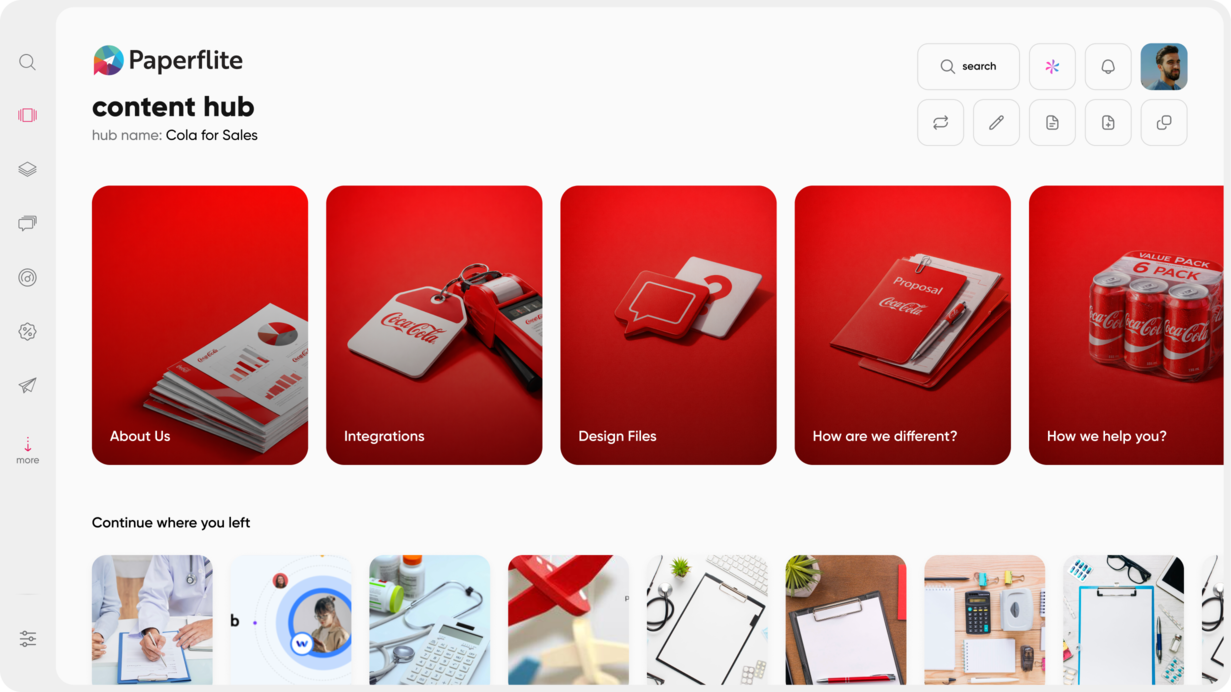
Platforms like Paperflite let you connect content from Google Drive, Dropbox, OneDrive, and other sources into a single searchable library. The audit and the consolidation happen at the same time. That's a week of work compressed into a day.
For a structured approach to organizing what you find, Organize B2B Marketing Content in 8 Simple Steps covers the taxonomy and folder structure decisions that make the next audit faster.
Step 2: Map Every Asset to a Funnel Stage and Buyer Persona
Once your inventory exists, the next move is to tag every asset by where it belongs in the buyer journey: Awareness, Consideration, or Decision. Add a persona tag and a product or use case tag while you're at it. This is the step that makes gaps visible.
When you sort by funnel stage, one pattern shows up in almost every audit: the content pile is largest at the top of the funnel and gets thinner as you move toward the decision. Awareness content is usually overproduced. Decision-stage content is almost always the most critical gap.
Decision-stage content is what buyers need when they're choosing between you and a competitor. It's competitive comparisons, ROI calculators, security and compliance documentation, customer references, implementation guides, and pricing context. These are the assets that close deals or lose them. They're also the assets most companies have the least of.
A practical exercise: build a simple matrix with funnel stages across the top and buyer personas down the side. Fill in which assets exist for each cell. The blank cells are your coverage gaps. Color-code them: red for no coverage, yellow for thin coverage, green for solid. This view alone is often enough to immediately prioritize the first three content projects from your audit.
For a deeper look at which content types belong at each stage, 17 Must-have Types of Sales Collateral with Examples is a useful companion to this mapping exercise.
Step 3: Pull Performance Data (This Is Where the Real Gaps Show Up)
Your inventory tells you what exists. Your performance data tells you what's actually working. These are not the same list. Some of your most-sent content is performing terribly. Some assets reps rarely share are quietly closing deals when they do get used. Without data, you're guessing at both.
The metrics that matter most in a sales content audit are: view rate (is it being sent and opened?), time spent (are buyers reading it or bouncing after 10 seconds?), completion rate (do they get to the end?), share rate (are buyers forwarding it internally?), and deal-stage correlation (do deals move forward when this asset is used?).
That last metric is the most valuable and the hardest to get without the right tools. Content tracking shows you which assets correlate with deals progressing or closing, not just which assets look polished in a library.
The shift from email attachments to tracked sharing links is itself one of the most impactful changes a sales team can make during an audit. With attachments, content disappears into a black hole after you hit send. With tracked links, you know exactly who opened it, how long they spent on each page, whether they shared it with a colleague, and when they came back. That data is what separates a content audit from a content guess.
What Underperforming Content Actually Looks Like
- High send rate, low engagement time: the content is being shared, but buyers aren't reading it. Usually, it's a positioning or relevance problem: it's being sent to the wrong person at the wrong stage.
- Zero sends in 90 or more days: orphaned content. Reps either don't know it exists or don't trust it.
- High engagement but low deal correlation: the content is interesting but not converting. Often, awareness content is being used in decision-stage conversations.
- Rarely shared by most reps but consistently used by top performers: this is a hidden gem. When you find it, make it prominent and train reps on it.
For a full breakdown of what content tracking reveals and how to use the data, What Is Content Tracking? Types, Techniques, and Tools goes deeper on the mechanics.
Step 4: Interview Your Sales Reps (The Data They Have That Your CRM Doesn't)
Quantitative data shows you what's happening. Rep interviews tell you why. Both are necessary. Neither is complete without the other.
The four questions worth asking every rep: What content do you send most often? What do you wish you had but don't? What content do you never use, and why? When deals stall, what's typically missing from the conversation?
Run this as a short async survey rather than pulling reps into hour-long calls. Five questions, three minutes to complete, sent to every rep on the team. The response rate on a short survey from a manager asking for genuine input is usually high.
Cross-reference their answers with your performance data. Where rep perception matches usage data, you have a confirmed finding. Where they diverge, there's a story to investigate. Reps sometimes avoid content they don't trust, even if the engagement data shows it's effective when used.
The gap between what leadership thinks reps need and what reps actually say they need is often significant. An audit is one of the few structured moments to surface it. For more on why reps avoid official content and what to do about it, why sales reps overlook marketing content is a useful read alongside your survey data.
Step 5: Run a Competitive Content Benchmark
The last external input your audit needs is a look at what your competitors are producing and sharing. This is not about copying their approach. It's about identifying where buyers are comparing you side by side and you have nothing to show.
Review the resource pages and content libraries of your top two or three competitors. Note content types you lack if they have a detailed competitive comparison guide and you don't, that's a gap buyers are filling with their version of the story. Note use-case or vertical coverage they own that you've left open. Note the formats: if they're using interactive ROI calculators and you're using static PDFs, that's a format gap.
Also pay attention to what shows up in win/loss interviews. When a deal goes to a competitor, ask specifically what content or information they provided that helped seal the decision. That's your most direct signal of a competitive content gap.
Competitive benchmarking feeds directly into your content gap action plan. It tells you where urgency should be highest, because these are the gaps buyers are actively noticing. If you need a framework for building content strategy around what you find, How to Build a Sales Enablement Strategy is a useful next step.
Step 6: Build a Prioritized Content Gap Action Plan
After a thorough audit, you have three lists: content to create (coverage gaps), content to improve (performance gaps), content to retire (freshness gaps or redundant assets). The action plan is how you turn those lists into actual projects.
Prioritization works on two axes: impact and effort. Impact is how much the gap costs you in real terms deals stalling at a specific stage, lost opportunities in a high-value vertical, competitive deals going to a rival with better decision-stage content. Effort is the resource cost to fill the gap: a refreshed one-pager takes a day, a full video series takes months.
Start with high-impact, lower-effort gaps. A missing mid-funnel case study for your highest-volume customer segment is almost always the right first project. The asset often exists in rough form somewhere in your rep-built content. It just needs polish and an owner.
The common mistake at this stage is building an ambitious content calendar and executing none of it. Every gap-fill project needs three things: a named owner, a deadline, and a definition of done. Without those, the action plan is theater.
Assign each project, set 30-day first-pass deadlines for quick wins, and schedule 60 to 90-day timelines for more complex assets. Review the list monthly. The audit is a system, not an event.
For the asset management layer that supports a healthy post-audit library, Sales Asset Management: What, Why and How covers the governance model that keeps the gaps from coming back.
How Often Should You Repeat the Audit?
A full audit every six months is a reasonable cadence for most teams. Monthly analytics reviews catch underperforming assets between full audits. Trigger an unscheduled audit after a major product launch, an entry into a new vertical, a significant pricing change, or if you notice a pattern of deals stalling at a particular stage.
The goal is not a perfect content library. It's a content library that stays directionally correct and gets measurably better over time. Teams with the best content don't run one perfect audit. They run a lot of imperfect ones.
How Paperflite Turns a Content Audit Into an Ongoing System
Most teams audit content once, build a fix plan, and let the library drift again. Six months later, the gaps are back. Different assets, same problem. The audit was a project. What you need is a system.
Paperflite makes the audit cycle continuous because the data is always live. Every piece of content shared through Paperflite generates engagement data automatically no manual tracking, no spreadsheets after the fact. The performance data you need for Step 3 of this audit is already waiting for you the moment you start.
A few capabilities directly relevant to the audit process:
The content hub is a single source of truth for all sales and marketing assets, tagged by funnel stage and persona. When every asset is organized and tagged from the start, the inventory step of your next audit takes an afternoon instead of two weeks.
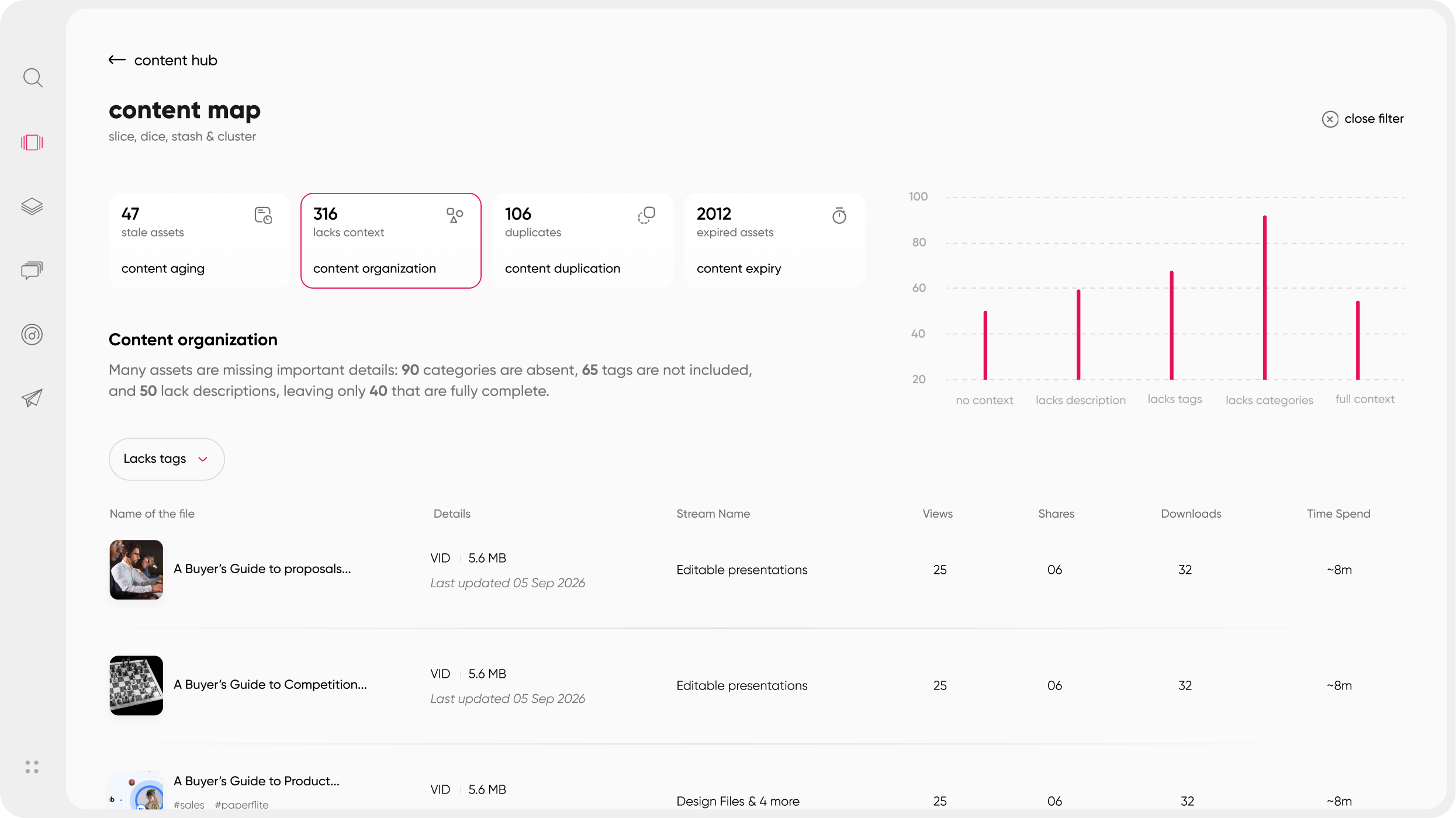
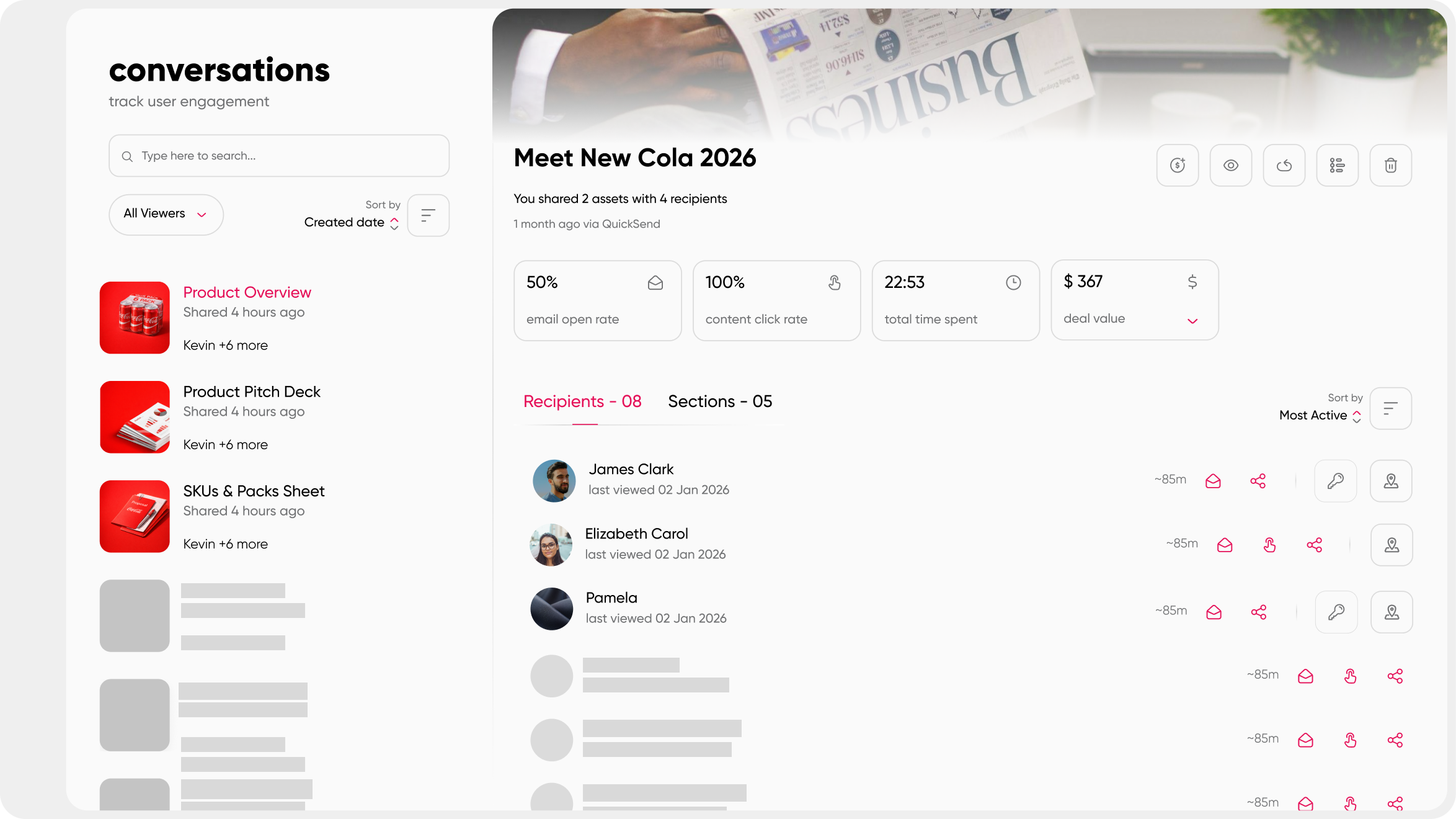
Real-time engagement analytics show view rate, time spent per page, completion rate, and buyer journey correlation per asset, per prospect, and per deal. The performance data in Step 3 is not a quarterly report you request from analytics. It's a dashboard you can pull up right now.
SEEK helps reps find what they need without knowing exactly what it's called, by using simple English. Search patterns also surface what reps are looking for that doesn't exist a direct and continuous gap signal. Zero-result searches are your next content creation brief.
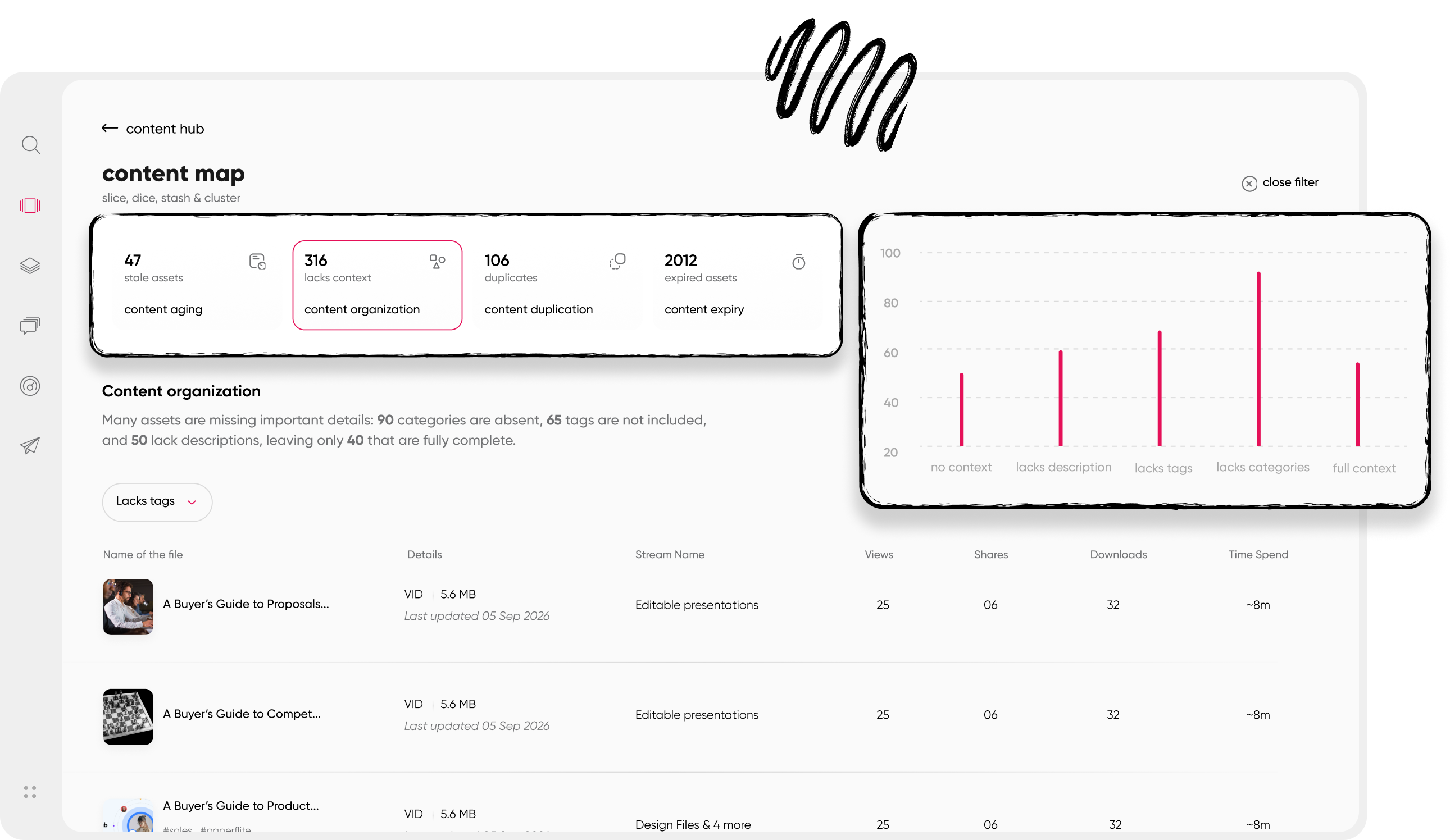
Content expiry and version control mean outdated content doesn't reach buyers between audits. Set an expiry date on anything time-sensitive. When it lapses, it's flagged for review, not silently shared with a prospect.
For teams that want to move from a reactive audit model to a proactive content intelligence model, Content Hub Operations: Strategies for Managing Effectively covers what that looks like in practice.
Paperflite starts at $30 per user per month (Starter plan: content hub, AI-powered discovery, and core analytics). The Professional plan at $50 per user per month adds CRM integrations, SSO, white-labeling, and a dedicated Customer Success Manager. The Advanced plan adds digital deal rooms, predictive deal insights, and AI-powered content recommendations. Enterprise pricing covers large global teams needing deep Salesforce integrations and multilingual support.
Conclusion
Most content audits end with a spreadsheet and good intentions. Six months later, the gaps are back different names, same problem.
The teams that break that cycle do one thing differently: they build the audit into their process, not past it. That means live performance data instead of manual tracking, content organized by buyer stage from the start, and a clear owner for every gap on the list.
Start with the inventory. Map what you have. Pull the performance data. Ask your reps. Look at what your competitors are doing. Build a prioritized fix list. Run it again in six months, faster and with better data than the first time.
That's the difference between a content audit as a project and a content audit as a system.
Frequently Asked Questions
What is a sales content gap audit?
A sales content gap audit is a structured review of all content your sales team uses, mapped to each stage of the buyer journey. The goal is to find where content is missing, outdated, or underperforming, and to produce a prioritized list of what to create, fix, or retire. For most teams running one for the first time, the process takes two to four weeks.
How often should you audit sales content?
A full audit every six months is a practical cadence. Monthly analytics reviews catch underperforming assets between full audits. Run an unscheduled audit after a major product launch, a new vertical push, a significant pricing change, or if deals start stalling consistently at a specific funnel stage.
What metrics matter most in a sales content audit?
Focus on five: view rate (is it being sent and opened?), time spent (are buyers reading it?), completion rate (do they get to the end?), share rate (are buyers forwarding it to colleagues?), and deal-stage correlation (do deals move forward when this asset gets shared?). Content with high send rates but low engagement time is a performance gap. Content with zero sends in 90 or more days is likely orphaned.
What is the difference between a content gap and a content audit?
A content audit is the overall process: inventory, performance review, funnel mapping, rep feedback, and competitive benchmarking. A content gap is a specific finding from that process a missing or underperforming asset at a given stage of the buyer journey. The audit surfaces the gaps. The action plan closes them.
How do I find content gaps without expensive tools?
Start with a spreadsheet. List every asset your sales team uses, tag each one by funnel stage and buyer persona, and look for blank cells. Add a short rep survey for qualitative gap signals. Tools help most with performance analytics which assets engage buyers and which don't but the foundational inventory and mapping can start manually.
What types of content are most commonly missing?
Decision-stage content is the most common gap: competitive comparisons, ROI calculators, security documentation, customer references, and pricing context. These are the assets buyers need when choosing between you and a rival. Mid-funnel content for specific personas or verticals is the second most common gap. Awareness content is almost always overproduced relative to need.
Can a content audit improve sales rep performance?
Directly, yes. When reps have the right content at the right stage, they spend less time building their own materials and more time selling. Research consistently shows that a large share of sales content goes unused, often because reps can't find it or don't trust it. Fixing that findability and relevance problem is one of the fastest levers for improving rep productivity without changing headcount.
What is the first step in a sales content gap analysis?
Build your content inventory first. Catalog every asset your sales team uses, including shadow content in individual drives and email threads. Without a complete inventory, the gap analysis has blind spots. Most teams discover 20 to 40 percent more content than they expected during this step, which changes how the rest of the audit unfolds.