How to Stop Using Outdated Sales Collateral (And Keep It From Happening Again)
A rep is fifteen minutes into a call that actually matters. The prospect asks about pricing, and the rep pulls up a deck they grabbed from a shared drive that morning. The numbers are three months old. Nobody flagged it, because nobody was checking. The rep didn't know, the prospect definitely didn't know, and the deal quietly gets a little harder to close.
Multiply that moment across a whole sales team and you start to see the real cost. It isn't one bad slide. It's the dozens of small credibility hits that pile up every week: a case study that references a customer who churned, a battle card that still lists a feature you retired last quarter, a one-pager with your old logo on it. Individually, each one feels minor. Together, they quietly train prospects to trust you a little less at exactly the moment you need trust the most.
If you've ever stopped using outdated sales collateral for a week only to watch an old version resurface a month later, you already know the fix isn't "tell everyone to be careful." Reminders don't fix a broken system. Reps aren't careless, they're working inside a setup that makes the wrong file just as easy to find as the right one. This piece walks through why collateral goes stale in the first place, a step-by-step system to clean it up, the mistakes that quietly undo most cleanup efforts, and what actually keeps the problem from happening again.
Here's the part that's easy to miss when you're deep in a cleanup: fixing the library is only half the job. The other half happens after collateral leaves your hands and enters a real conversation with a real buyer, somewhere you usually can't see what's happening at all. We'll get to that too, because it's the piece most teams never solve, even after they've done everything else right.
To stop using outdated sales collateral: audit your current library, retire anything inaccurate, centralize what's left in one searchable hub, assign an owner to every asset, set a review cadence, and track what reps actually open and send. The fastest fix isn't more content. It's fewer places for old content to hide.
Why Outdated Collateral Keeps Showing Up
Why do sales teams keep using outdated collateral even after a "big cleanup"? Usually because the cleanup fixed the content but not the system that let it go stale. Old files sit in the same shared drive, no one owns them, and nobody's checking anymore once the initial push is over.
Think about how this plays out on an average team. Marketing ships a new pitch deck. It lives in a shared drive next to eleven older versions, none of them clearly labeled. A new rep joins three weeks later, searches for "pitch deck," and grabs whichever file loads fastest (usually not the right one). Nobody's lying or cutting corners here. The system just doesn't tell them which file is current, so they guess.
There's usually a second layer underneath the obvious one, too. Sales teams grow faster than content teams do. A company might add fifteen reps in a quarter and zero people to manage the library those reps depend on. Every new hire inherits the same folder structure, the same ambiguous file names, and the same guesswork their predecessors used. Nobody built it that way on purpose. It just accumulates, the same way a junk drawer fills up one small decision at a time until nobody remembers what half of it is for.
Sales reps tend to resist blame here, and they should, because the resistance is usually correct. A rep who's judged on quota isn't going to spend an hour a week auditing a shared drive on the side. They'll use whatever surfaces fastest when they search, and if the wrong file surfaces fastest, that's what gets sent. Fixing this by asking reps to "double-check before sending" puts the burden in the wrong place. The system should make the current version the easiest one to find, not the hardest.
It also helps to separate two things that get lumped together too often: content that's simply old and content that's actively wrong. A two-year-old blog post can still be useful if the ideas hold up. A two-year-old pricing sheet almost never can. Treating every aging asset the same way, either ignoring all of it or panicking about all of it, misses the point. The question worth asking about each piece isn't how old it is, but whether the specific facts in it still hold true today.
That's the pattern behind almost every "why is this happening again" moment: no single source of truth, no clear owner, and no schedule for checking anything. Rebuild collateral without fixing those three things, and you'll be running this same cleanup again in six months (we've seen it happen more than once).
sales enablement collateral is meant to give reps confidence walking into a conversation. When it's unreliable, reps stop trusting it, and they start building their own versions instead, which is how you end up with eleven decks in the first place. Every one of those homemade versions is a small brand risk waiting for the wrong meeting to surface in.
Step 1: Run a Full Collateral Audit
Before you fix anything, you need an honest list of what's actually in your library. A collateral audit isn't a redesign project. It's a scheduled review that checks whether each asset is still accurate, still being used, and still tagged correctly.
Pull every asset into one list and score each on three things. Accuracy: has the pricing, the logo, or a specific claim changed since this was made? Usage: has anyone opened or sent it in the last ninety days? Quality: on a scale of "retire it," "give it a refresh," or "it's fine as-is," where does it land?
Most collateral libraries carry more waste than teams expect (duplicates, expired pricing, features that don't exist anymore taking up half the shelf space). That's not a reason to panic. It's just the starting number you're working from.
The mistake most teams make at this stage is trying to audit everything by memory. Someone opens the shared drive, scrolls for twenty minutes, and calls it an audit. That approach catches the obvious junk and misses everything subtle: the case study whose logo is technically correct but whose stats haven't matched reality in a year, or the battle card that's accurate on every point except the one competitor detail that changed last month. A real audit needs a checklist, not a scroll.
A simple spreadsheet works fine for this. Six columns get you most of the way there: asset name, last updated date, accuracy check, usage in the last quarter, quality rating, and a recommended action. You don't need a platform to run this pass. You need honesty about what's actually sitting in the library, including the assets nobody's opened since they were uploaded.
Sort what you find into three buckets: keep, update, retire. Don't try to fix everything in one sitting. Retire the clearly dead stuff first, since that alone removes most of the confusion, then work through the update pile at a pace your team can sustain. It's worth pulling in two or three of your best reps at this stage and asking them directly what they actually reach for during a live deal. Their answer, compared against your official library, usually reveals a gap nobody had flagged: content that officially exists but that no rep trusts enough to use.
A few categories are worth flagging first, because they cause outsized damage relative to how often they get checked. Pricing sheets and rate cards top the list, since a wrong number in front of a prospect is one of the fastest ways to lose credibility mid-conversation. Battle cards come next, because competitive information ages the moment a rival ships a new feature or changes their pricing, and an out-of-date battle card can send a rep into a comparison conversation with confidence they shouldn't have. Case studies and customer logos round out the top three: a churned customer's logo still sitting on a slide is the kind of thing a sharp prospect notices and quietly questions, even if they never say anything out loud.
One thing worth deciding upfront: who actually runs the audit. It doesn't need to be a dedicated hire. A rotating owner on the marketing or enablement team, someone who blocks off half a day each quarter specifically for this, is enough to keep the exercise from sliding indefinitely. The goal isn't perfection on the first pass. It's building the muscle of checking regularly, so the next audit takes an hour instead of a week.

Step 2: Centralize Everything in One Hub
Once the audit tells you what's worth keeping, the next move is getting it all into one place. Scattered files are the actual root cause here, not carelessness. If collateral lives in three different drives, a Slack channel, and someone's email attachments, there's no way for anyone to know which copy is current, no matter how disciplined they try to be.
A real content hub needs three things to work: tagging so assets are findable by product, persona, or stage; permissions so the wrong version can't get shared by accident; and search that doesn't depend on someone remembering an exact file name. Sales content management done well removes the guesswork entirely. Reps stop asking "does anyone have the current version of this," because there's only ever one version to find.
This is also where you start building the habit that prevents the next round of sprawl. Every new asset goes into the hub first. Nothing gets emailed around as a "quick draft" that quietly becomes the version everyone keeps using.
Think about how this compares to something like a food delivery app. You don't call three different restaurants and hope one of them still has the dish you want. You open one app, search, and the current menu is right there. Sales collateral should work the same way. One place to look, one current answer every time, no guessing about whether the menu changed since last week.
Permissions matter more than most teams initially realize, too. Without them, anyone can duplicate an asset, rename it, and tweak a sentence, and now there are two "current" versions circulating with slightly different claims. A hub with proper access controls keeps editing rights with the people who own each asset, so a rep can view and share freely without accidentally creating a new fork of the truth.
It's worth being honest about the migration itself, because this is where a lot of centralization projects stall. Moving years of scattered files into one hub feels like a big lift, and teams sometimes put it off waiting for a "quieter quarter" that never comes. The better approach is starting with whatever's actively being used right now, migrating that first, and letting the rest follow in the background. A hub with eighty percent of active collateral moved over beats a perfect migration plan that never gets past the planning stage.
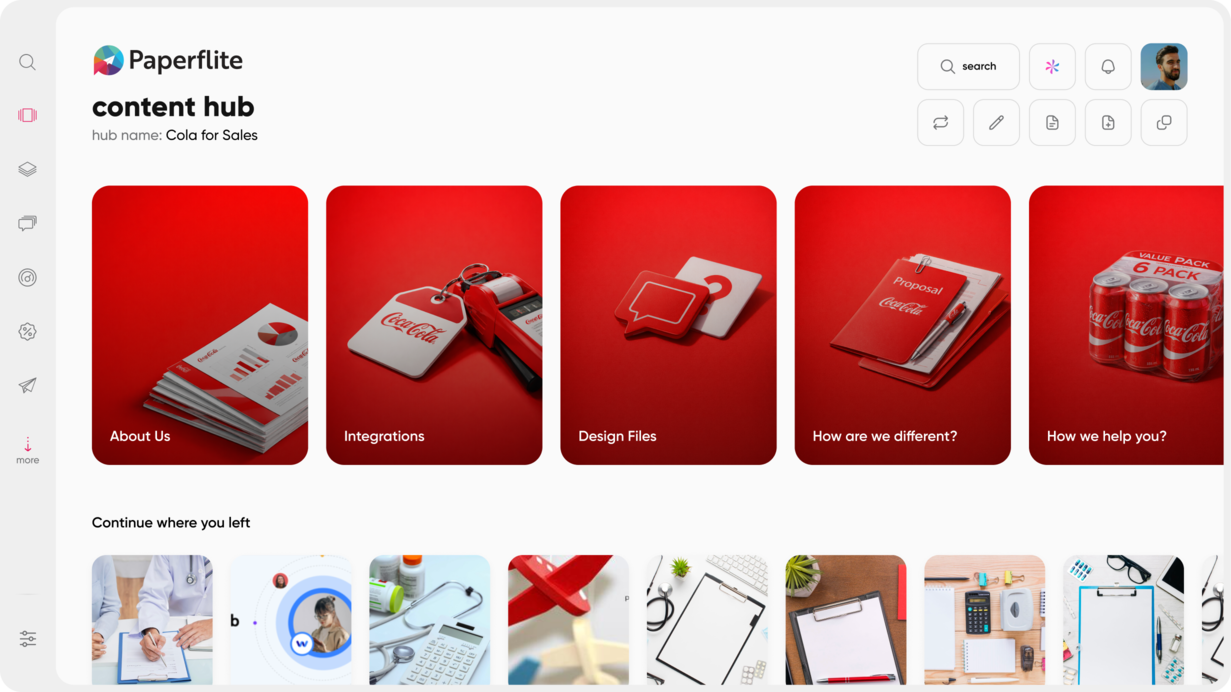

content hub operations exist for exactly this reason: someone has to own the structure, not just the content sitting inside it.
Step 3: Assign an Owner to Every Asset
Here's a pattern worth noticing: the collateral that goes stale fastest is almost always the collateral nobody owns. A pricing sheet with a named owner gets updated the week pricing changes. A pricing sheet with no owner gets updated whenever someone happens to notice it's wrong, usually mid-call, usually too late.
Ownership doesn't need to be complicated. One person per asset, one review date attached to their name, and a clear expectation that if it changes, they're the one who updates it. This works best when it sits with marketing or enablement rather than sales, since reps are busy selling, not maintaining a library.
The difference shows up fast. Teams with named owners catch outdated pricing before a rep ever sends it. Teams without owners catch it after a prospect asks a confused follow-up question.
Ownership also solves a quieter problem: accountability during a handoff. People leave teams, get promoted, or shift focus, and if an asset's ownership lived only in someone's head, it disappears with them. Writing ownership down, next to a review date, means the asset survives the person who first built it. That's a small habit that pays off years down the line, long after the original owner has moved on to something else entirely.
Step 4: Set a Review Cadence That Actually Sticks
An audit fixes today's mess. A cadence keeps tomorrow's mess from building up in the first place. Most teams should run a full review quarterly, and monthly for anything tied to pricing or product details, since those change faster than almost anything else in the library.
Tie reviews to actual triggers instead of just the calendar. A pricing change, a product launch, a rebrand: any of these should automatically flag the collateral connected to it for review, rather than waiting for the next scheduled pass to catch it by accident.
A cadence only works if it's genuinely light enough to survive a busy quarter. A twenty-minute monthly check on your highest-risk assets (pricing sheets, battle cards, anything customer-facing) will catch more problems than an ambitious annual audit that keeps getting pushed to "next month."
It helps to think of this the way you'd think about a car's maintenance schedule. Nobody waits for the engine light to come on before checking the oil. The point of a cadence is catching small issues before they turn into the kind of problem a prospect notices on a call. Build the schedule around risk, not convenience: the assets tied to pricing and product claims deserve the tightest loop, while something like a general company overview deck can safely sit on a longer cycle.
Step 5: Make the Right Version Impossible to Miss
Even with a clean hub and clear ownership, findability still matters. If a rep has to remember an exact file name or dig through nested folders, they'll eventually take the shortcut and grab whatever's easiest to find, current or not.
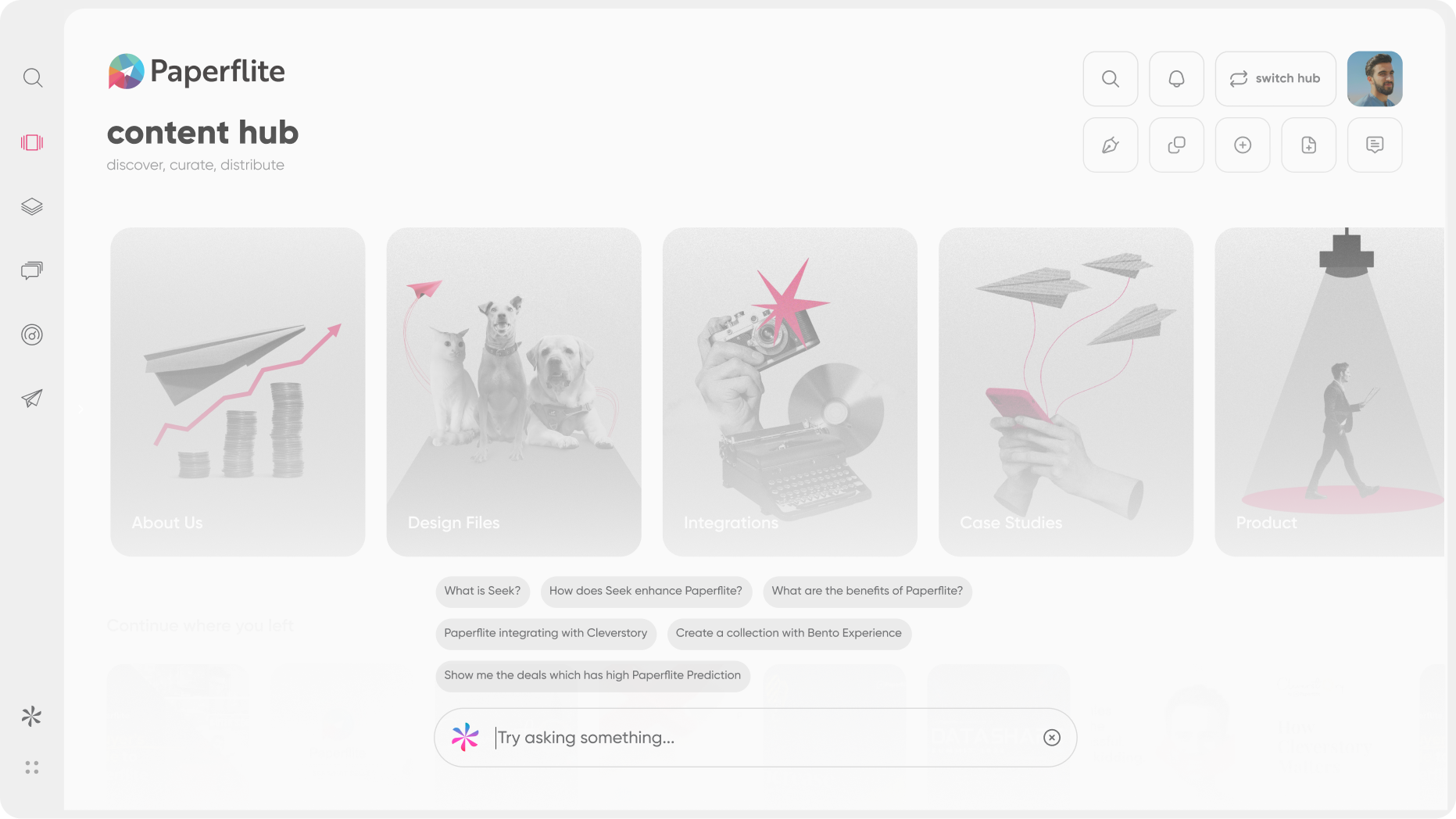
This is where natural-language search earns its keep. A rep should be able to type "battle card for the retail vertical" and get the current one back, not a folder tree they have to interpret. Timestamped, single-version assets remove the other half of the problem: there's no "v3_final_FINAL.pptx" sitting next to the real file, because there's only ever one file.
There's a real cost to skipping this step. Reps can spend hours a week just looking for the collateral they need, and every one of those hours is time they're not spending in front of a prospect. When search works the way it should, that time collapses to a few seconds, and reps stop building a mental workaround (their own personal folder of "stuff I trust") because the system already gives them the right answer faster than their workaround ever could.
Step 6: Know What Happens to Collateral After You Hit Send
What is a sales collateral audit supposed to catch that a content hub can't? Mostly, what happens after the file leaves your hands. An audit and a hub solve the internal mess: what's accurate, where it lives, who owns it. Neither one tells you whether the right person on the buyer's side actually opened what you sent, or whether an old version is still sitting in someone's inbox from three months back.
That's the part most teams never solve, because it happens outside their own systems, inside the buyer's world. A rep can send the perfectly current, freshly audited asset, and still have no idea if it landed with the person who matters or got buried under everything else in a crowded inbox. All the internal discipline in the world doesn't answer the one question that actually decides whether collateral did its job: did the right person see it, and what did they do next?
content tracking closes that gap by showing what happens to an asset once it's out of your hands: who opened it, how long they spent with it, and whether it ever reached the other stakeholders in the deal. That visibility turns collateral from a one-way send into something you can actually manage, the same way you'd manage any other part of a deal you're trying to move forward.
Common Mistakes That Undo a Collateral Cleanup
Even teams that run a solid audit and build a real hub sometimes find themselves back in the same mess a year later. It's worth naming the mistakes that cause this, because they're easy to miss while you're in the middle of the fix.
The first is treating the cleanup as a one-time project instead of an ongoing system. A team spends a month getting everything organized, celebrates, and then nobody's assigned to keep it that way. Six months later, half the "current" library is quietly out of date again, and the team is back where it started. The fix isn't a bigger cleanup. It's building the cadence and ownership from Steps 3 and 4 into the process from day one, so the cleanup never actually ends, it just becomes lighter over time.
The second is over-centralizing without making search genuinely easy. Teams sometimes move everything into one hub and consider the job done, but if that hub still requires digging through nested folders or guessing at exact file names, reps quietly revert to their own personal shortcuts. A hub only solves the problem if finding the right asset takes less effort than recreating it from scratch or messaging a colleague for a copy.
The third is skipping the feedback loop entirely. Reps use collateral in real deals every day, and they notice things marketing never sees: the slide that gets a confused look on every call, the case study a prospect always asks a follow-up question about. Without a simple, recurring way to capture that feedback (even a fifteen-minute monthly check-in), marketing keeps producing content based on guesses instead of what actually happens in the room.
The fourth is forgetting that "no feedback loop" and "no visibility after send" are two different problems. Internal feedback tells you what reps think of an asset. It doesn't tell you what happened to it once a buyer had it. Teams that only fix the first one often assume they've solved the whole problem, then get surprised when a stalled deal turns out to have hinged on a piece of content nobody tracked past the send button.
How Paperflite Keeps Collateral From Going Stale in a Live Deal
Everything above gets your library in shape. The harder problem is what happens once collateral actually enters a live deal, and that's where most cleanup projects quietly stop short.
Paperflite centralizes your collateral in one searchable, taggable hub, so there's never a second "real" version floating around waiting to confuse someone. SEEK, Paperflite's natural-language search, means reps stop guessing at file names or digging through folder trees. They type what they need in plain English and get the current asset back.
The part that goes further than a typical cleanup: once that collateral is shared, Paperflite's Digital Sales Room shows you exactly what's happening to it inside the deal itself, not just whether a file was opened somewhere. Buyer identity gets captured from the very first click on a shared microsite, instead of getting reverse-engineered later from UTM guesswork that only tells you part of the story.
You see the full buying committee engaging with the content, not just the one contact who happened to click first. Deal signals go beyond opens and clicks too: depth of engagement, how many stakeholders are actually involved, and where momentum is quietly stalling before anyone on your side notices. In-room Q&A keeps buyer questions and seller answers attached to the deal itself, instead of scattered across five different email threads nobody can find later. Mutual action plans keep both sides accountable to what happens next, so an outdated asset never ends up being the last thing a buyer saw before they went quiet.
Put together, this closes the loop that the audit and the hub can't close on their own. The sales collateral basics work of keeping content accurate happens inside your own systems. What happens after a rep hits send happens inside the buyer's world, and that's the part Paperflite is built to make visible. A rep no longer has to wonder whether a champion actually forwarded the deck to their VP, or whether the deal went quiet because nobody read what was sent. The engagement data answers that directly.
None of this asks you to rip out what you already use. Deal room capability is built to work with your existing stack, so the collateral cleanup you just did and the deal visibility layer on top of it can run together instead of competing for budget. Reps keep working out of the tools they already know, and the visibility just shows up alongside it.
For teams still in the audit-and-hub phase, this is worth planning for early rather than bolting on later. A content hub built with future deal-room visibility in mind (consistent tagging, clean single-version assets, clear ownership) plugs into that layer far more smoothly than a hub that was never designed with it in view. The cleanup work you're doing now becomes the foundation the visibility layer sits on top of, instead of a separate project you have to reconcile with it down the line.
Paperflite's plans start at $30 per user per month, with $50 and $60 tiers as you need deeper functionality, and custom pricing for Enterprise teams with more complex requirements.
See how it works with a short walkthrough of your own collateral library and a live deal room.
Conclusion
Outdated collateral rarely comes down to one careless moment. It's usually a system quietly making the wrong file just as easy to find as the right one, again and again, until someone notices at the worst possible time. Fixing it for good means running an honest audit, centralizing what survives it, assigning real ownership, setting a cadence that fits how your team actually works, and making the current version impossible to miss.
The step most libraries skip is the one that matters most once collateral leaves your hands: knowing what happens to it inside a live deal. A clean library tells you what's accurate. Deal-level visibility tells you whether it actually did its job. Put both in place, and the moment that opened this piece (a rep reaching for the wrong deck under pressure) stops being a recurring risk and becomes something that just doesn't happen anymore.
FAQ Section
Why does sales collateral become outdated so quickly?
Products, pricing, and messaging change faster than most teams update their content. Without a single source of truth and a named owner for each asset, old versions keep circulating even after a refresh happens, since nothing forces the outdated copy to disappear once the new one exists.
How often should you audit your sales collateral?
Most teams should run a full audit quarterly, and monthly for anything tied to pricing or product details that change often. Tying reviews to actual triggers, like a pricing change or product launch, catches problems faster than a fixed calendar alone, since it flags the right assets the moment something actually changes.
What's the difference between a content audit and a content refresh?
An audit tells you what's outdated, unused, or missing across your library. A refresh is the actual work that follows: updating what's fixable, retiring what isn't, and filling the gaps the audit surfaced. Skipping straight to a refresh without an audit usually means guessing at what needs fixing instead of knowing.
Who should own sales collateral inside a company?
Ideally, one accountable owner per asset, usually sitting with marketing or enablement rather than sales. Reps are busy running deals, not maintaining a library, so ownership works best with the team already responsible for producing the content in the first place.
How do you know if reps are actually using the collateral you build?
Track opens, shares, and engagement at the individual asset level rather than guessing. If something hasn't been touched in months, it's a strong candidate to retire rather than refresh, and that pattern usually shows up clearly once you're tracking usage instead of assuming it.
Can outdated collateral actually cost you a deal?
Yes. Sending stale pricing or a case study that no longer reflects your product can undercut buyer trust at exactly the moment a decision is being made, which is often enough to stall momentum that's otherwise in your favor and hand a competitor an opening they wouldn't have had otherwise.
What's the fastest way to start if the collateral library is a total mess?
Start with the highest-risk assets first, usually pricing sheets and battle cards, rather than trying to audit everything at once. Retiring the clearly dead files removes most of the confusion immediately, and the rest of the cleanup can follow at a pace the team can actually sustain.
Do you need a dedicated platform to fix outdated collateral, or can a shared drive work?
A shared drive can work temporarily if it's paired with real tagging, a named owner per asset, and a review cadence that people actually follow. Most teams eventually move to a dedicated hub because search and permissions get harder to manage by hand as the library grows past a few dozen assets.