How to Share Content Without Attachments (Without Losing Track of Who's Reading It)
You finish the deck at 11pm, attach the file, and hit send. Then nothing. No idea if it landed, no idea if anyone opened it, no idea if it got forwarded to three other people who are now making a decision about your deal without you in the room.
That's the problem with attachments. They leave your inbox and disappear into a black hole. This guide walks through how to share content without attachments, from the basic cloud link everyone already knows to the shared workspaces that show you exactly who's engaging with your content and how far along the deal actually is.
Whether you're sending a proposal to one prospect or running content through an entire buying committee, there's a better way than bolting a PDF onto an email and hoping for the best.
This isn't a debate about whether attachments are convenient. They are. Drag, drop, send, done. The real question is what you give up in exchange for that convenience, and whether the trade is still worth it once your content is actually driving a deal rather than sitting in someone's downloads folder.
The fastest way to share content without attachments is to host the file (proposal, deck, or case study) online and send a link instead. This skips size limits and spam filters, and depending on the tool, lets you see who opened it, which pages they read, and when they came back.
Why People Are Moving Away From Email Attachments
Generally, yes, and often safer than attaching a file directly. Link-based sharing lets you set expiry dates, restrict downloads, and revoke access after the fact, none of which is possible once a file has landed in someone's inbox as an attachment.
Attachments were the default for so long that most people never questioned them. But they come with a handful of problems that get worse the more your business depends on sales content actually landing with the right person.
Size limits are the obvious one. Most email providers cap attachments around 25MB, so anything with embedded video, high-res images, or a dense product deck bounces straight back to you. Spam filters are the less obvious one. A cold email with an attachment gets treated with more suspicion than one without, and that suspicion can tank your deliverability before the prospect ever sees your subject line.
Then there's the visibility problem, which matters most once you're actually in a deal. Once a file is attached and sent, you have zero insight into what happens next. Did they open it? Did they read past page two? Did they forward it to their boss, their finance team, or a competitor? An attachment can't tell you any of that. It just leaves.
Version control adds a second layer of pain. Update your deck after sending it, and everyone who already has the old attachment is now working off stale information. You either resend the whole thing (awkward) or accept that half your prospects have outdated pricing sitting in their inbox.
There's also a trust dimension people don't talk about enough. Attachments from an unfamiliar sender still trip a small mental alarm for a lot of recipients, especially on a first outreach email. A well-formatted link that opens to a branded, recognizable page reads as more legitimate than a file with a generic name sitting in someone's downloads folder.
None of this means attachments are useless. A signed contract going to a known contact, an internal file between two colleagues who already trust each other, these are fine as attachments. The problems show up specifically when content is doing sales work: introducing a prospect to your product, moving a deal forward, or getting reviewed by people you've never met.
It helps to separate the two situations clearly before deciding how to share anything. Ask whether the content is meant to close a loop with someone you already have a relationship with, or whether it's meant to open one with someone evaluating you against other options. The second case is where attachments start costing you more than they save.
Method 1: Cloud Storage Links (Google Drive, Dropbox, OneDrive)
This is the one most people already use without thinking of it as a method. Upload the file to Google Drive, Dropbox, or OneDrive, generate a shareable link, and send that instead of the raw file.
Setting it up takes a couple of minutes. Upload the file, right-click to share, choose who can view or edit it, and decide whether to set an expiry date. Some platforms let you disable downloads too, which is worth doing if the content is anything you'd rather people not save locally and forward around.
Picture a marketer sending a case study PDF to a prospect who mentioned they'd share it with two colleagues. A cloud storage link handles that fine. The prospect opens it, forwards the same link to their colleagues, and everyone sees the current version. Nobody's stuck with an outdated attachment three weeks later when the case study gets updated with a new customer quote.
This works well for internal collaboration and for casual, low-stakes sharing where nobody's tracking a deal. Where it falls short for sales content: there's no per-page engagement data, no sense of who on the other end actually opened it versus just clicked the link, and nothing stopping the file from getting forwarded to five more people with zero visibility into any of them.
It's also worth being deliberate about permissions here. "Anyone with the link" is the fastest setting to choose and the easiest to regret later if that link ends up somewhere you didn't intend, like a public Slack channel or a forwarded email chain outside the deal. Restricting access to specific people, even when it adds a small extra step, is usually worth it for anything beyond a public resource.
For a look at how teams organize the content that ends up behind these links in the first place, see how a well-structured content hub keeps assets from getting scattered across a dozen different folders.
Method 2: Dedicated File-Transfer Tools (WeTransfer, Send Anywhere)
For a one-off large file drop, purpose-built transfer tools are the quickest path. No account required on either end, no folder structure to maintain, just an upload and a link that's good for a set number of days.
These tools are genuinely useful for what they're built for: getting a big file (a video, a zipped folder, a design export) from one person to another without email choking on the size. They're not built for a repeatable sales workflow. There's no ongoing relationship between the link and your CRM, no record of who touched the file weeks later when you're trying to remember who's warm and who's gone cold.
Think about a design team sending a client a folder of final assets at the end of a project. That's a clean use case: the relationship is basically done, there's no ongoing sales motion to track, and the client just needs the files. Try to use the same tool mid-negotiation with a prospect, and you'll notice fast that you've got a link with an expiration date and nothing else. No engagement signal, no way to know if the buyer's team is even still looking at it.
Method 3: Document Tracking Links
Yes, with a document tracking tool. Instead of attaching the file, you upload it once and share a link. The tool then reports back on opens, time spent per page, and repeat visits, giving you visibility an attachment can never provide.
This is where sales-specific sharing starts. Document tracking links sit a level above a plain cloud storage link because they report back on engagement: who opened it, how long they spent on which page, whether they came back for a second look before the follow-up call.
For proposals and pitch decks, that data changes how you follow up. Instead of a generic check-in email, you know the prospect spent four minutes on the pricing page and skipped the case studies entirely, so your next message can actually respond to that instead of guessing.
One founder pattern that shows up constantly: send the same tracked pitch deck to forty investors, then focus follow-up calls only on the eight who spent real time on it and came back for a second view. That's a much better use of a founder's week than calling all forty in the order they replied. The same logic holds for a sales rep juggling a dozen open proposals. The tracking data tells you where to spend your limited follow-up time.
The gap these tools tend to leave: they're built around one document. They can tell you *someone* engaged, but confidently identifying *who* on a multi-person deal gets murkier, and there's no way to see whether the rest of the buying committee is reading the same content in parallel. If the deck gets forwarded to legal, finance, and a VP, you might see three sessions with no names attached to any of them.
That's usually fine for a single-stakeholder sale. It starts to matter a lot more once your average deal has four or five people weighing in before anyone signs anything, which describes most B2B purchases past a certain deal size.
There's also a subtler cost: when engagement data only covers one document, you lose the thread the moment you send a second one. A prospect who read the proposal closely but hasn't touched the follow-up pricing sheet yet looks the same in your dashboard as someone who's gone completely cold, unless you're manually piecing together data from two or three separate tracked links.
Method 4: Shared Workspaces (Digital Sales Rooms)
How do you share content without attachments in a B2B sales cycle?
In a B2B sales cycle, the most reliable way to share content without attachments is through a shared workspace, sometimes called a digital sales room, built specifically for the deal. Instead of a single tracked link for one document, every asset the buyer needs (the deck, pricing, proof points, next steps) lives in one workspace tied to that specific opportunity. Buyer identity is captured from the first click, so engagement data is tied to a named stakeholder rather than an anonymous session.
A shared workspace replaces the pile of attachments and follow-up links with one destination. Instead of emailing a deck on Monday, a case study on Wednesday, and a pricing sheet on Friday, everything the buyer needs lives in a single digital sales room you both come back to.
The meaningful difference from a tracked document link is buyer identity. Rather than guessing who's behind an anonymous "someone viewed this" notification, a shared workspace captures who's engaging from the first click, so engagement is tied to a name and a role, not a session number. That matters once a deal involves more than one person making the decision, which is most B2B deals.
It also solves the version problem for good. Update the pricing page, add a new case study, swap out a deck once a competitor comes up in conversation, and everyone with access sees the current version the next time they open the workspace. No resending, no wondering who still has the old file sitting in their inbox.
There's a real shift in what the buyer experiences too. Instead of piecing together a picture of your product from five separate emails and attachments sent over three weeks, they get one place that already has the answer to whatever they're wondering about next. Fewer emails asking "can you resend that" is a small thing that adds up to a much smoother buying experience.
For the seller, the workspace becomes a running record of the deal rather than a scattered inbox history. Six weeks into a negotiation, you can open the workspace and see exactly what's been shared, who's looked at what, and what's still outstanding, instead of scrolling back through a long email thread trying to reconstruct the timeline.
How Paperflite Solves This With Digital Sales Rooms
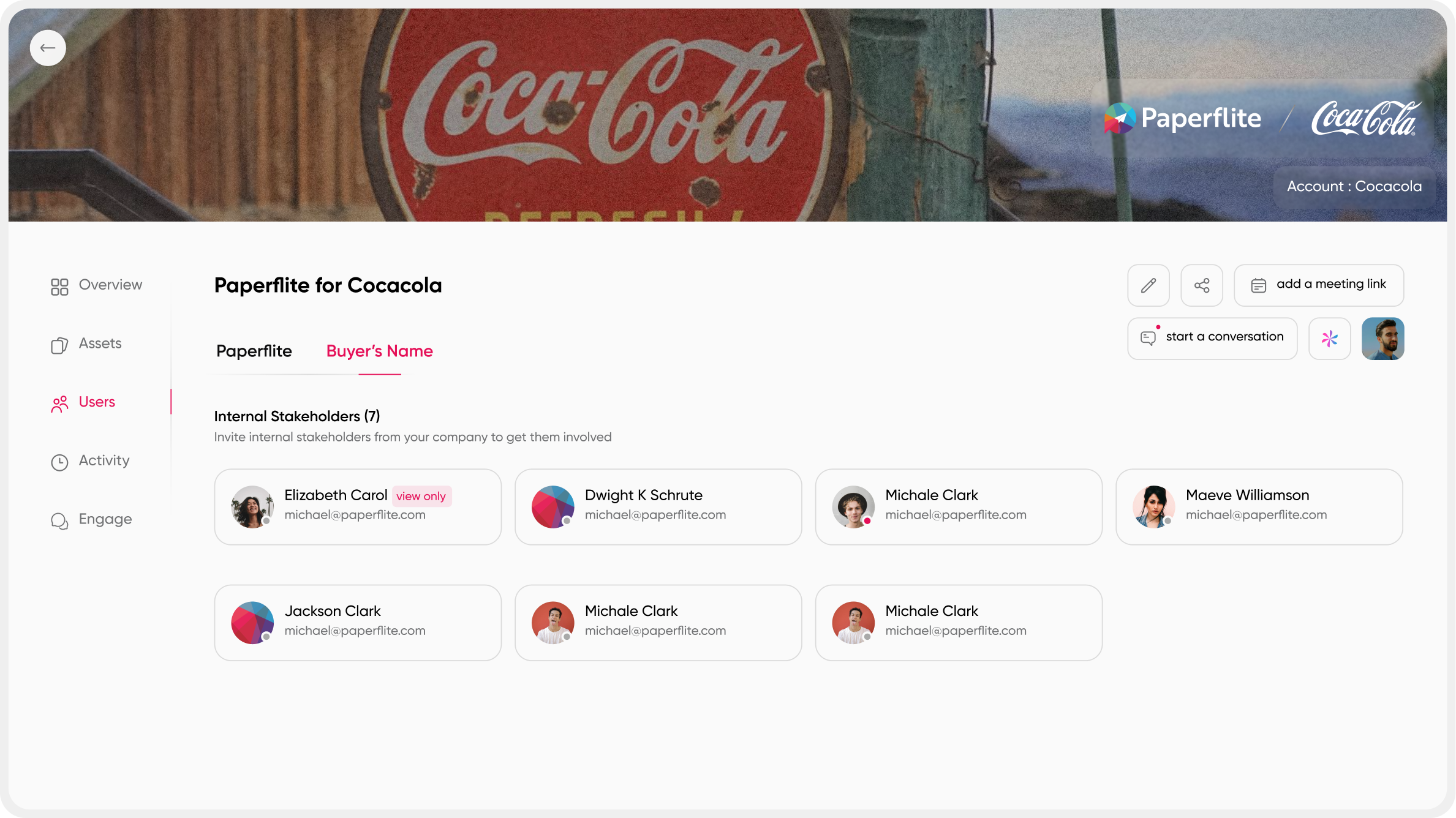
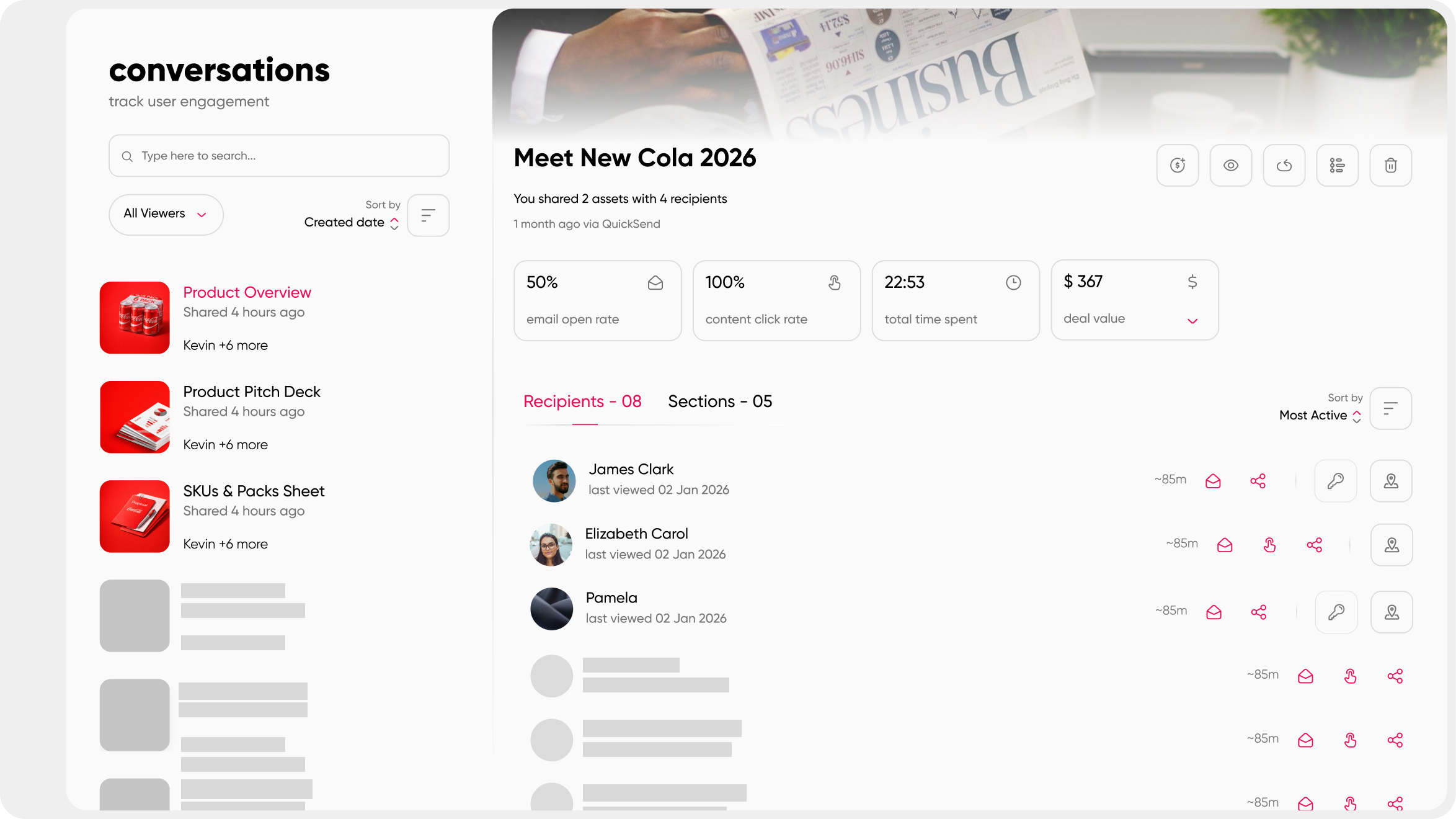
A few things it does that a plain link can't. It shows you the full buying committee as it forms, so you know who's engaged, who's gone quiet, and who just joined the deal without you sending a single email to find out. It surfaces deal signals that go past a basic open or click, like how deeply someone is engaging and how engagement is spreading across the stakeholder group, which gives you something closer to evidence than a gut feeling when you're forecasting. A closer look at digital sales room features covers this in more depth.
It also keeps buyer questions and your answers tied to the deal itself through in-room Q&A, so nothing gets buried in an email thread that only one person on the buyer's side can see. And it tracks mutual next steps, so both sides can see what's due, who owns it, and whether the deal is actually moving or just feels like it is.
None of this requires ripping out what you're already using. Paperflite's Digital Sales Room is built to work with your existing stack, so it sits on top of your current sales process rather than replacing it.
Think about what changes for a rep who's mid-deal with a mid-market prospect. Instead of attaching a deck to email number one, a case study to email number six, and a pricing PDF to email number twelve, the rep sends one link to the workspace at the start of the conversation. Every new asset gets added there instead of triggering another attachment. When the buyer's finance lead joins the conversation two weeks in, the rep sees them show up in the workspace instead of finding out by accident on a call.
If you're currently emailing decks and hoping for the best, seeing a shared workspace in action tends to make the gap obvious fast.
What About Security and Confidentiality?
Attaching a file feels secure because it sits quietly in an inbox, but that feeling doesn't hold up. Once an attachment lands, it lives forever on the recipient's device, in their backups, and in every place their email gets archived. You can't revoke it, you can't tell if it's been forwarded, and you can't stop someone from screenshotting a slide and sending it to a competitor.
Link-based sharing flips that. You can set an expiry date so a proposal stops working after the deal closes or falls through. You can restrict who has access down to specific email addresses instead of "anyone with the link." You can disable downloads so sensitive pricing or roadmap content stays viewable but not saveable.
And if something changes mid-deal, you can revoke access entirely without needing the recipient to delete anything on their end.
None of this is about distrust. It's about the same instinct that makes you password-protect a shared spreadsheet instead of leaving it open to anyone with the link: the content matters enough that you'd rather have control over who sees it and for how long.
This becomes especially relevant once a deal touches competitive information, like early pricing conversations or a roadmap discussion that hasn't been publicly announced. Controlling access at that stage isn't paranoia. It's just matching the sensitivity of the content to the sensitivity of how it's shared.
How to Choose the Right Method for What You're Sharing
Not every piece of content needs the heaviest tool available. Matching the method to the stakes saves you from either under-tracking a real deal or over-engineering a simple file drop.
A quick way to think about it: ask how many people will realistically touch this content, and how much it matters if you can't answer "who's engaged" a week from now. A single internal file between two people who already trust each other doesn't need tracking. A proposal going to one prospect benefits from a tracked link. A deal with a buying committee, a multi-week evaluation, and real budget on the line is exactly the situation a shared workspace was built for.
It's also worth thinking about who owns the follow-through. If your team constantly asks "did they see the updated pricing" or "who else is looking at this deck," that's a signal the current method has run out of road, regardless of how well it worked for smaller deals earlier in the pipeline. That question alone is usually enough to tell you it's time to move up a tier.
Sharing Methods at a Glance (Internal Reference)

Conclusion
Attachments were never built for sales. They can't tell you who opened them, they choke on file size, and they leave you guessing every time you follow up. A basic link fixes the size and spam problem. A tracked link adds visibility into engagement. A shared workspace goes further still, showing you the whole buying committee and the whole deal, not just one document floating in someone's inbox.
None of these methods is wrong for every situation. The right one depends on how much is riding on the content and how many people are actually going to touch it before a decision gets made. What matters is picking on purpose instead of defaulting to whatever's fastest to attach.
If your content is still traveling as an attachment, that's usually the easiest part of the sales process to fix first. See how a sales enablement content strategy that starts with the right sharing method changes what your follow-ups look like.
FAQ
What can I use instead of an email attachment?
A shared link to cloud storage, a document tracking link, or a shared workspace, depending on how much visibility you need into who's engaging with the content and how far along the deal is.
Is it safe to share files without attachments?
Generally, yes, and often safer than attaching a file directly. Link-based sharing lets you set expiry dates, restrict downloads, and revoke access after the fact, none of which is possible once a file has landed in someone's inbox as an attachment.
How do you send a large file without an attachment?
Upload it to a cloud storage platform or a dedicated file-transfer tool and share the resulting link instead of the raw file. Most of these tools handle files well beyond typical email size limits.
Can you track who opens a shared link?
Yes. Document tracking tools show opens, time spent per page, and repeat visits. Fewer of them can confidently tell you which specific stakeholder is viewing versus just registering an anonymous session.
Do shared links work for people without an account?
Most link-based tools and shared workspaces work for anyone with the URL. The recipient doesn't need to sign up or log in to view the content.
What's the difference between a tracked link and a digital sales room?
A tracked link shows engagement on a single document. A digital sales room holds every asset for a deal in one workspace and shows engagement across the whole buying committee, not just one file.
Do I need a shared workspace for every deal?
No. A single tracked link is usually enough for a straightforward proposal to one contact. A shared workspace earns its place once a deal involves multiple stakeholders, several rounds of content, or a long enough evaluation that keeping track of who's seen what becomes genuinely hard.
Will recipients see a big difference in experience compared to an attachment?
Yes, usually a better one. Instead of downloading a file and hunting for the right app to open it, they click a link and view the content immediately in their browser, on any device, without needing to save anything locally.