What Replaces Static PDFs in Sales? 7 Formats Buyers Actually Engage With
Static PDFs are being replaced by interactive, trackable formats: personalized microsites, digital sales rooms, flipbooks, and video-embedded documents. Unlike a PDF, these formats update live, work on any device, and show sellers exactly who viewed what and when.
You send the proposal. Forty pages, nicely designed, pricing on page twelve. Then nothing. No reply, no read receipt, not even a "got it, thanks." You refresh your inbox like it might change something. It won't.
That silence is the real problem with static PDFs in sales, not that they look dated. A PDF can't tell you if your champion opened it, forwarded it to procurement, or let it sit unread while the deal quietly went cold. And once you hit send, the file is frozen. Pricing changes, a case study gets added, a slide needs fixing, none of that reaches the version already sitting in someone's downloads folder.
This is what's replacing static PDFs in sales right now: formats built to update live, travel well on a phone, and show sellers exactly what happens after the send. Some of it is a light upgrade (a trackable link instead of an attachment). Some of it is a bigger shift (a shared workspace built around the deal itself). This piece walks through both ends of that spectrum, and how to tell which one your next deal actually needs.
If you sell anything with more than one decision-maker involved, this matters more than it used to. B2B buying committees have gotten bigger and quieter at the same time. Buyers do most of their research before a rep even knows the deal exists, then loop in colleagues who never show up on a call. A PDF has no way to notice any of that happening. It just sits in an inbox, waiting.
Why Static PDFs Are Losing Ground in Sales
Why are PDFs bad for sales? Mostly because they're a dead end. A PDF can't be updated once it's sent, can't tell you who opened it, and doesn't adapt to the device it's viewed on. It's a snapshot of your pitch frozen at the moment you clicked export, which is rarely the moment your buyer actually reads it.
The version control problem
Picture this: a rep sends a pricing proposal on a Tuesday. By Thursday, the pricing team has adjusted a tier, a new case study has gone live, and marketing has updated the messaging on slide four. None of that reaches the buyer. They're negotiating off a document that's already wrong, and nobody told them.
With static content, every update means a new file, a new email, a new "ignore the last version I sent you." (We've all typed that sentence more than once.) The buyer has to keep track of which attachment is current. Most won't bother. They'll just work from whichever one they opened first.
Multiply that across a busy quarter, twenty reps, dozens of active deals, and the same slide getting resent in a dozen slightly different versions, and it's easy to see how a buyer ends up with the wrong pricing tier in their inbox for weeks. Nobody catches it until the contract stage, when it becomes an awkward call instead of a quick fix.
Zero visibility into buyer behavior
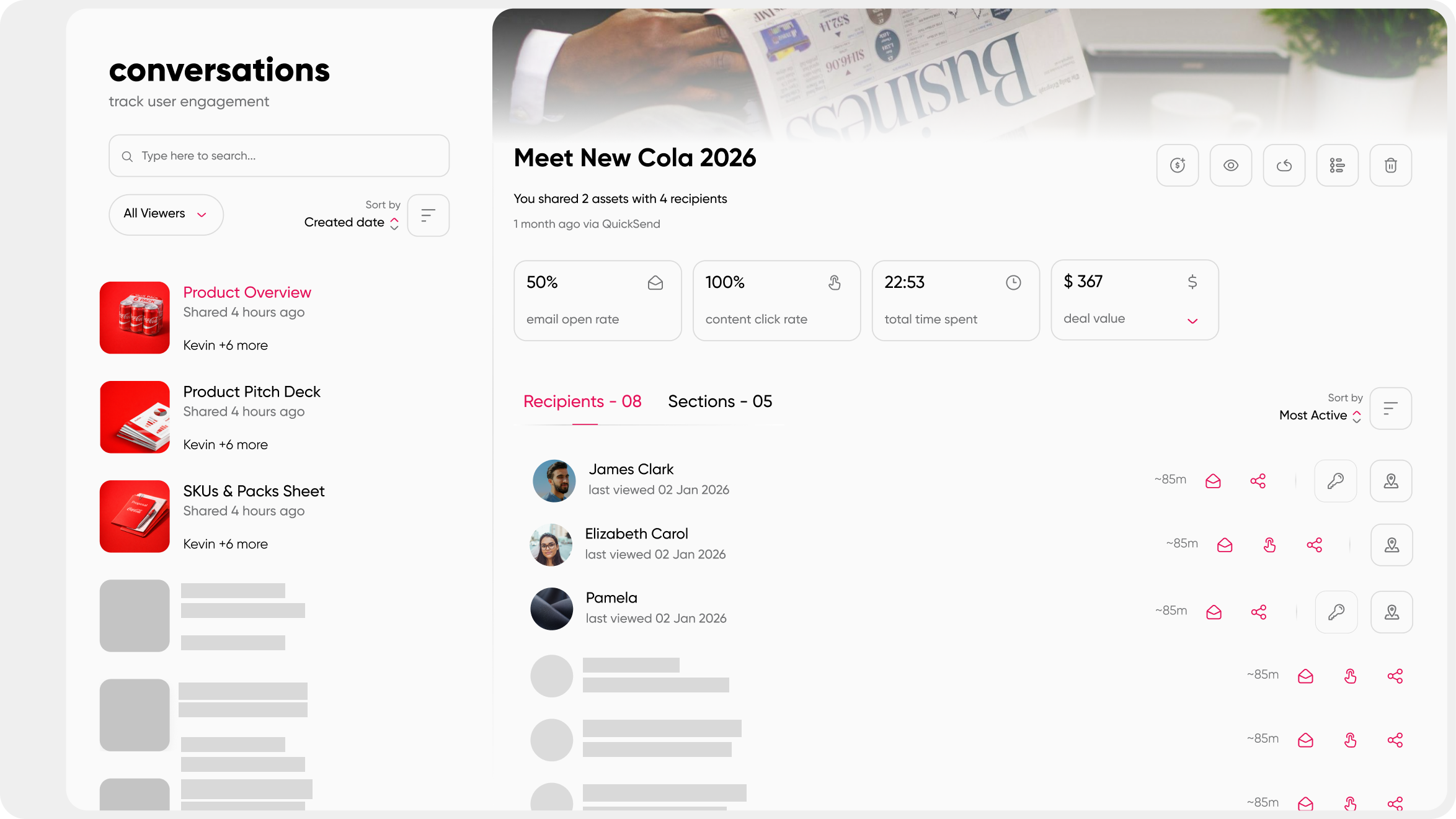
Here's the part that actually costs deals: once a PDF leaves your outbox, you're flying blind. Did the CFO open it? Did it get forwarded to legal? Did anyone even look past page two? A PDF gives you none of that.
Trackable formats close that gap. A rep can see who opened the content, how long they spent on the pricing section, and whether it got shared with a new stakeholder who wasn't on the original call. That's the difference between guessing when to follow up and knowing exactly when a deal needs attention.
Mobile and accessibility friction
Most buyers aren't reviewing your proposal at a desk. They're skimming it between meetings, on a phone, with one thumb. PDFs don't reflow for that. Text gets tiny, tables break, and the pinch-to-zoom dance starts. It's the same friction you feel trying to read a restaurant menu that was clearly designed for print, not a screen.
There's an accessibility cost too. Scanned or image-heavy PDFs often aren't searchable and don't work with screen readers, which quietly excludes part of the buying committee from engaging with your content at all.
None of this is a small edge case. Most email opens now happen on a phone, and a buyer who gives up trying to read your pricing table on a cramped screen doesn't come back to try again later on a laptop. They just move on to the next vendor whose content actually works where they are.
No path back to the seller
A PDF is a one-way street. There's no embedded next step, no way to ask a quick question without opening a new email thread, no natural moment for the buyer to say "can we get pricing for the enterprise tier instead." It just sits there, static, until someone remembers to follow up.
That's the real gap. Sales content should move a conversation forward, not park it in a downloads folder.
The 7 Formats Replacing Static PDFs
None of these formats are exotic. Most sales teams already have access to at least a few of them. The real skill is knowing which one fits which deal, which is exactly what the next section covers. First, here's the lineup.
Interactive presentations and documents
An interactive presentation isn't just a PDF with a nicer skin. It's a document with a clickable table of contents, expandable sections a buyer can dig into on their own, and embedded video instead of a screenshot of a demo. The buyer controls the pace instead of scrolling top to bottom through everything whether it's relevant to them or not.
create interactive business presentations that hold attention past the first slide, and creating an interactive sales presentation that engages and converts both go deeper on the mechanics if you want to build one from scratch.
Digital flipbooks
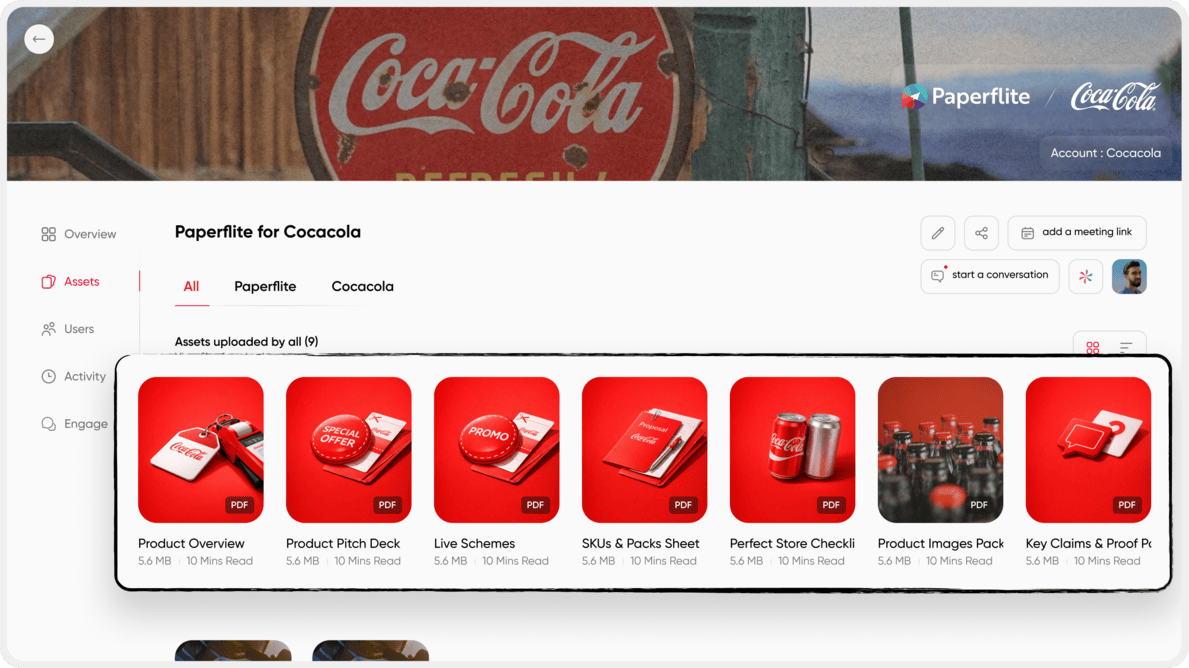
A flipbook keeps the page-turn feel people associate with a catalog or lookbook, but it lives on the web instead of in a download. It's a solid middle step for teams not ready to overhaul their whole content workflow, and it works well for single-reader content where nobody needs to see who else is looking at it.
Where it falls short: a flipbook still doesn't tell you anything about a buying committee. If your deal involves more than one decision-maker, this format alone won't show you who's actually engaged.
It's worth treating a flipbook as a stepping stone rather than a destination. Teams that start here often outgrow it within a quarter or two, once they realize how much they still can't see about who's reading what they send.
Content hubs
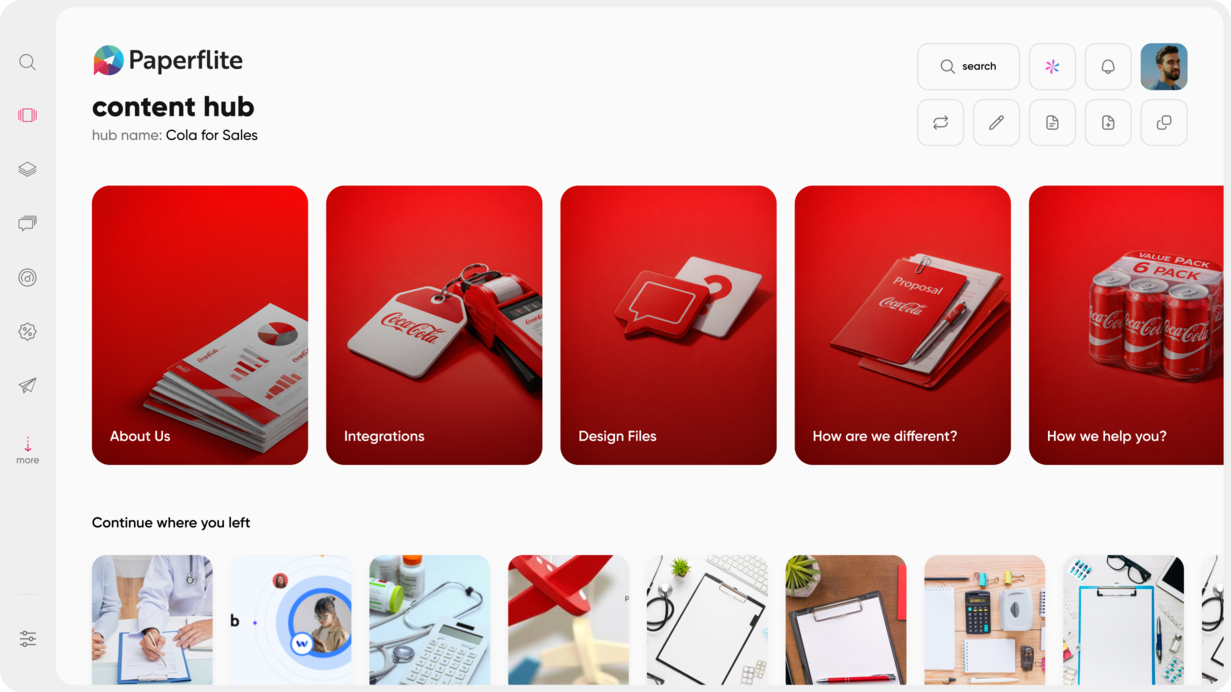
A content hub is the always-on library a rep pulls from, not the buyer-facing room itself. Instead of a rep hunting through old email threads for "that one case study from Q2," everything lives in one searchable place, and it's always the current version.
content hub operations covers how to keep that library from turning into digital clutter, and 7 must-have features of a content hub is a useful gut-check if you're evaluating whether your current setup is actually doing its job.
Digital sales rooms
What is a digital sales room and how is it different from a PDF? A digital sales room is a shared, branded workspace built around one specific deal rather than one specific document. Instead of sending a proposal, then a case study, then a pricing sheet across three separate emails, everything lives behind a single link that updates as the deal moves forward, and every stakeholder who opens it is identified rather than logged as an anonymous view.
A digital sales room is the step beyond a microsite. It's not just personalized content, it's a live workspace: proposal, pricing, case studies, in-room Q&A, and next steps all in one place, updated in real time instead of re-sent.
This is also where buying-committee visibility actually becomes possible. Because every person who opens the room is identified, a rep can see not just that "someone from the account" looked at the pricing page, but that it was the CFO, and that she spent four minutes on the ROI section specifically.
Video-embedded documents
A short, unscripted walkthrough video does something a static slide never can: it puts a human voice next to the content. Think of it as a companion to a digital sales room rather than a replacement for one, a two-minute welcome message inside the room rather than instead of it.
The best versions of this feel closer to a voicemail than a produced ad. A rep pointing out the one slide that matters for this specific buyer tends to land better than a polished thirty-second brand video nobody asked for.
Trackable links with engagement notifications
If a full workflow change feels like too much right now, this is the lowest-effort starting point. Wrap the content you're already sending in a trackable link, and you immediately get visibility you didn't have before, without asking your team to learn a new tool overnight.
how touchscreen sales content can accelerate sales cycles touches on a related idea: content that responds to how it's actually used in the field, not just how it looks in a deck.
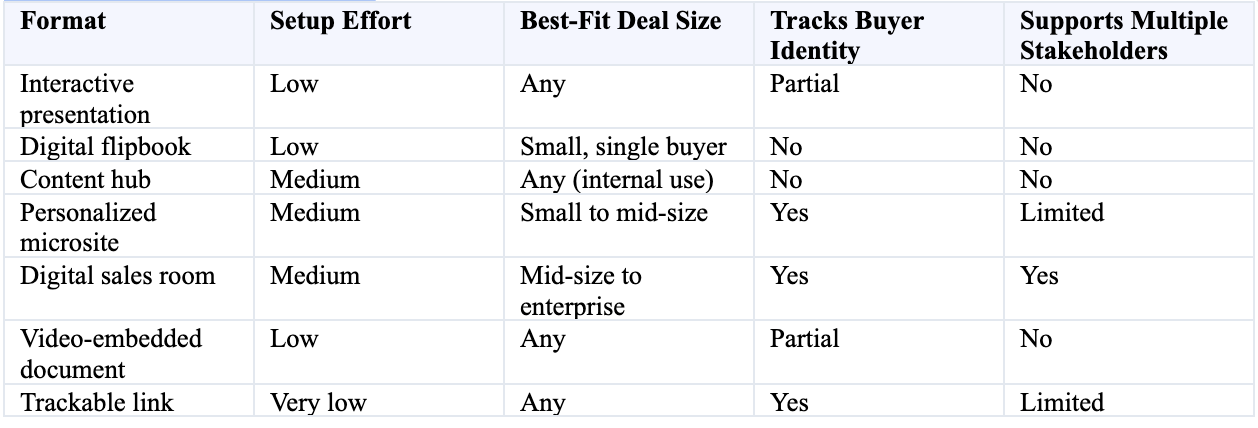
How the 7 formats compare
How to Choose the Right PDF Replacement for Your Sales Motion
Do I need a full digital sales room or is a flipbook enough? It depends on the deal, not the industry. A single buyer signing off on a straightforward purchase rarely needs more than an interactive document or flipbook. A deal with a nine-person buying committee, a multi-month evaluation cycle, and a real chance of stalling needs the visibility a digital sales room provides.
Map format to deal complexity
Start with the shape of the deal, not the size of the logo. A simple deal with one buyer and a short cycle rarely needs more than an interactive document or a flipbook. A deal with a buying committee, multiple approval layers, and a cycle measured in months is exactly where a digital sales room earns its keep.
A quick gut-check: if you can name every person who needs to say yes before this deal closes, and that number is more than two, you're probably underserved by a static file no matter how well it's designed.
It also helps to ask how long the deal has been open. A three-week deal rarely needs the full weight of a shared workspace. A three-month deal that keeps slipping probably needed one from day one, and the sooner a rep sets it up, the less time gets wasted rebuilding context every time a new stakeholder joins.
The deciding question
Everything in this article comes down to one question: do you need to know that someone engaged, or do you need to know who? A trackable link answers the first question. A digital sales room answers the second, and that distinction matters more as deal size grows.
There's a forecasting angle here too. Knowing which stakeholders have gone quiet is itself a signal. A deal where the economic buyer hasn't opened anything in two weeks tells a very different story than one where the whole committee is actively engaging, and a PDF will never surface that difference.
Reps who lean on gut feel alone tend to call deals "probably fine" right up until they aren't. Identity-level engagement data replaces that guesswork with something closer to a real read on where the deal actually stands.
Rollout considerations
Are digital sales rooms worth it for smaller deals? Often, yes, though the payoff scales with complexity. Even a simple deal benefits from a single link that stays current instead of a chain of email attachments, but the case gets stronger fast once more than one stakeholder is involved.
You don't have to flip a switch on your whole team at once. Most teams start with trackable links on their existing content, move to a handful of digital sales room templates for their higher-stakes deals, and expand from there once reps see the visibility pay off.
The bigger hurdle usually isn't the tool, it's the habit. Reps who've sent PDFs for years need a reason to change, and "you'll finally see who's actually reading this" tends to be a pretty convincing one.
How Paperflite's Digital Sales Room Replaces the PDF Send
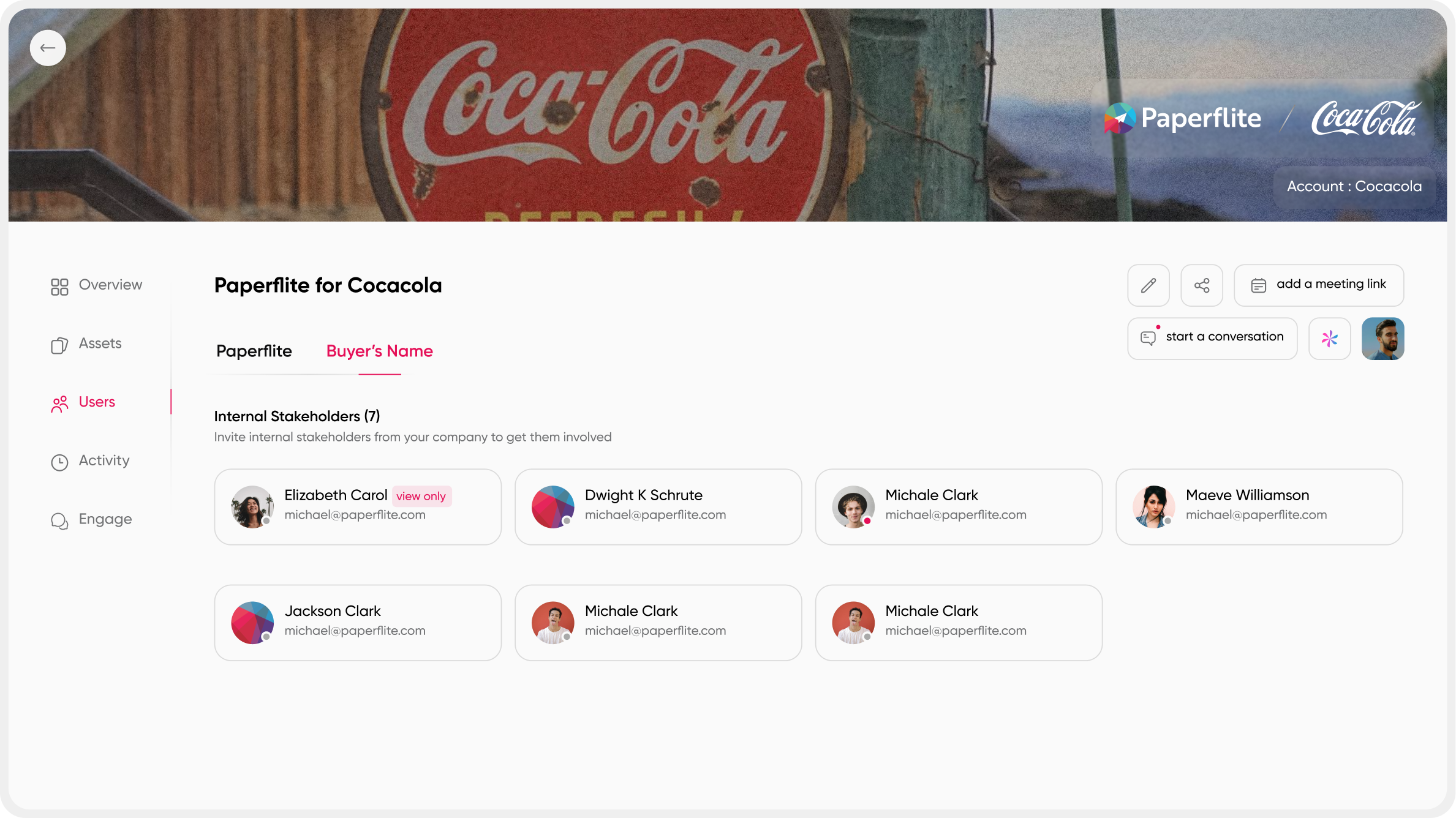
Paperflite's Digital Sales Room tracks buyer engagement by capturing identity from the very first click on a personalized microsite, rather than trying to reconstruct it later through UTM guesswork. That means a rep knows exactly which named stakeholder opened which asset, how long they spent on it, and whether it was shared further into the buying committee.
Everything covered so far points toward the same conclusion: the deal that used to live across a dozen PDF attachments now lives in one shared workspace, and that workspace is built around helping people decide, not just around getting content opened.
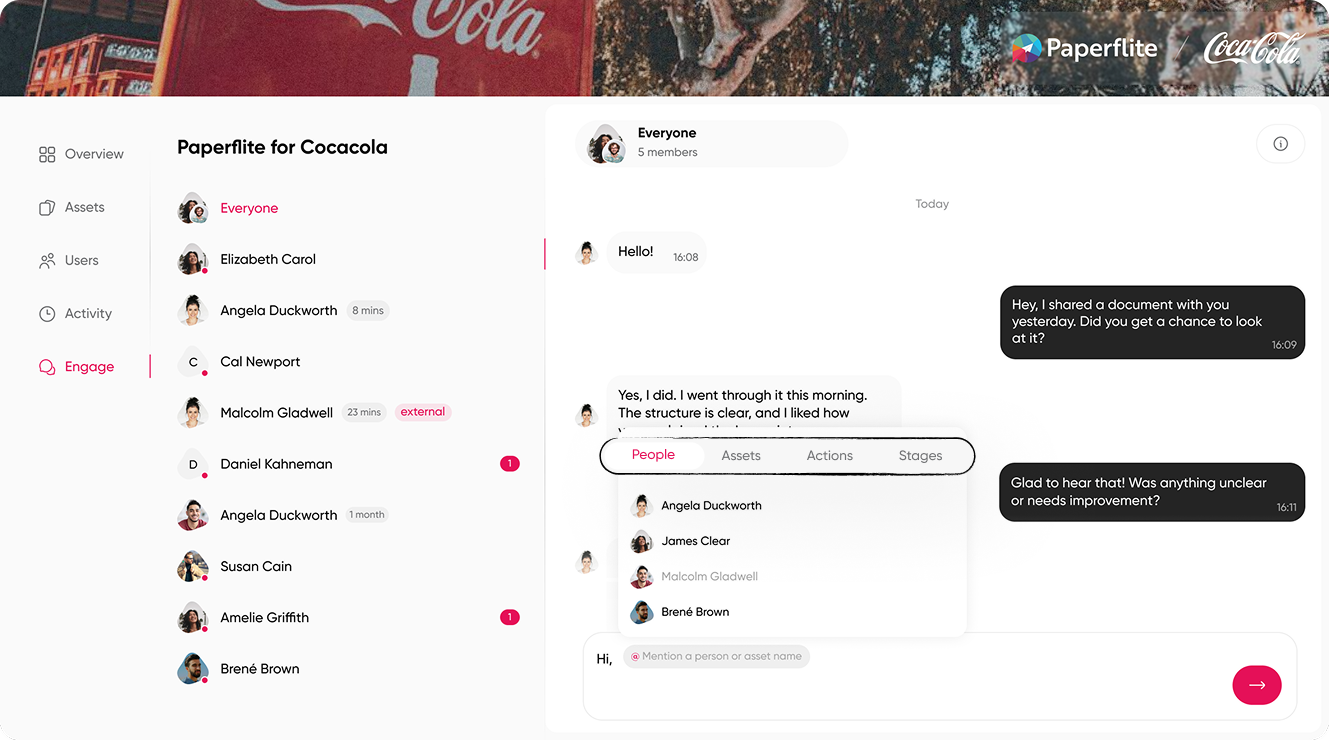
Paperflite's Digital Sales Room is built around that shift. It shows the full buying committee: who's engaged, who's missing, and who just joined the deal, so a rep isn't relying on their champion to relay everything secondhand.
It goes past opens and clicks. A rep can see depth of engagement and where stakeholder interest is spreading (or isn't), which turns "I think this deal is going well" into something closer to evidence.
In-room Q&A keeps buyer questions and seller answers tied to the deal itself, instead of buried three replies deep in an email chain nobody can find later. And mutual action plans make the next steps visible to both sides: who owns what, and by when, so the deal doesn't quietly stall while everyone assumes someone else has the ball.
None of this requires ripping out the tools your team already uses. The Digital Sales Room works alongside your existing CRM and content stack, adding a buyer-facing layer on top rather than replacing what's already working.
For a sales team, the practical shift looks small at first: instead of attaching a proposal, a rep sends one link. But that one link keeps updating as pricing changes, as new case studies get approved, and as the deal moves through legal.
The buyer never has to ask "is this the latest version," because there's only ever one version Paperflite's plans start at $30 per user per month, with $50 and $60 per user per month tiers as needs grow, and custom Enterprise pricing available for larger deployments.
Conclusion
Static PDFs aren't losing ground because they look outdated. They're losing ground because they can't tell you anything about what happens after you hit send: who opened it, what changed since, or whether the deal is actually moving.
The formats replacing them, from a simple trackable link all the way up to a full digital sales room, all solve some version of that same problem. The right one depends on how complex the deal in front of you actually is, not on which format looks the most impressive in a demo.
A one-buyer deal with a short cycle doesn't need the full weight of a shared workspace, and forcing it there just adds friction nobody asked for. But the moment a deal involves a real buying committee, a multi-month evaluation, or a habit of quietly stalling, the visibility a digital sales room provides stops being a nice-to-have.
Start where your deals actually need visibility, and build up from there.
Frequently Asked Questions
What replaces a PDF proposal in B2B sales?
A digital sales room or personalized microsite, both give buyers a live, trackable link instead of a static file that goes out of date the moment terms change.
Is a flipbook a good PDF replacement?
For simple, single-buyer content like catalogs or lookbooks, yes. For multi-stakeholder deals, a digital sales room offers more visibility into who's actually engaging.
Why do sales teams need engagement tracking on content?
Without it, a sent document is a black box. Tracking shows which stakeholders opened, viewed, or shared content, which helps reps prioritize follow-up and spot deals that are going quiet.
Do digital sales rooms replace the CRM?
No, they work alongside it. A digital sales room centralizes buyer-facing content and activity, then feeds engagement signals back into the CRM reps already use.
Can a digital sales room work for smaller deals too?
Yes, though the value compounds with deal complexity. Even a simple deal benefits from one current link instead of a chain of attachments.
How is a digital sales room different from just tracking a PDF?
A tracked PDF shows opens. A digital sales room shows who from the buying committee engaged, with what content, in what order, tied to the deal's progress.
How long does it take to move from PDFs to a digital sales room?
Most teams start with a single deal template and expand from there, so the switch happens gradually rather than as an all-at-once migration.
What should I look for when evaluating a digital sales room platform?
Buyer-identity tracking from the first click, full buying-committee visibility, in-room Q&A, and native fit with the CRM and content library your team already uses.