How to Standardize Content for New Sales Reps (Without Starting Over)
Picture a new sales rep's first week. She opens three different shared drives, gets added to six Slack channels, and receives a 47-slide deck with no instructions on when to use it. By Friday, she's building her own pitch from scratch because nothing she was handed made sense in context. Marketing doesn't know. The deal suffers. Nobody connects the dots.
This is not a people problem. It is a content infrastructure problem. And it is one of the most preventable causes of slow ramp times, inconsistent messaging, and lost deals in growing sales teams.
The goal of this guide is to walk you through exactly how to standardize content for new sales reps: from auditing what you already have, to building a library they can actually use on day one. If you want to go deeper on the broader topic, the Sales Content Management Guide is a good companion read.
Why New Reps Struggle With Content (And Why It's Not Their Fault)
Here's a number worth sitting with: nearly 60-70% of the content marketing creates for sales teams goes completely unused. Not because reps are lazy. Because the content is unfindable, uncontextualized, or irrelevant to the specific conversation they're trying to have.
For a new rep, the problem is even sharper. A seasoned rep has workarounds: she knows which Google Drive folder has the good stuff, who to Slack for the latest battlecard, which old deck has the slide that actually lands. Your new hire has none of that. She has a folder full of PDFs and a prayer.
Research consistently shows that reps who can't find the right content at the right moment don't abandon the sale. They do something worse: they create their own version. To understand the full breakdown of why this happens, why sales reps overlook marketing content is worth reading before you build anything new.
- The structural reasons new reps struggle with content are consistent across teams:
- Content isn't organized around selling situations. It's organized around file types. (PDFs in one folder, videos in another, no connection to when or why each asset matters.)
- Without context, reps don't know which piece to use at which stage. A well-written case study sitting in the wrong folder is invisible.
- Content adoption gaps produce a slow, silent cost: reps create their own decks, messaging drifts, brand standards erode, and you don't know it's happening until a prospect pushes back on something a rep said that was simply wrong.
CSO Insights research found that nearly 42% of reps feel unprepared after onboarding. That's not a training problem alone. It's a content accessibility problem. Almost half your new hires walk into their first deal without the materials they need, in a format they can actually use.
What "Standardized Sales Content" Actually Means
Standardizing sales content means building a centralized, organized library of approved materials that every rep can find, use, and trust regardless of how long they've been on the team. It replaces scattered, inconsistent files with a shared foundation: tagged by stage, persona, and use case, and accessible in the flow of how reps actually work.
The distinction most teams miss: standardization is not about every rep sounding identical. It's about every rep starting from the same strong foundation and knowing what to use when.
A standardized sales content library typically includes two categories of material. For a full breakdown of what belongs in each, 13 Most Important Types of Sales Enablement Content covers the landscape well.
Customer-facing materials:
- Presentation decks and pitch materials
- Case studies and customer success stories
- One-pagers and product briefs
- Demo videos and product walkthroughs
- Proposal and pricing templates
Internal enablement content:
- Competitive battlecards
- Objection handling scripts and talk tracks
- Buyer persona guides and discovery call frameworks
- Onboarding guides and product messaging sheets
- Win/loss review summaries
The key is that all of this lives in one place, organized so that a rep who's been on the team for 10 days can find the right asset as easily as someone who's been there for 10 months.
Step-by-Step: How to Standardize Content for New Reps
This is the part that actually matters. Six steps. Each one builds on the last. You don't need to do them all at once, but skipping any of them tends to recreate the same chaos you started with.
Step 1: Audit What You Already Have
Before you build anything new, stop and catalog what exists. Most teams discover they have the right content in entirely the wrong places, or in formats that don't serve anyone.
Pull everything from shared drives, email threads, Slack channels, CRM attachments, and old presentation folders. Then apply three filters to each asset:
- Is it still accurate? (Does it reflect current pricing, positioning, and product?)
- Does it reflect how you actually sell today?
- Would a new rep know when to use this without being told?
Anything that fails two of three gets retired or updated before it goes into the new library. Yes, this takes time. No, you cannot skip it. One outdated pricing deck in a "standardized" library erodes trust in the entire collection.
For a practical framework on organizing what survives the audit, Organize B2B Marketing Content in 8 Simple Steps gives you a replicable process.
Step 2: Organize by Selling Situation, Not File Type
This is where most content libraries fail. Structuring a library by format (PDFs here, videos there, decks in this folder) doesn't help a rep who is mid-call trying to answer a specific buyer objection.
Organize instead by:
- Stage in the sales cycle: early discovery, mid-evaluation, late negotiation, post-demo
- Buyer persona: economic buyer, champion, technical stakeholder, end user
- Use case or industry: if your product is multi-vertical, segment by vertical
- Content purpose: educate, differentiate, handle objections, build trust
A rep who is 10 days into the job should be able to search "CFO objection, SaaS mid-market" and get the right battlecard. Not "Resources > PDFs > 2024 > Version 3." The taxonomy is not a bureaucratic detail. It is the whole gam
Step 3: Build the New Rep Starter Pack
Before a new hire's first day, assemble a curated, small set of content they will actually use in their first 30 days. Not the entire library. Specifically:
- 2-3 case studies from the verticals they'll be selling into
- A product one-pager they can share after a first call
- Competitive battlecards for your top 3 alternatives in the market
- Objection handling scripts for the five most common pushbacks
- A discovery call framework
- Brand messaging guide and talk tracks
Too much content in week one produces paralysis. A rep handed 200 assets on day one will default to doing nothing with any of them. (We hear you, it feels comprehensive. It isn't.) A short, confident starter pack produces early wins, builds confidence, and creates genuine demand for more content over time.
Step 4: Create Playbooks That Connect Content to Behavior
Content alone is not enough. New reps need to know when and how to use each piece. A sales playbook closes that gap by mapping content to specific selling moments.
Each playbook entry should answer five questions:
- What is the selling situation?
- What content should I use here?
- What do I say before sharing it?
- What does the customer response typically look like?
- What should I do next?
Think of the playbook not as a policy document, but as a conversation guide built by your best rep, preserved for every rep. It's institutional knowledge made transferable.
If you're building a playbook from scratch, How to Build a Sales Enablement Strategy? with Template gives you a practical framework to start from.
Step 5: Centralize in a Platform That Works in Rep Workflow
A content library that reps have to go out of their way to use will collect digital dust. The fix: bring the content to where reps already work.
This means:
- Integrating your content hub with your CRM so reps see recommended assets inside their deal view, not in a separate tab
- Enabling email integration so sharing happens from the platform directly, no switching tools
- Mobile access for field reps who are in meetings without a laptop
The fewer clicks between "I need a case study" and "I'm sharing a case study," the higher the adoption rate. Three clicks is too many. One is the target.
For a broader look at how organizations manage the assets that live in these libraries, Sales Asset Management: What, Why and How covers the full picture.
Step 6: Track Usage and Close the Feedback Loop
Standardization is not a one-time project. A new rep joining in Q3 should have access to better, more refined content than the rep who joined in Q1. The only way that happens is if you build a feedback loop into the process.
Four signals to track:
- Which assets do reps actually share? (usage data)
- Which content gets opened and read by buyers? (engagement analytics)
- What questions do new reps keep asking that the content doesn't answer? (rep feedback)
- What objections are turning into losses? (CRM and deal data)
Use those signals to retire weak assets, promote high performers, and fill genuine gaps. A quarterly review cycle is a good starting cadence.
For more on tracking what actually happens to your content after it leaves the library, What is content tracking? Types, Techniques, and Tools is the complete breakdown.
Content Standardization vs. Content Rigidity: Know the Difference
One common pushback when teams start thinking about standardization: "If I lock everything down, my reps lose authenticity. They'll sound scripted."
Fair concern. Wrong conclusion.
Standardization sets the foundation. It does not cement the ceiling. Reps should absolutely be able to swap a case study for a more relevant one, adjust the opening line to match a specific buyer's language, or drop a reference that doesn't fit the conversation. What they should not be doing is rebuilding the entire pitch from a blank slide deck at 10pm before a big call.
Think of it like a recipe. The ingredients are standardized. Every cook in the kitchen starts from the same base. What a skilled cook does with those ingredients is still their own.
The practical solution is modular, customizable content. Pre-approved blocks (the logo, the case study, the core messaging) that a rep can assemble and adjust without going off-brand or introducing inaccurate product information.
How Paperflite Helps You Standardize Content for New Reps
The six steps above work regardless of what tool you use. But the difference between a content library that gets maintained and one that turns into another cluttered drive comes down to how easy it is to organize, surface, and track content in the flow of how your reps actually sell.
Paperflite is built around that problem. Here's how specific features map to the steps above:
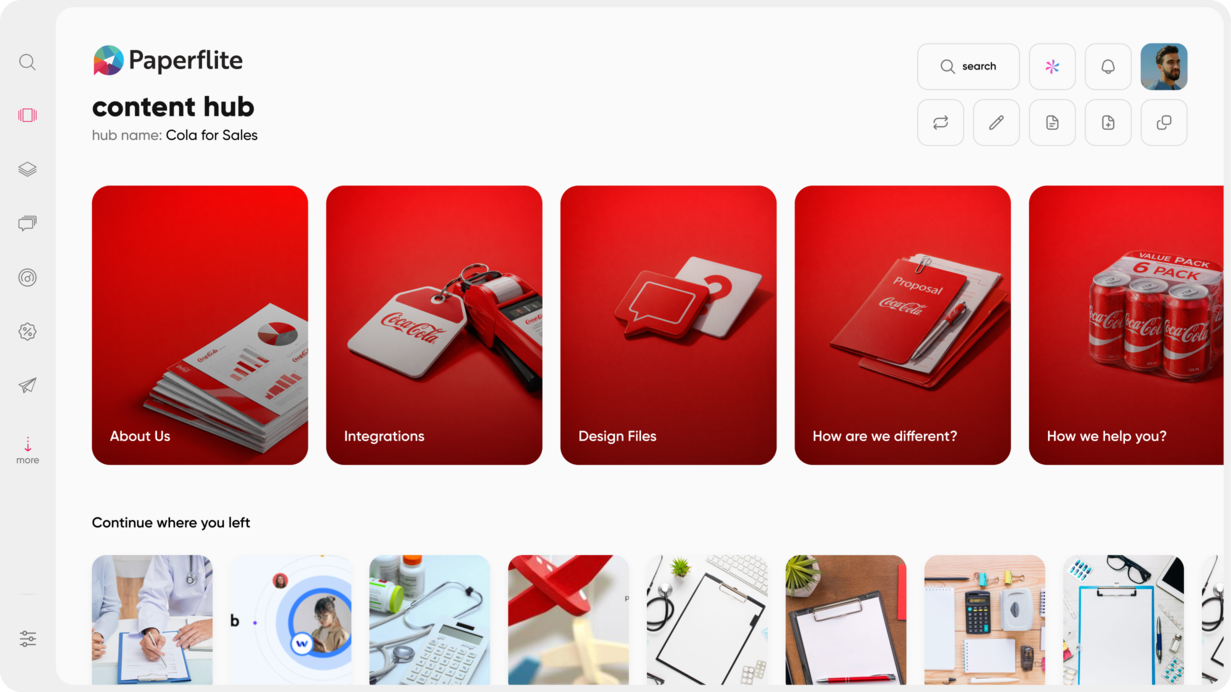
Netflix-like Content Hub. Reps browse curated content the way they browse a streaming service. Collections are built around selling situations, buyer personas, or deal stages, not folder structures. A new hire on day one navigates the library the same way as a veteran.
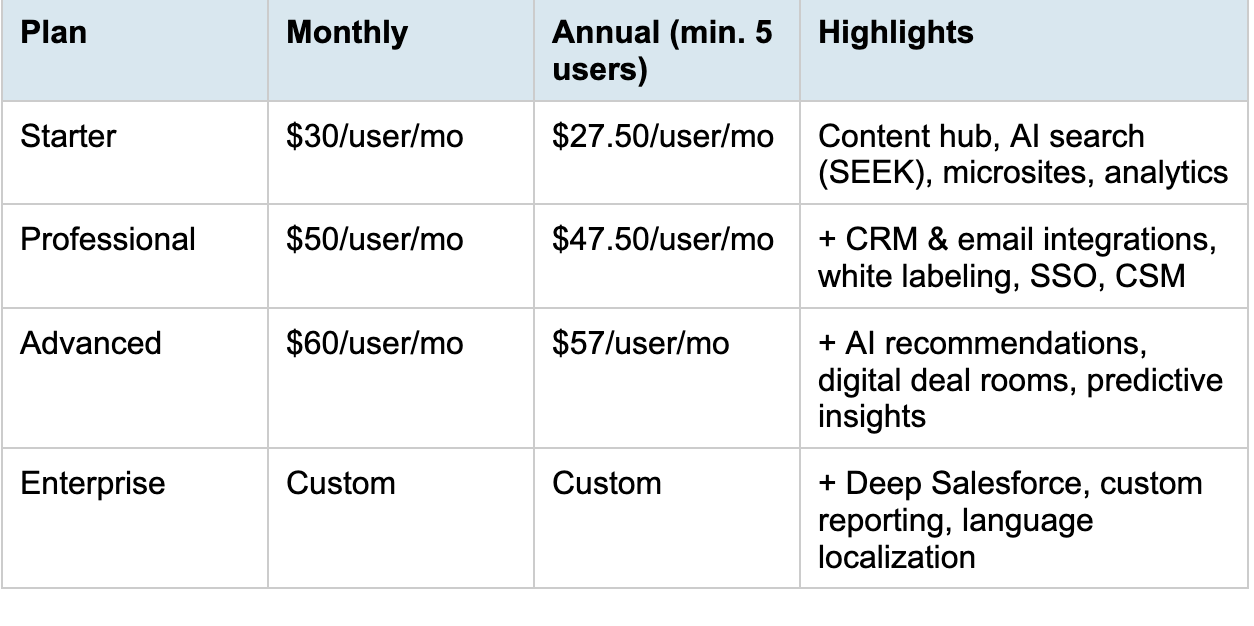
SEEK (AI-Powered Content Discovery). New reps type a question in plain language and surface the right asset. No need to know the exact filename, folder structure, or which version is current. Available from the Starter plan.
Content Streams. Marketing curates collections for specific scenarios (new hire onboarding, competitive deals, enterprise prospects) and reps access only what's relevant to their current situation.
CRM and Email Integrations. Content surfaces inside HubSpot, Salesforce, MS Dynamics, Freshsales, Pipedrive, Gmail, and Outlook so reps never leave their workflow to find an asset. (Professional plan and above.)
Engagement Analytics. See which assets new reps share, how buyers engage with them, and which content is actually moving deals. Use that data to build smarter training and a better library over time.
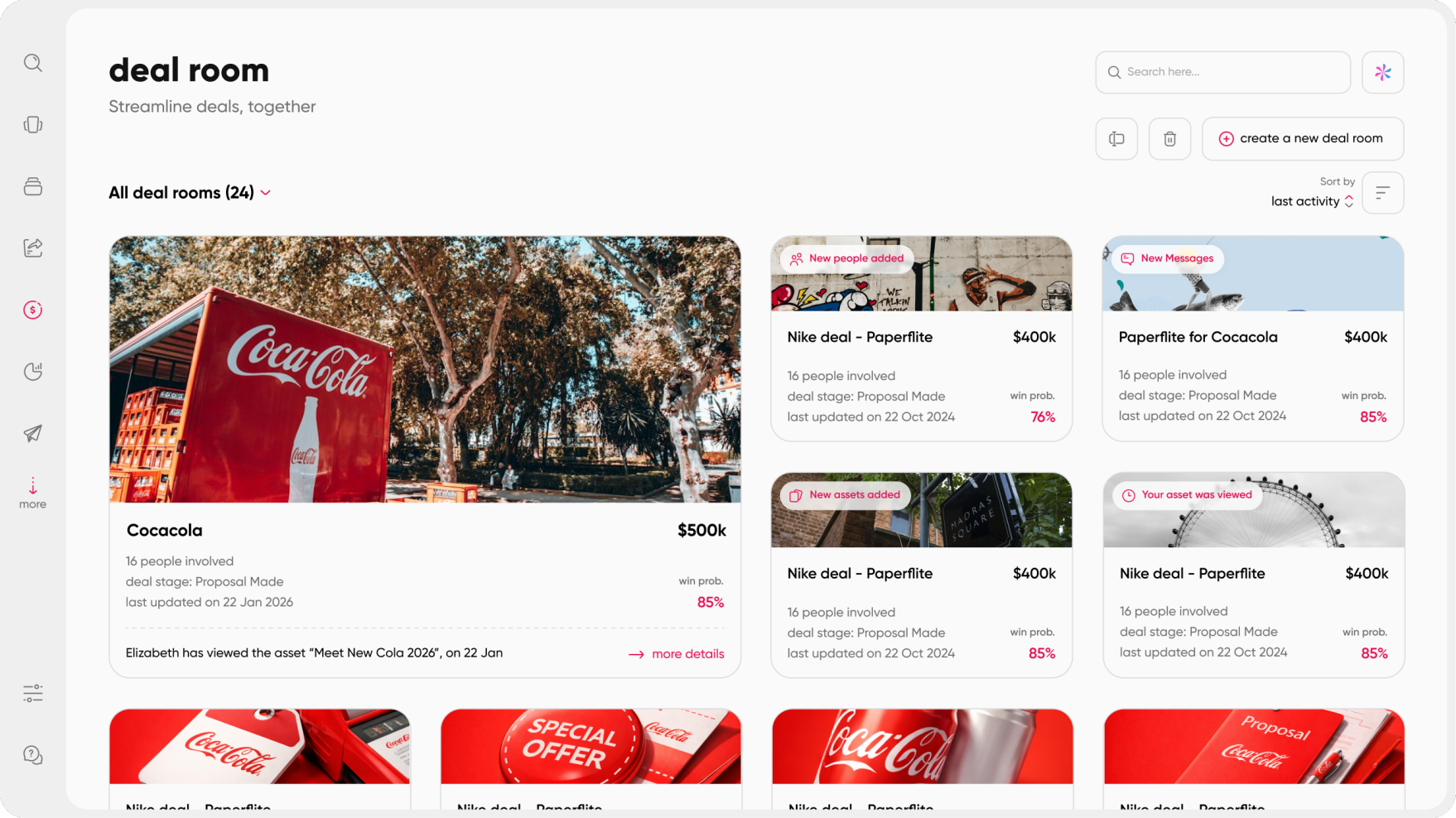
Digital Deal Rooms. New reps can create collaborative spaces for buyers without needing design help. (Advanced plan.)
If you're thinking about how this fits into a broader enablement framework for your team, A Blueprint to Guide You walks through what a full sales enablement setup looks like at different stages of growth.
Common Mistakes to Avoid When Standardizing Content for New Reps
Most of these mistakes don't feel like mistakes when you're making them. They feel like being thorough.
Dumping everything at once. New reps cannot absorb 200 assets in week one. The result is not a well-equipped rep. It's an overwhelmed one who ignores the library entirely and asks a colleague instead. Start with a curated starter pack. Expand access over time.
Organizing by format, not function. "PDFs folder" tells a rep nothing about when or why to use something. Organize around selling situations and the structure will do the work your onboarding session can't.
Letting content go stale. One deck with last year's pricing in a "standardized" library destroys new rep trust in everything else. Build a content audit into someone's quarterly responsibilities and make it non-negotiable.
No context for how to use content. Attaching usage guidance to every major asset (when to share it, who it's for, what conversation it fits) takes 10 minutes per asset and saves 10 conversations per quarter.
Not tracking what gets used. If you're not measuring content adoption, you're guessing at what's working. Start with basic sharing and engagement data. The signals will tell you what to retire, what to promote, and what's still missing.
Conclusion
New reps don't fail because they're bad salespeople. They stumble because they're handed an unorganized, inconsistent pile of content and told to figure it out. The solution is not more content. It's better infrastructure around the content you already have.
Standardizing content for new sales reps is not a one-afternoon project. But it is a solvable one. Start with the audit. Kill what's stale. Organize around selling situations. Build the starter pack. Connect content to behavior through playbooks. Put it where reps work. Then close the loop.
If you want to go deeper on what the onboarding side of this looks like in practice, What Makes Sales Onboarding Faster and Efficient? is a useful next read.
Ready to see how Paperflite helps new reps find the right content on day one?
Most teams are sharing their first content from a structured library within a week of setup. See what that looks like for your team.
Book a demo at paperflite.com/book-a-demo
Frequently Asked Questions
What does it mean to standardize sales content?
Standardizing sales content means building a centralized, organized library of approved assets (case studies, decks, battlecards, scripts) that every rep can find and use confidently. It replaces scattered, inconsistent materials with a shared foundation that keeps messaging consistent and onboarding faster. The goal is not uniformity. It's that every rep starts from the same strong base and knows what to reach for when.
How long does it take to ramp a new sales rep with standardized content?
Average ramp time ranges from 3 to 12 months depending on deal complexity and product. Research shows that sales reps who go through standardized onboarding become productive roughly 3 months sooner on average than those who don't. A strong content library, paired with structured playbooks that explain when and how to use each asset, is one of the largest levers for closing that gap.
What content should I give new sales reps on day one?
Keep it small and focused. On day one, a new rep needs 2-3 relevant case studies, a product one-pager, top competitive battlecards, an objection handling guide, and a discovery call framework. That's it. Avoid overwhelming new hires with the full library upfront. Add depth gradually as they build confidence in the core material. The goal is early wins, not comprehensive coverage.
What is the difference between a sales playbook and a content library?
A content library is the collection of assets a rep can use. A sales playbook tells the rep when and how to use them. Both are necessary for a new rep to succeed. The playbook provides behavioral context ("use this battlecard when a prospect mentions Competitor X in discovery"). The content library provides the actual material. Ideally, they're connected inside the same platform so reps move from guidance to asset in one step.
Why do sales reps ignore the content marketing creates?
Reps ignore marketing content for a few consistent reasons: they can't find it quickly, it doesn't feel relevant to their specific selling situation, or they don't know when to use it. The solution isn't creating more content. It's organizing existing content around how reps actually sell, tagging it by stage and persona, and surfacing it where reps already work. Content that shows up in the right moment gets used. Content buried in a drive does not.
What is the best way to organize a sales content library?
Organize by selling situation rather than file type. Tag content by stage in the sales cycle (discovery, evaluation, negotiation, close), by buyer persona (economic buyer, champion, technical stakeholder), and by use case or industry. This structure lets a new rep search by context ("enterprise CFO objection") rather than guessing folder structures. The taxonomy should reflect how your reps think about their deals, not how your files happen to be saved.
How do I measure whether content standardization is working?
Track four signals: content adoption (which assets get shared), buyer engagement (how prospects interact with shared content), rep feedback (what questions keep coming up that the content doesn't answer), and deal outcome data (which assets correlate with closed deals). Review quarterly and retire assets that aren't earning their place. Standardization is a living system, not a one-time setup.