Best Digital Sales Room Software in 2026: Tools That Actually Personalize the Buyer Experience
Your prospect opened the pricing deck four times last Tuesday. You have no idea. It arrived as an email attachment three follow-ups ago, and now it lives somewhere between their spam folder and a shared drive no one updates. You sent a check-in message. They said they were "still reviewing." And that is all the visibility you have.
That gap between "I sent it" and "I know what they actually think of it" is exactly what digital sales room software is built to close. A well-built buyer portal gives prospects one clean link where everything lives: curated, branded, and tracked. And it gives you a real-time window into what they are reading, who else is in the room, and what questions still need answering.
This guide covers the leading digital sales room software in 2026, what separates tools that genuinely personalize the buyer experience from ones that are just glorified file folders, and where Paperflite fits into the picture. Whether you are evaluating for the first time or replacing something that stopped working, here is what you need to know.
What Is Digital Sales Room Software?
Digital sales room software is a buyer-facing workspace where sales teams share curated content, track prospect engagement, and collaborate with multiple stakeholders in a single branded link. Unlike a shared drive, it gives sellers real-time visibility into who viewed what, and lets buyers self-serve information on their own schedule, without waiting for a rep to respond.
You will also see the category referred to as deal room software, virtual sales room software, buyer portals, or client portals. The terminology is still unsettled, but the core concept is the same: a private, persistent microsite built for a specific deal or account, where the buying journey actually happens.
The clearest way to understand what this software does is to compare it to the alternatives. Email threads scatter context across inboxes and give you no signal about what happened after you hit send. Shared Google Drive folders are passive. They do not tell you who opened the proposal at midnight or which sections your champion shared with the CFO. CRMs track sales activity internally. They are excellent at pipeline visibility, but they face inward. A digital sales room faces outward. It is the place your buyer goes between calls.
One way to think about it: your CRM tells you where a deal is. A digital sales room tells you what a buyer is thinking.
What Makes Digital Sales Room Software Worth Using?
According to a 2026 Gartner survey of 646 B2B buyers, 67% now say they prefer a rep-free research experience, up from 61% the year before. That is not a signal that buyers do not want help. It is a signal that they want access to information on their own schedule, without having to book a 30-minute call every time they have a question. Digital sales room software is the infrastructure that makes that possible.
Here is what it actually solves:
- Fragmented content delivery: When you send a PDF attached to an email, that file is now outside your control. It gets forwarded to a stakeholder you have never met, in an older version, without context. A digital sales room means everything lives in one link. You update the deck, and the link updates. No one is working from the version you sent months ago.
- Zero post-send visibility: Traditional sales gave you open/not-opened, and even that was unreliable. A digital sales room shows you per-page time, which stakeholders visited, how many times they revisited the pricing section, and who else in the buying committee accessed the room. For a 20-deal pipeline, a 26% increase in win rate means roughly five additional closed deals a quarter — just from giving buyers a cleaner experience and giving reps better signals.
- Generic buyer experience at scale: McKinsey research found that 76% of buyers get frustrated when their buying experience is not personalized. Dropping a company logo on a generic deck is not personalization. A well-built buyer portal reflects the buyer's industry, role, and deal stage — it shows them that someone thought about their specific situation before sending the link.
- Multi-stakeholder chaos: The average B2B buying committee sits at 10 to 11 members, and Forrester and 6sense both put the median above 11 for deals over $50,000 in 2026. Most of them never talk to your rep directly. Deals stall because a security lead has a question and an IT director has a different one and neither of them wants to wait for the AE to get back from a demo. A digital sales room gives each stakeholder access to what is relevant to them, without the seller having to hold separate briefings for each one.
Key Features to Evaluate in Digital Sales Room Software
Before you start comparing tools, it helps to know what you are actually buying for. Most digital sales room software checks similar boxes on a features grid. The differences show up in depth, not breadth. Here is what to probe.
Personalization at Scale
The question is not whether the software allows customization. Every tool in this category does. The question is whether a rep can create a branded, deal-specific room in under five minutes without a designer, and whether that room actually reflects the buyer's role and stage — or just their company logo pasted on a template.
Look for: per-buyer branding, role-specific content views, welcome video embedding, and no-login access links. A room that requires the buyer to create an account before they can see your proposal is a room many buyers will not bother opening.
The difference between a personalized room and a branded template is meaningful. One is curated for this buyer's specific situation. The other just has their name on it.
Buyer Engagement Analytics
What happens inside the room needs to come back to the rep in a usable form. Per-page time, stakeholder visit counts, revisit patterns, and section-level heatmaps tell you far more than "they opened it." The best digital sales room software connects those signals directly to CRM records, so reps are not manually logging "prospect revisited pricing section three times on Tuesday night."
Ask during evaluation: does engagement data sync to Salesforce or HubSpot automatically, or does it require a Zapier workaround? The answer tells you a lot about how much the vendor thought about a rep's actual daily workflow.
For more detailed requirements, read our breakdown of core digital sales room features.
Content Management and Governance
A digital sales room is only as good as the content inside it. And that is where many point solutions hit a wall. They handle the room. They do not handle the content library that feeds it.
Can marketing govern what reps share? Is there version control, so outdated decks cannot accidentally live inside active rooms? Can a content update propagate automatically across every room where that asset appears, without someone manually swapping files?
This is a bigger deal than it sounds. If reps are building rooms from personal Dropbox folders, you do not have a digital sales room strategy. You have a more visually polished version of the same email chaos.
To avoid library chaos upstream, align your portals with dedicated sales content management systems.
CRM Integration and Mutual Action Plans
Engagement data is only useful if it flows somewhere. Native CRM sync means deal records update automatically when a buyer visits the room. No one has to remember to log activity. That is the difference between insight and noise.
Mutual Action Plans (MAPs) are worth asking about too. A shared timeline with named owners and due dates, visible to both sides of the deal, is one of the most practical things a digital sales room can offer. It replaces the back-and-forth "just checking where you are in the process" emails with a live document both teams can see.
Security and Access Controls
For enterprise deals, this is non-negotiable. Password protection, link expiry, download restrictions, and full audit trails are the baseline. Stakeholder-specific access permissions matter too. Your legal team lead and your IT director do not need to see the same content, and they probably should not.
The Best Digital Sales Room Software in 2026
Most digital sales room software does the basics reasonably well: a link, some content, a notification when the prospect opens it. The differences show up at the edges. How deeply the system personalizes the experience. Whether content governance is built in or left to the rep's judgment. Whether deal insights flow back into how reps are coached. Here is how the leading options compare.
Paperflite
Best for: Revenue teams that want content management, personalized buyer portals, interactive experiences, and AI coaching in one connected motion
Paperflite is an AI-native revenue enablement software that connects the content hub to the buyer portal to the coaching layer, without requiring separate tools for each stage of the deal. Most digital sales room software gives you a place to put content. Paperflite governs the content, personalizes the room, and then learns from what buyers do inside it.
FliteView creates per-prospect branded buyer portals directly from your content library. No assembly required. Cleverstory lets marketing and sales build no-code interactive experiences and deal rooms — role-specific microsites that adapt to the viewer rather than presenting the same slide deck to everyone. And HeySales, Paperflite's AI coaching product, uses engagement signals from buyer portals to surface coaching moments for reps based on what actually happened in deals.
Engagement analytics track per-section time and buyer intent signals, feeding directly into rep workflow. Content governance means marketing controls what reps share, and version updates propagate automatically across active rooms.
Native CRM integrations include Salesforce, HubSpot, and Microsoft Dynamics.
Pricing: Contact Paperflite directly for current pricing.
GetAccept
Best for: Mid-market teams that need a digital sales room tightly connected to proposal automation, e-signatures, and CPQ workflows
GetAccept combines deal room and contract room functionality in one system. It is built for teams running structured, proposal-to-signature sales motions, where the room and the proposal are the same artifact. The platform handles document creation, personalized proposals, e-signatures, and CRM sync in a single workflow.
According to GetAccept's own published pricing, plans including digital sales rooms start at $49 per user per month, with a five-user minimum on the Professional tier. Enterprise plans with CPQ, SSO, and API functionality are also available.
Teams that primarily need a governed content management layer or want AI coaching alongside their deal rooms may find value in a more integrated software option. GetAccept is best understood as a proposal-and-signature workflow with deal room functionality built in, rather than the other way around.
Aligned
Best for: Sales teams managing complex, multi-stakeholder deals with an AI-assisted buyer workspace
Aligned focuses on deal orchestration: stakeholder visibility, mutual action plans, and AI-assisted momentum. It is particularly well-suited to enterprise deals with extended buying committees where keeping everyone on the same timeline is the main challenge.
Pricing, according to Aligned's published plans, starts at $29 per user per month for the basic plan, with Pro plans (including AI features and key integrations) starting at $49 per user per month. A free Starter plan is also available for teams that want to test the platform before committing.
Teams needing a broader governed content library or interactive content builder alongside their deal rooms typically require additional tools to complement Aligned's deal coordination strengths.
Trumpet
Best for: SaaS sales teams that want fast, visually polished buyer-facing pods without heavy admin setup
Trumpet is built for speed. Reps can spin up a branded, personalized pod in minutes using pre-built widgets and design defaults that require no coding or design work. For individual AEs and smaller SaaS teams running high-volume outbound motion, Trumpet's time-to-room is genuinely fast.
Trumpet offers a freemium tier and paid per-user plans (see Trumpet's website for current pricing).
Teams with enterprise content governance requirements, compliance needs, or coaching integration requirements typically need a more comprehensive enablement software to sit alongside Trumpet's room-creation strengths.
Dock
Best for: Teams wanting a clean deal workspace that spans sales through customer onboarding
Dock positions itself as a customer lifecycle software that uses one link to carry the relationship from initial deal room through onboarding and post-sale. The same URL that your buyer first accessed during evaluation becomes the workspace your customer success team uses for onboarding. For teams where the sales-to-CS handoff is a persistent source of friction, that continuity is genuinely useful.
According to Dock's published pricing, the Standard plan starts at $70 per user per month ($350 per month for up to five users) and the Premium plan starts at $1,000 per month for up to ten users. Additional seats run $50 per user per month on either paid tier.
Teams with deep content personalization requirements or coaching and rep readiness needs may find Dock's enablement layer lighter than purpose-built options.
Flowla
Best for: Growing teams that want deal room automation and a clean sales-to-onboarding handoff
Flowla's AutoPilot feature automates room creation and distribution based on CRM triggers, which is useful for teams running high volume with limited ops resources. Rooms get created and sent at the right stage without a rep having to remember to do it.
According to Flowla's published pricing, published plans start at $49 per user per month on the Pro tier, with a free Starter plan and a Team tier at $79 per user per month that adds AI agents and automated workflows.
Enterprise teams evaluating content governance depth and advanced reporting should probe Flowla carefully in those areas during evaluation, as it is better understood as a workflow automation and buyer journey tool than a full enablement platform.
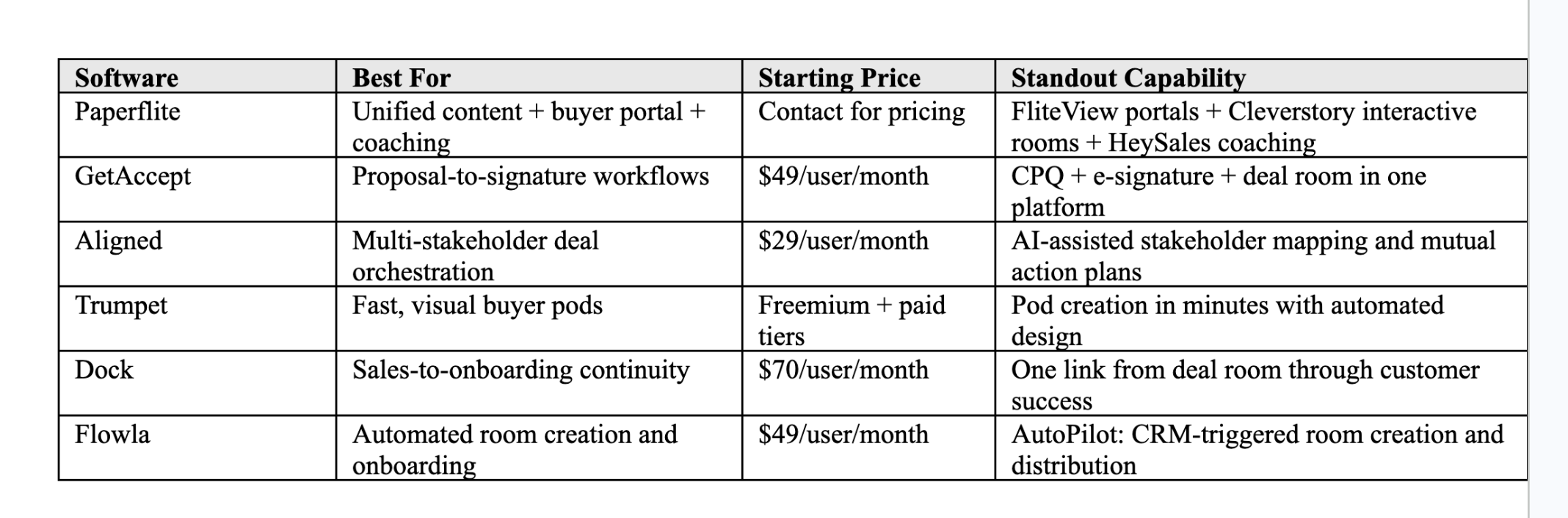
Note: Pricing sourced from each vendor's publicly published pricing pages as of 2026. Paperflite pricing available on request.
How Paperflite Goes Beyond the Digital Sales Room Category
Most tools in this category give you the room. The question is what you put in it, whether that content is any good, and what you learn after the buyer walks through. Paperflite connects all three.
The content-to-room gap is where most DSR deployments quietly fail. Teams build the room and then discover that reps are pulling content from personal folders, old versions, or memory. Marketing has no visibility into what is being shared, and no way to update it. Paperflite's content hub sits upstream of the room: marketing governs the library, tracks which assets actually influence deals, and pushes updates that propagate automatically to every active room where that asset appears.
FliteView turns any set of curated assets into a branded buyer portal in one step. No designer, no separate tool, no assembly. The rep selects what this buyer needs at this stage, and the room builds itself around them. The buyer gets a clean, personalized experience. The rep gets engagement signals the moment the buyer opens it.
Cleverstory takes the room beyond the document. When a PDF is not enough — when you want to build a role-specific microsite, an interactive battlecard, or a no-code demo environment — Cleverstory lets marketing and sales build those experiences without developer involvement. That is what a genuinely personalized content experience looks like, rather than a branded PDF with the prospect's logo dropped in.
HeySales closes the loop. Engagement signals from buyer portals — what they lingered on, what they skipped, what they came back to — feed into HeySales's AI coaching layer. Reps learn what works based on what buyers actually did in real deals, not based on what a manager thinks should work. To understand this holistic framework, see how content experience strategy shapes buyer behavior and seller preparation.
Paperflite connects your content library, your buyer portals, and your rep coaching in one workflow. See how it fits your sales motion. Book a demo.
How to Choose the Right Digital Sales Room Software for Your Team
The features comparison will only take you so far. Every vendor in this category will show you an impressive demo. The right question is not which tool has the most features. It is which problem you are actually solving.
Three questions worth answering before you evaluate:
- Is this a content problem or a deal coordination problem? If reps cannot find the right content to put in the room, the room itself will not fix your win rate. You need a software system that governs the content library, not just the room. If reps have great content and deals stall because stakeholders lose context between calls, deal coordination-first tools may be the faster fix.
- Do you need this for one deal stage, or the whole buyer journey? Some software covers discovery to close. Some extends into onboarding and renewal. If the same buyer relationship continues post-signature, a tool that bridges sales and customer success reduces the handoff friction that quietly kills post-sale retention.
- What happens to the engagement data? Buyer analytics are only useful if they flow somewhere. Does the software push signals to your CRM automatically? Can those signals inform how reps are coached? A system where someone has to pull a weekly report and manually update Salesforce is not a system most reps will use consistently.
Conclusion
Digital sales room software has shifted from a category experiment to a standard part of how serious B2B sales teams run deals. Buyers in 2026 expect access to relevant information on their own schedule. They expect the experience to feel like it was built for them. Teams that are still running complex enterprise deals entirely over email are not just working harder than necessary. They are losing deals to competitors who give buyers a cleaner, more organized, more responsive experience.
The tools doing this well have one thing in common: they treat the buyer portal as part of a connected motion, not an isolated link. The best buyer portal software does not just give buyers somewhere to go. It gives sellers visibility into what matters, and it gives marketing a feedback loop on which content is actually doing the work.
If you want to shorten your B2B sales cycle without adding friction for your buyers, the right buyer portal software is one of the highest-leverage investments you can make in your revenue motion.
Frequently Asked Questions
What is a digital sales room?
A digital sales room is a branded, secure online workspace where sales teams share curated content with buyers and track how they engage with it. Buyers access it via a single link on their own schedule. Sellers see real-time signals about what stakeholders viewed, how long they spent, and who else in the buying committee accessed the room — without having to ask.
How is digital sales room software different from a CRM?
A CRM tracks sales activity internally: pipeline stages, call logs, deal values. Digital sales room software is buyer-facing. It gives prospects a place to access content, ask questions, and collaborate with multiple stakeholders. The two systems work together. The best digital sales room software integrates with your CRM so engagement signals flow in automatically, and deal records update without manual entry.
What features should I look for in digital sales room software?
Prioritize: per-buyer content personalization, per-page engagement analytics, native CRM integration, content governance so reps always share the most current version, and access controls for sensitive materials. For teams with complex multi-stakeholder deals, mutual action plan functionality and stakeholder-specific content views make a meaningful difference in how quickly consensus forms across the buying committee.
Can digital sales room software replace email for buyer communication?
Not entirely, but it significantly reduces the volume of back-and-forth. Buyers can access all deal materials in one place, comment directly on content, and share the room with internal stakeholders without cc-ing anyone. Sellers stop resending decks and start having conversations based on engagement signals from the room — which tends to be a much more useful use of everyone's time.
How does digital sales room software improve the buyer experience?
Buyers get a single link with everything they need, organized the way they think, accessible on their schedule without needing to log in. The experience feels curated rather than forwarded. When the content inside the room is personalized to their role, industry, and deal stage, buyers spend more time engaged with it, and fewer interactions stall at the "still reviewing" stage.
How much does digital sales room software cost?
Pricing varies significantly by capability tier in 2026. Entry-level options typically start around $29 to $49 per user per month. Mid-market solutions with deeper proposal or CPQ workflows generally run $49 to $79 per user per month. Platforms that bridge sales and customer success, like Dock, price closer to $70 to $100 per user equivalent. Enterprise-grade enablement suites use custom pricing. Most tools in the category offer a free trial or free tier. For Paperflite pricing, request it directly via a demo.