The Best Way to Share Buyer Deal Rooms (And Actually Move Deals Forward)
The best way to share a buyer deal room is to invite stakeholders by email with OTP-authenticated access, add curated content before the first invite, personalise the room with buyer branding, and introduce it live on a call. From there, use real-time engagement signals to guide follow-up and update content as the deal evolves.
Your buyer champion said the team loved the demo. That was two weeks ago. Since then: nothing. No reply. No forward. No next step. You are not losing the deal to a competitor. You are losing it to silence.
Most reps respond with a follow-up email, three PDF attachments, and a Calendly link. The buyer ignores the attachments, forwards the wrong version to procurement, and loses track of the original thread entirely. By the time the CFO asks to review pricing, your champion is hunting through their inbox hoping the right file is still there.
Gartner research shows that only 17% of a buyer's total purchase journey is spent talking to sales reps. The other 83% happens inside the buying organisation, in meetings you are not invited to, with stakeholders you may not even know exist. A buyer deal room is how you show up for that 83%.
This guide walks through exactly how to share a buyer deal room so content lands, engages, and actually moves deals forward. Not just the mechanics of setup, but the strategy behind timing, stakeholder sequencing, and the signals that tell you when to follow up and when to wait.
What Is a Buyer Deal Room (And Why Reps Still Share Content the Wrong Way)
A buyer deal room is a shared, secure digital workspace where sellers organise proposals, case studies, demos, and supporting materials into one link that every stakeholder on the buying committee can access, contribute to, and engage with across the deal cycle. Unlike email, it updates in real time and tracks exactly who viewed what.
A buyer deal room, also called a digital sales room (DSR), is a persistent, secure workspace where sellers and buyers collaborate throughout a deal. Unlike a shared Google Drive folder or a long email chain, a deal room centralises all content in one place, tracks who views what and when, and gives the entire buying committee access without your champion needing to forward a single thing.
The problems with the old way are familiar. Wrong document versions get forwarded to procurement. The security questionnaire the IT lead needed went to the wrong inbox. Your proposal PDF is somewhere in a thread from three weeks ago, sandwiched between a Zoom link and an out-of-office reply. The buyer is not ignoring you. They are just drowning.
A deal room replaces all of that with one link. One place where content is always current, access is always verified, and every stakeholder's engagement is always visible to you. That is collaborative selling, and it is what separates reps who consistently hit their numbers from reps who live in Slack asking their champion to forward it to the team. Paperflite's Deal Room is built exactly for this kind of selling.
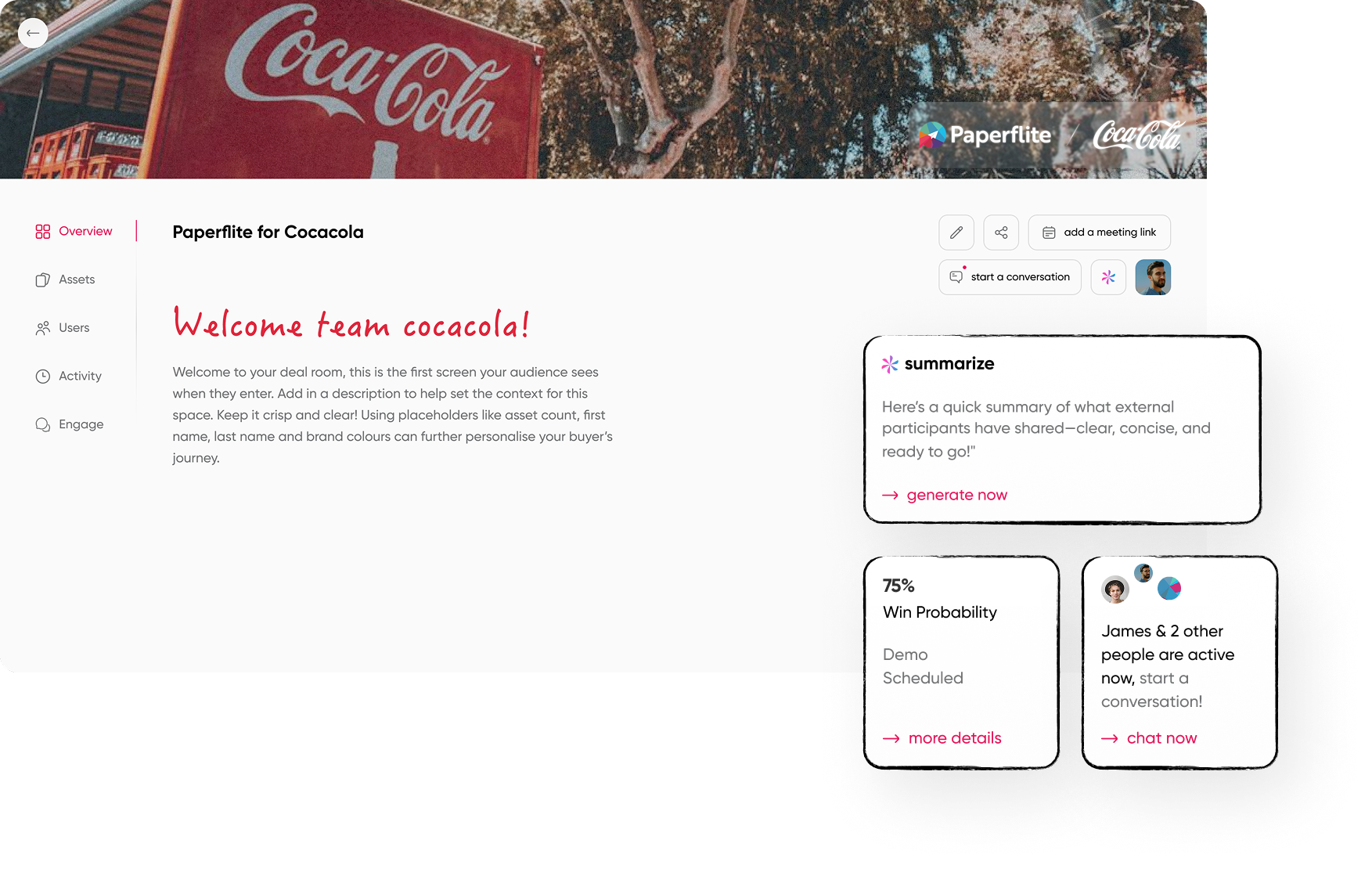
When Is the Right Time to Share a Buyer Deal Room?
The best time to share a buyer deal room is immediately after your first discovery call or demo follow-up, not at the proposal stage. Early sharing lets you track which stakeholders engage, identify new buying committee members, and personalise follow-up before competitors get into the picture.
Most reps wait too long. They build the room after the proposal goes out, when the buying committee is already comparing you to a shortlist. By then, someone else may already be living rent-free in your buyer's inbox with a cleaner follow-up experience. The room should go live much earlier, and it should evolve with the deal.
Post-discovery call
Share a lightweight room with the one-pager, the demo replay recording, and one or two case studies relevant to their industry. Keep it focused. Low friction, immediate personalisation, and a timestamp on when they accessed it.
Post-demo
Expand the room with proposals, technical specs, and pricing. This is where the room becomes the primary content channel for the deal. Every asset you would otherwise email goes here instead.
During evaluation
Add a mutual action plan (MAP) to the room. A MAP breaks down the evaluation and procurement process into clear steps with assigned owners and deadlines. When it lives in the deal room, every stakeholder can see it, not just your champion. This is also where you start tracking which specific sections each person is spending time on, so you can shape your follow-up accordingly.
Pre-close
The room becomes the contract and signature hub. Security docs, final terms, implementation overview: everything a buying committee needs to get legal and procurement across the line in one organised space.
One important note: a deal room is not for every deal. For quick, transactional sells, a simple content collection or a direct link is enough. Deal rooms earn their setup time on multi-stakeholder, long-cycle opportunities where the buying committee is larger than two people and the evaluation spans more than a few weeks.
And the single most important rule, regardless of timing: introduce the room live on a call before you send the link. Walk your champion through what is inside. The rooms that fail are the ones that arrive cold in an inbox. The rooms that win are the ones the buyer has already seen.
How to Structure Your Buyer Deal Room Before You Share It
This is where most reps lose the deal before the buyer even opens the link. An empty room. Or worse, a room with eight PDFs dumped in with no context, no order, and no signal about where to start. Structure is not a nice-to-have. It is what determines whether the room gets used or ignored.
Step 1: Personalise before you share
At minimum, the room should have the buyer's company logo, your company logo, a short description of what the room is for, and at least one piece of content already inside it before the invite goes out. Buyers who open a generic-looking room experience it as a mass-produced document, even when the content inside is tailored. Full white-labelling, buyer logo, company name, relevant background, signals that this deal is a priority.
Step 2: Organise by stakeholder, not by content type
A CFO reviewing pricing and an IT lead checking security documentation have completely different priorities. Organising your room into a single long list of files forces every person to dig for what they need. Structure content into clearly labelled sections that match each evaluator's lens: an executive summary at the top, proposals and business case in the middle, technical and security docs below that. In Paperflite's Deal Room, the Overview section anchors the room and the content hub organises everything underneath by section.
Step 3: Add content in the right order
Start with what the buyer already knows (the demo replay, the use case summary from your discovery call), then add what they need next (pricing, security, implementation timeline). The landing view should feel curated, not like a file dump. If a buyer opens the room and immediately sees twelve documents with no context, you have already lost momentum before they read a single word.
Step 4: Set up OTP authentication and email-only access
A deal room shared as a public link is not a deal room; it is a website. Proper deal rooms require verified email access. OTP (one-time password) authentication means every access attempt requires the visitor to confirm their email before they enter. This protects sensitive deal content from unauthorised sharing and, crucially, tells you exactly who is in the room and what they are looking at.
Email-only invites (rather than shareable links) prevent your champion from forwarding access to someone outside the buying committee without you knowing. In Paperflite, all deal rooms default to OTP authentication and email-only invites. Every access is logged and timestamped. That is your audit trail.
How to Share the Room (And Introduce It the Right Way)
The share method matters as much as the room itself. A well-structured room dropped cold into an inbox gets treated like a newsletter: opened once, skimmed, forgotten. The sequence below changes that.
Step 1: Introduce it on the call first
Before you send the invite, tell your champion what the room is and why you are using it. Something like: 'I am going to set up a shared space where everything we have talked about lives, including the case study you asked about and the pricing overview. You will be able to share it directly with your team without the email thread chaos.' Context before the link means the room gets opened. Sales reps who introduce the room on a call see measurably higher first-open rates than those who just send the link in a follow-up email.
Step 2: Send the invite immediately after the call
The 'this is fresh and relevant' window is short. Mention the call in the email, name one specific piece of content that is already inside ('I have added the implementation timeline we discussed'), and tell the buyer what to do next. One clear action, not three.
Step 3: Let the buyer bring in their own team
This is where deal rooms change the game entirely. When your champion shares the room with their CFO, IT lead, or procurement manager, you get notified. You see every new stakeholder who joins. You see what each of them looks at. In Paperflite, a New Stakeholder Alert fires every time an external participant is added to the room by another buyer, which means you are mapping the buying committee in real time, without ever having to ask 'who else is involved in this decision?'
Step 4: Enable two-way content sharing
Buyers often have documents they need to contribute: RFPs, technical requirements, security questionnaires, internal presentations. A deal room that only accepts your content is a one-way broadcast. Let them upload directly into the room. This turns the space into a genuine collaboration, not a content drop.
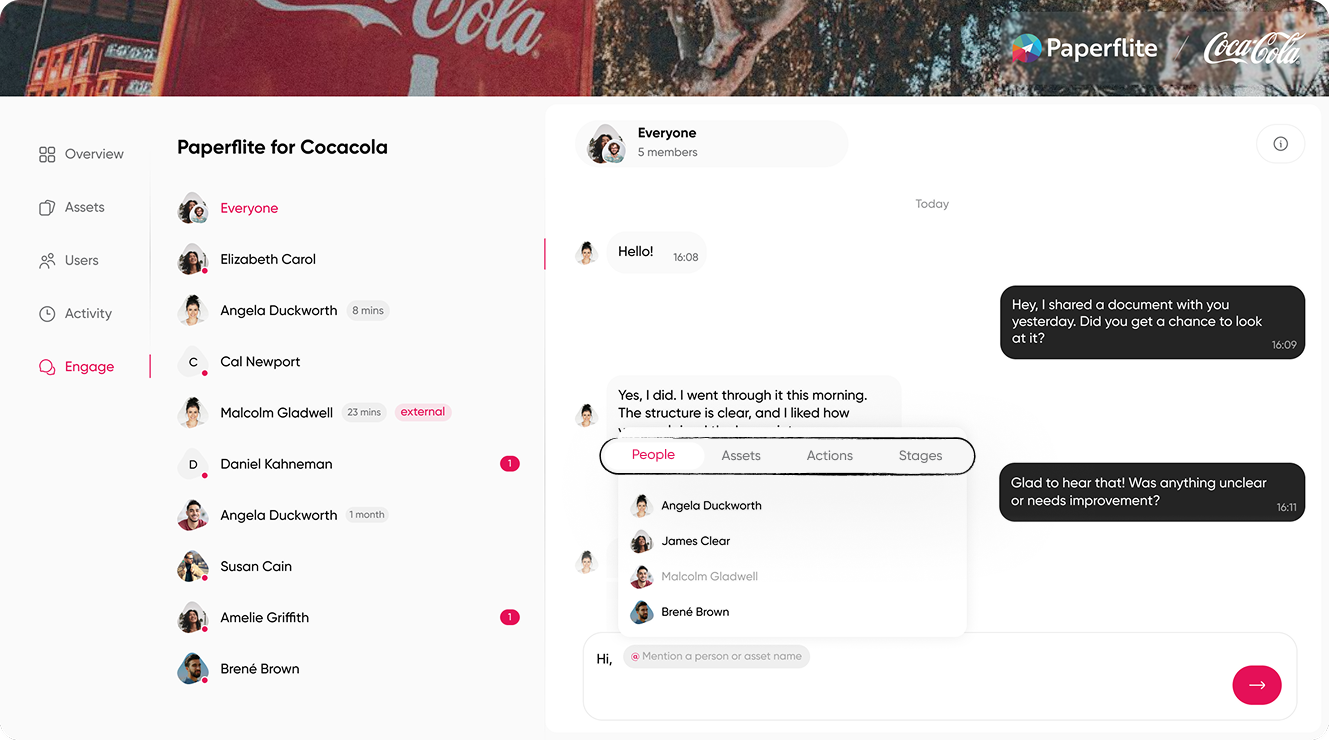
How to Use Engagement Signals to Drive Follow-Up
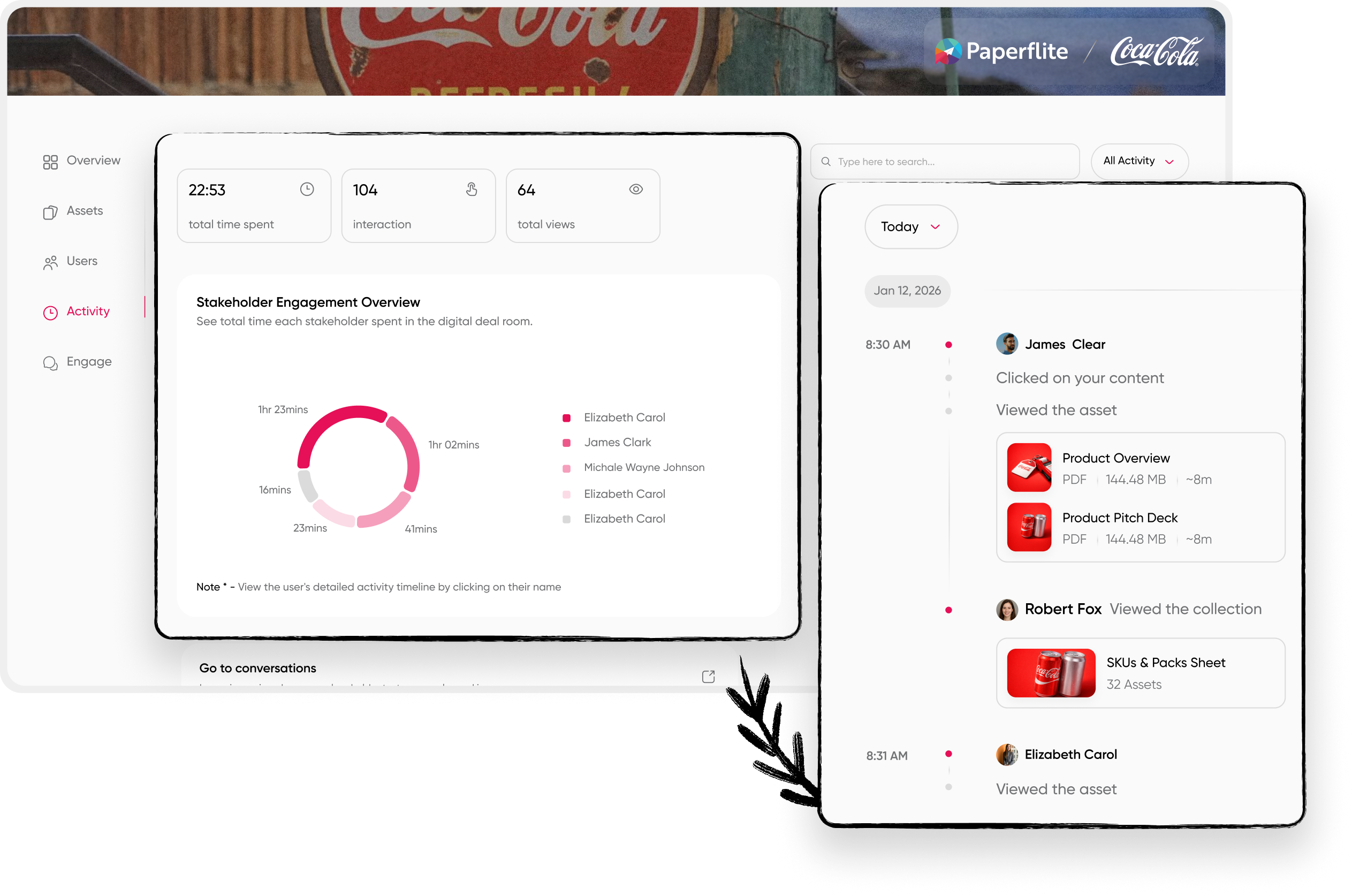
The best way to follow up after sharing a buyer deal room is to watch engagement signals rather than follow a fixed cadence. When a new stakeholder joins, when a key asset gets viewed for the first time, or when pricing pages see extended activity, those are the moments to reach out with a specific, relevant message
Most reps follow up on a schedule. Tuesday morning, then Friday afternoon, then a break-up email in week three. Deal rooms flip this. You follow up when the buyer is ready, not when your calendar reminds you.
Reading the signals correctly matters. When someone views your pricing page for 12 minutes at 9pm, that is not a casual browse. When a technical evaluator opens the security docs on a Sunday afternoon, they are preparing for an internal review. When a new stakeholder you have never heard of joins the room, someone on the buying committee is bringing in reinforcements. These are the moments to act, and none of them are visible through email.
Modern deal room platforms do not just track opens; they surface patterns: which assets correlate with deals that close, which content types stall evaluation, which stakeholder engagement sequences predict a yes. The analytics are telling you a story. Your job is to read it.
Acting on the signals is where most reps still underperform. Three concrete examples:
- Champion viewed pricing for 12 minutes at 9pm: reach out the next morning with a message that references the specific pricing tier, not a generic check-in.
- Technical evaluator opened the security docs: proactively offer a security review call before they ask for one.
- Nobody has accessed the room in 10 days: send a light content update ('Added a new case study from a company in your vertical') to re-open the loop without a naked follow-up request.
And for the moments when a buyer is actively inside the room: Paperflite lets you initiate a real-time chat while they are viewing content. Not a follow-up email scheduled for tomorrow. An actual conversation, while the pricing page is open in front of them.
Engagement analytics also give you an early warning system for forecasting. A deal room that went from daily activity to zero in two weeks is not progressing the way your champion's optimistic updates suggest. Catching that signal early and re-engaging with new content or a direct conversation changes the outcome before the deal is lost.
What to Include in a Buyer Deal Room (By Deal Stage)
A deal room is not a content dump. What you include should match what the buyer needs to make a decision at their current stage of evaluation. Front-loading the room with every asset you have ever produced is the fastest way to make a buyer feel like they are being processed, not helped.
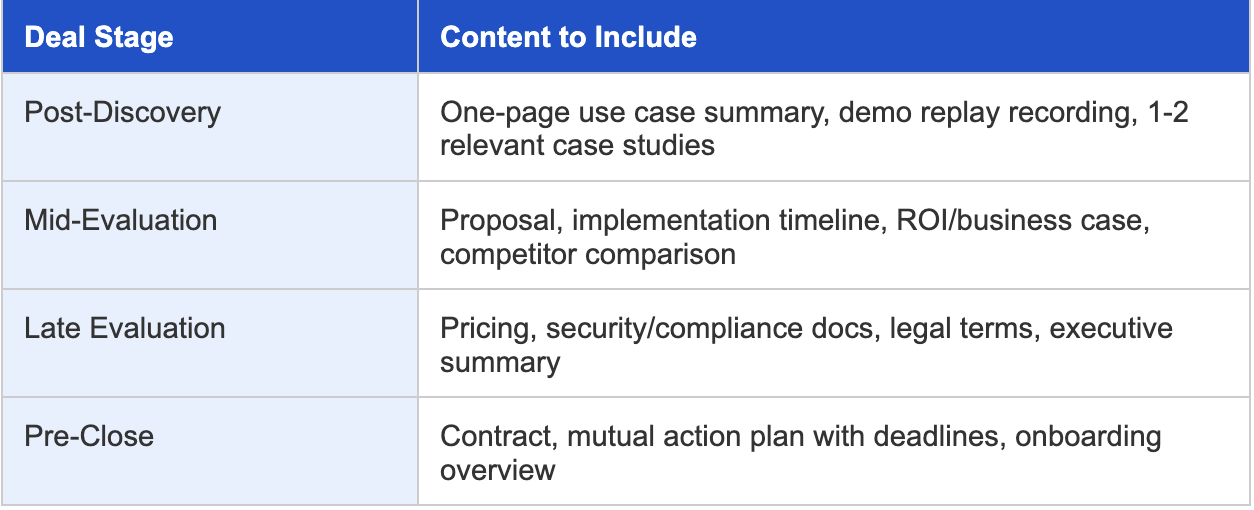
The principle that holds across all four stages: add content progressively. Buyers engage more deeply with a room that has something new at each touchpoint than with a room that arrived fully loaded on day one.
How Paperflite Deal Rooms Make This Easier
Here is what makes Paperflite Deal Rooms different from sending a link or setting up a shared Google Drive folder. Not claims, but specifics.
One shared workspace for decisions, not just engagement
Put the entire deal in one place: key assets, proof, pricing, and next steps. Guide buyers through what matters without sending five emails and ten links. Fewer meetings to 'catch up.' More meetings to decide. This is what the Paperflite deal room is designed for.
See the full buying committee, instantly
Know who is engaged, who is missing, and who just entered the deal. Identify champions and silent influencers early. Share the right assets to the right stakeholders and build consensus before procurement shows up with surprises.
Live collections by default
Every deal room in Paperflite is a live collection. Add a new asset, swap out an outdated proposal, update the pricing deck; the buyer sees the changed version instantly, without you resending anything. No 'please use the attached, it replaces the one from last week' emails.
OTP authentication on every access
Every time a stakeholder opens the room, they verify via one-time password. This gives you a complete, timestamped audit trail and eliminates unauthorised forwarding. You always know who is in the room
.
Real-time engagement intelligence
See exactly who is looking at what, when, and for how long: at the asset level, the stakeholder level, and the deal level. These signals feed directly into predictive deal insights on Paperflite's Advanced plan, so your gut feeling about a deal gets replaced by actual buyer behaviour data.
In-room Q&A that keeps decisions moving
Keep buyer questions and seller answers in one place, tied to the deal context. No scattered email threads. No buried file comments. Faster responses, fewer drop-offs, and clean alignment across every stakeholder.
Mutual next steps, owned by both sides
Make progress visible: milestones, owners, due dates, and follow-through. Buyers know what is next. Sellers stay in control of the process. Fewer stalls, smoother handoffs, faster signatures.
Two-way content sharing
Buyers can upload their own documents into the room: RFPs, internal requirements, technical specs. This turns a one-way broadcast into a genuine collaborative space where both sides are contributing.
Live chat
When a buyer is actively inside the room, you can start a real-time conversation. Not a follow-up email. An actual conversation while the pricing page or case study is open in front of them.
CRM integration
Connect the deal room to an existing CRM deal and Paperflite pulls in deal context, previous interactions, and stakeholder history automatically. No manual logging, no duplicate data entry.
Deal rooms are available on Paperflite's Advanced plan (which also includes AI-powered content recommendations and predictive deal insights) and on the Enterprise plan. Book a Demo
Conclusion
You get roughly 17% of your buyer's time. The rest of the evaluation happens in meetings you are not in, with stakeholders you may not know exist, using documents they may or may not be able to find. A well-shared buyer deal room changes all of that.
The best deal rooms are not set up the night before a proposal goes out. They go live after the first serious conversation, get introduced on a call rather than dropped cold into an inbox, and evolve as the deal does. Content is curated by stage, not uploaded all at once. Engagement signals shape follow-up, not a fixed email cadence. Every stakeholder who joins the room is a signal worth acting on.
Paperflite's deal rooms are built for exactly this kind of selling: two-way collaboration, live engagement intelligence, real-time content updates, and security infrastructure designed for enterprise buying committees. Want to see how your team's deal rooms could look? Book a personalized demo.
Frequently Asked Questions
What is a buyer deal room?
A buyer deal room is a secure, personalised digital workspace where sales teams share all deal-related content with a buying committee in one place. Unlike email attachments, it updates in real time, tracks stakeholder engagement, and gives every decision-maker access without your champion needing to forward anything.
What is the difference between a deal room and a data room?
A data room is used for secure document storage during due diligence, typically in M&A processes. A deal room is buyer-facing and sales-focused: it is designed to move a commercial decision forward, not archive information for legal review. Deal rooms track engagement, support collaboration, and update dynamically.
What should I include in a buyer deal room?
Include content matched to the buyer's current deal stage. After discovery: a use case summary, demo replay, and a case study. During evaluation: proposal, implementation timeline, and ROI calculator. Near close: pricing, security docs, contract, and mutual action plan. Add content progressively rather than front-loading everything at once.
How do you share a buyer deal room?
Introduce the room on a live call before sending the invite so your buyer understands what is inside and what to do next. Send the email invitation immediately after the call. Use verified, email-only access, not a public link, so you know exactly who joins and can track every stakeholder's engagement.
How do deal rooms help with multi-stakeholder deals?
When your champion shares the room with colleagues, you get notified. You see every new stakeholder who joins and track what each one views. This gives you visibility into the entire buying committee, not just your primary contact, and lets you tailor follow-up to each evaluator's interests.
When should I use a deal room versus just sending a link?
Use a deal room for complex, multi-stakeholder opportunities with long evaluation cycles. For quick transactional deals, a simple content collection or direct link may be sufficient. Deal rooms pay for their setup time when there are multiple evaluators, sensitive content, or a procurement process that spans multiple weeks.
Can buyers upload their own content into a deal room?
Yes, in platforms like Paperflite. Two-way content sharing allows buyers to upload their own documents: RFPs, technical requirements, internal presentations. This helps sellers understand buyer needs more deeply and positions the room as a genuine collaboration space, not just a one-way content delivery tool.
How do engagement analytics in deal rooms improve win rates?
Engagement analytics show you who viewed which assets, for how long, and when. This replaces gut-feel follow-up with precise, signal-driven outreach. When a CFO spends 12 minutes on your pricing page, you reach out the next morning with relevant context. When the room goes quiet, you know before your champion tells you there is a problem.
How do you measure whether a buyer deal room is working?
Track four metrics: room open rate (did they visit?), unique stakeholder count (how many people joined?), time-on-content per asset (what captured attention?), and deal velocity change (did cycles shorten after you started using rooms?). A room with multiple stakeholders and rising engagement time is a healthy deal.