Leading Secure File Sharing Tools for Sales Teams in 2026
Secure file sharing for sales means sharing proposals, decks, and collateral through platforms that encrypt content, control access, and track how prospects engage with it. The best tools go beyond basic security: they tell you which page a buyer spent the most time on, when they forwarded your file, and whether the deal is still warm. That's the signal a good follow-up needs.
Picture this: you spend 40 minutes tailoring a proposal, attach it to an email, hit send, and then wait. Two days later, nothing. So you send the classic "just circling back" follow-up. Still nothing. You have no idea if anyone opened the file, which section actually got read, or whether it was forwarded to three other stakeholders who are now passing judgment on your pricing. The proposal went out. The silence came back.
This is the quiet problem with generic file sharing for sales. You get delivery confirmation. You get nothing else.
The leading secure file sharing platforms for sales teams solve a different problem than Box or Dropbox do. They don't just protect the file in transit. They tell you what happens to the deal after you hit send. This guide breaks down the tools worth considering, what distinguishes their security models, and how to pick the right one depending on your team's size and selling motion.
What Makes File Sharing Actually Secure for Sales?
The honest answer: it depends on what "secure" means to you. For an IT team, security means encryption, compliance certifications, and audit trails. For a sales rep, security means controlling what a prospect can do with your file after you send it. Both matter, and the best tools for sales cover both.
At the technical level, secure file sharing requires three things: confidentiality (only the right people can access the file), integrity (the file can't be tampered with, and changes are tracked), and availability (authorized users can get to the file when they need it). For teams sharing proposals across borders and time zones, this also touches data residency rules and cross-border transfer compliance.
For a sales rep, though, the day-to-day security checklist looks a bit different. The questions that actually matter are: Can I set a link expiry date? Can I stop someone from downloading the file? Can I revoke access if the deal goes sideways? Can I require a password before they open it? And critically, can I tell if they forwarded it to someone I haven't met yet?
That last one is where most generic tools fall short.
Security vs. Compliance vs. Sales Control: Not the Same Thing
Compliance-grade security (think HIPAA, FedRAMP, SOC 2 Type II) is a procurement requirement in industries like healthcare, finance, and government. Box, ShareFile, and similar platforms are built for exactly this. They will satisfy your IT department's vendor review, and they should.
But passing a compliance audit does not mean a tool is useful for a sales rep sending a deck to a CFO on a Thursday afternoon. Those platforms know a file was accessed. They don't know which slide held the buyer's attention for four minutes, or that the file was immediately forwarded to someone in procurement.
Mid-market B2B SaaS teams mostly need sales control. Healthcare and finserv teams need both. Knowing which category your team falls into is the first step toward picking the right platform.
Why Dropbox and Google Drive Are Not Built for Sales Conversations
Most sales teams start with Dropbox, OneDrive, or Google Drive. That's not a bad instinct. They're already paid for, the team knows how to use them, and they handle files fine. The problem shows up the moment you need to understand whether a prospect is actually engaged.
With a generic cloud storage link, you send a file and you wait. You don't know if it was opened. You don't know which section held their attention. You don't know if they shared it with their procurement lead or their legal team. You have no signal. You're following up on gut feel.
"The content disappears into a black hole" is the exact phrase sales reps use when describing this experience. And it's not just frustrating. It costs deals. Without engagement signals, reps follow up too late, or too early, on the wrong things, with the wrong people.
A category of tools built specifically for sales file sharing fixes this. They replace the raw link with a tracked, controlled experience that tells you exactly what happened after you hit send. The rest of this post covers the leading platforms in that category, alongside the compliance-first tools that still deserve consideration for certain teams.
The Leading Secure File Sharing Platforms for Sales Teams in 2026
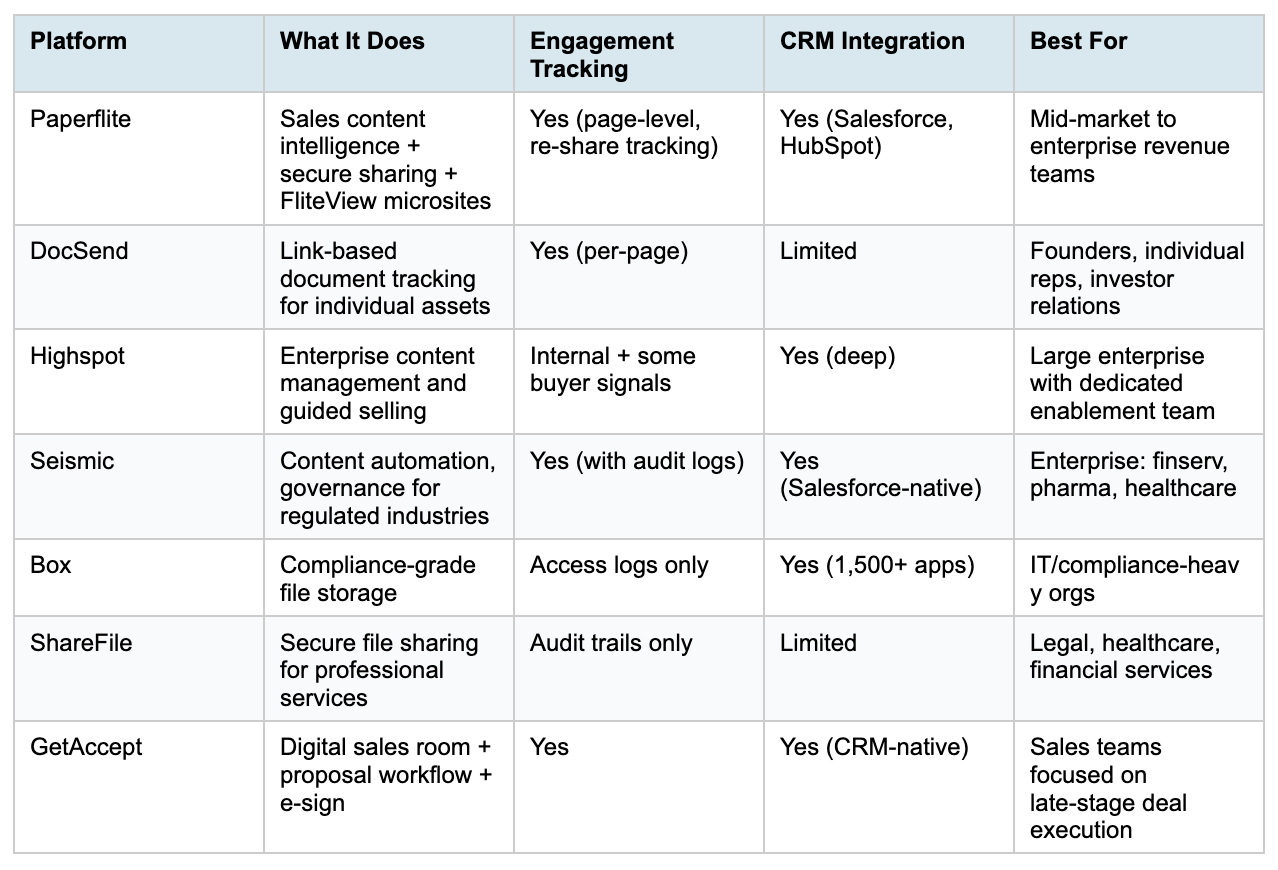
The platforms below range from deal-intelligence-first to compliance-first. Some do both. The right fit depends on whether your biggest problem is security, engagement, or content management at scale. A quick comparison table, then the details on each platform.
Paperflite
Paperflite is an AI-native sales content management platform that handles secure sharing, prospect engagement tracking, and content organization in one place. It is the platform in this list that most directly bridges the gap between IT-grade sharing controls and sales-grade intelligence.
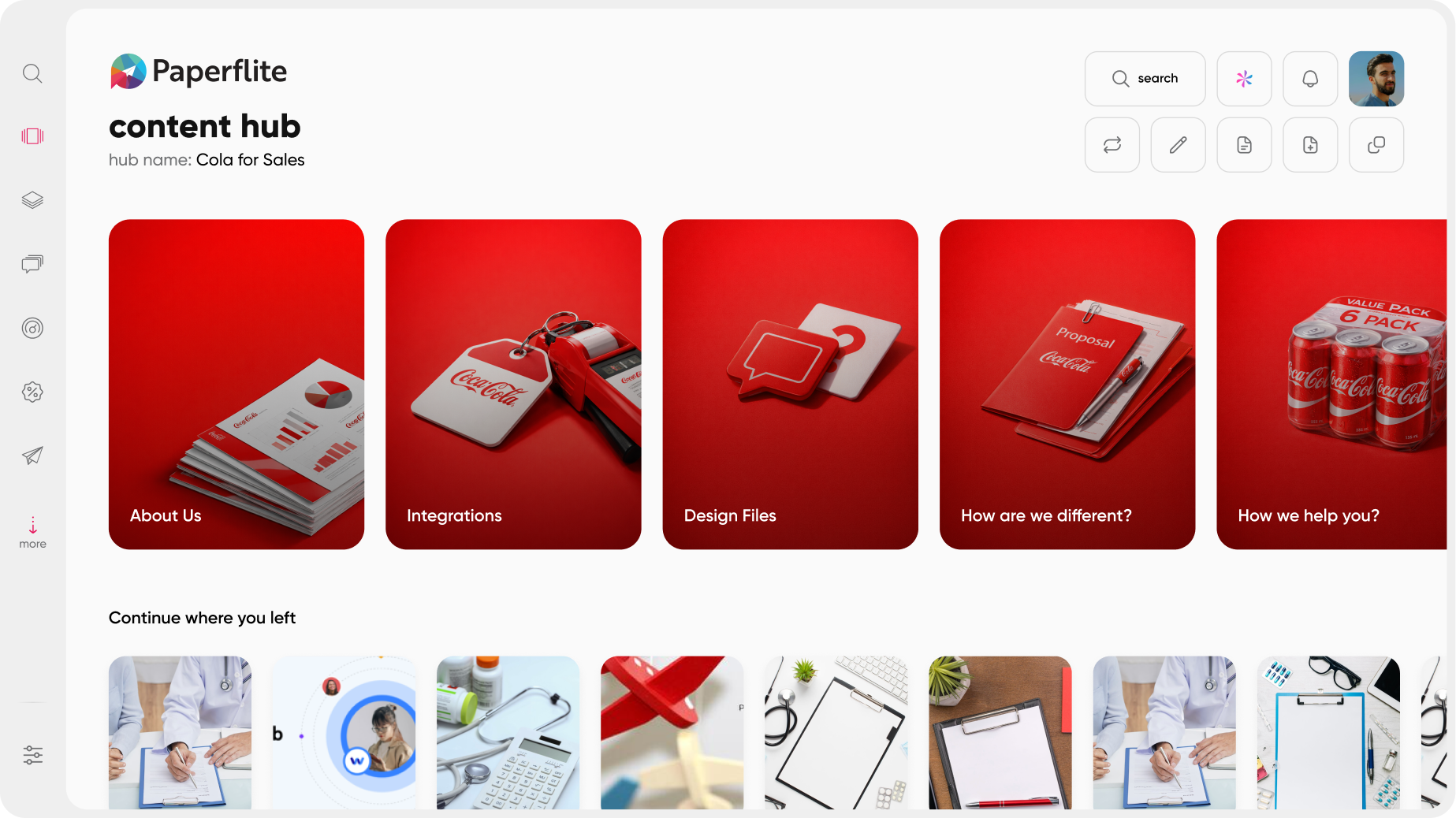
When a rep shares something in Paperflite, they can set link expiry dates, require a password, disable downloading, and restrict access to specific email addresses. The sharing layer is genuinely controlled. But the real differentiation is what comes after the share.
Paperflite's creates a branded microsite for each prospect. Instead of a raw PDF link, the buyer gets a curated, on-brand experience: a custom page with the rep's name, the prospect's logo, and a curated set of assets relevant to that specific conversation. And Paperflite tracks everything: which sections held attention, whether the deck was forwarded, and who else inside the buying organization is now looking at the file. That last signal, in a multi-stakeholder enterprise deal, tells you a new decision-maker just surfaced.
The QuickSend feature lets reps drag and drop content from any source and share it in seconds via email, with real-time tracking activated automatically. The AI-powered search (Seek) lets reps find the right asset by describing the situation in natural language, "Show me what closes healthcare CFOs," and get relevant content without digging through folders.
Paperflite integrates with Salesforce and HubSpot, piping engagement signals directly into deal records so a rep never has to leave their CRM to understand what a prospect is doing with their content.
Best for: B2B sales and marketing teams who want engagement intelligence alongside security, without deploying a full enterprise enablement suite. Especially strong for teams doing account-based selling where knowing who inside the buying org is engaging with content can change the whole follow-up strategy.
DocSend
DocSend is the most widely-used dedicated document sharing and tracking tool, particularly for pitch decks, investor materials, and sales collateral sent by individual reps or founders. Its core value is simple: you share a link instead of a file, and you get notified when someone opens it, how long they spent on it, and which pages they read.
Security highlights include password-protected links, link expiry dates, view-only sharing, download restrictions, and access revocation after sending. The Virtual Data Room feature is well-regarded for due diligence and fundraising workflows where document control is critical.
What DocSend does not do: it has no content library, no team-level content management, no branded prospect microsites, and no AI-powered content recommendations. It is a tracking tool, not an enablement platform. That's a feature for solo operators who want a focused tool without complexity. It becomes a limitation when a team of 30 reps all need to find, personalize, and share approved content at scale.
Best for: Founders sharing pitch decks with investors, individual AEs tracking prospect engagement on specific assets, small teams that want link tracking without a full platform.
Highspot
Highspot is an enterprise sales enablement platform focused on content management, guided selling, and rep training. Its security model is primarily internal-facing: content governance, approval workflows, multi-stage content review, and role-based access to ensure reps only see and share approved materials.
On the external sharing side, Highspot tracks buyer engagement with shared content and provides analytics on what resonates. Its AI-powered search (Spot Summaries and meeting prep cards, launched in 2025) helps reps find the right content faster. SSO, SOC 2 compliance, and configurable retention policies cover the compliance angle.
Highspot's limitation for many teams is complexity and cost. It is built for large enterprise organizations with dedicated enablement teams. For a 20-person sales team that needs secure sharing and deal intelligence without a six-month implementation, it can feel like deploying a freight train to move a bicycle.
Best for: Large enterprise revenue teams with a dedicated enablement function, particularly those where rep training and content governance are as important as buyer-facing sharing.
Seismic
Seismic is the platform of choice for content automation in regulated industries. Its security model goes deep: detailed audit logs, data residency options, and since its 2025 Aura release, AI-generated content provenance tracking that records the exact source assets an LLM referenced when generating a response. That last feature matters significantly in pharma and financial services, where what a rep says to a client is a compliance matter.
Seismic's LiveDocs feature automates personalized content creation at scale, a genuine differentiator for large teams sending customized materials to hundreds of accounts. Its Salesforce integration (deepened in 2025) logs content views, time-on-page, and asset shares directly to opportunity timelines.
Where Seismic struggles is adoption and agility. The platform is complex, the implementation curve is steep, and for teams that are not in financial services or life sciences, much of the compliance machinery is overhead rather than value.
Best for: Large enterprises in regulated sectors, primarily financial services, pharma, and healthcare, where content audit trails and governance at scale are non-negotiable.
Box
Box is the enterprise cloud content management platform most commonly chosen by IT for its compliance credentials. It holds FedRAMP authorization, HIPAA compliance, SOC 2 Type II, and ISO 27001, and is used by over 68% of the Fortune 500. Box Shield (with AI-powered threat detection added in late 2025) applies classification-based security policies and flags anomalous file behavior before a breach happens.
For file sharing specifically, Box encrypts content at rest and in transit, supports bring-your-own-key encryption for full control, and integrates with 1,500+ applications including Microsoft 365, Google Workspace, and Salesforce.
Box is not built for sales engagement intelligence. You can see whether a file was accessed. You cannot see which page held the buyer's attention for six minutes, or that the file was forwarded to the CFO. Organizations in compliance-heavy industries frequently run Box for secure storage alongside a dedicated sales tool for the sharing and tracking layer.
Best for: Compliance-heavy organizations where IT security certification is a procurement requirement. Often paired with a sales-specific tool rather than used as the primary sharing platform for external prospect interactions.
ShareFile (by Citrix)
ShareFile is purpose-built for compliance environments: healthcare, legal, and financial services. Its security model emphasizes HIPAA, SOX, and FINRA certifications, granular admin controls, client portals, detailed audit trails, and built-in e-signatures. If a vendor security review questionnaire is the first thing standing between you and a signed contract, ShareFile checks the boxes.
ShareFile is not an engagement intelligence platform. There is no per-page attention tracking, no re-share notifications, no content recommendation layer. It solves the security and compliance problem cleanly and makes no pretense of solving the sales intelligence problem.
Best for: Healthcare practices, law firms, and financial services organizations where regulatory compliance drives the technology decision and client-facing document security is the primary requirement.
GetAccept
GetAccept is a digital sales room and document workflow platform built around the late stages of a deal: proposals, mutual action plans, e-signatures, and buyer collaboration. It combines secure sharing with engagement tracking and signing in a single workflow designed to reduce friction from proposal to close.
Access controls cover role-based permissions, link controls, audit trails, and engagement notifications. The buyer-facing experience is collaborative: prospects can comment on proposals, complete milestones, and sign directly in the platform.
GetAccept is a deal-execution tool, not a content management or enablement platform. It does not handle upstream content organization or rep training. Teams that need a complete content library with sharing and analytics built in will find GetAccept incomplete as a standalone solution.
Best for: Sales teams focused on late-stage deal execution, particularly those sending proposals to multiple stakeholders and needing a single place to manage approvals and signatures.
How to Pick the Right Platform for Your Sales Team
The tools above solve different versions of the same problem. Before comparing feature lists, it helps to get clear on which problem is actually yours.
If your biggest issue is reps sending outdated or unapproved content, and ou have a large team that needs content governance at scale, Highspot or Seismic is worth evaluating. If your biggest issue is compliance: a security questionnaire that demands HIPAA or FedRAMP documentation, Box or ShareFile is the answer. If your biggest issue is knowing whether prospects are actually engaging with the materials you send, and you want that intelligence to inform follow-up, Paperflite or DocSend is where to start.
Three buyer types, roughly:
- Individual reps and founders: DocSend or Paperflite. Fast to set up, link-based tracking, no heavy implementation.
- Growing revenue teams (10 to 200 reps): Paperflite or GetAccept. Content library + sharing + deal intelligence, without enterprise complexity.
- Large enterprise with compliance needs: Box or ShareFile for IT, plus Paperflite or Highspot for the sales layer. Let IT own the storage compliance. Let sales own the engagement intelligence.
A practical checklist before you make a decision:
- Does it tell you when someone opened your file?
- Does it show you which page held attention?
- Can you set link expiry and require a password?
- Can you revoke access after sharing?
- Does it integrate with your CRM?
- Can a rep personalize a sharing experience without filing a ticket with IT?
If you are already living in Salesforce or HubSpot, integration depth matters more than anything else on that list. Engagement signals that live inside your CRM deal records get acted on. Engagement signals that live in a separate tab get ignored.
How Paperflite Approaches Secure File Sharing for Sales
The workflow in Paperflite is worth walking through because it illustrates why secure sharing for sales is not just a checkbox on a security form.
A rep gets ready for a follow-up call. They use Seek, Paperflite's AI-powered search, to find the right case study by describing the situation: "healthcare SaaS, compliance team, mid-market." Seek surfaces the assets most likely to land. The rep drags the relevant deck and a one-pager into a FliteView microsite, a branded page that arrives in the prospect's inbox looking like it was built for them specifically, not copy-pasted from a generic template. They set a link expiry date, disable downloading, and hit send.
Fifteen minutes later, the rep gets a notification: the prospect opened the microsite. Paperflite's content discovery and analytics engine shows the prospect spent three minutes on slide seven (the pricing model) and forwarded the link to someone at a different email domain. A new stakeholder just entered the deal. The rep knows, before the next meeting, to prepare a procurement-facing version of the pitch.
That sequence, from asset discovery to sharing to engagement signal to rep action, is what separates Paperflite from a file storage tool with a shared link. The security is real: access controls, link expiry, and view-only sharing are all configurable per asset, per share. But the intelligence layer is what changes what happens next in the deal.
Specific Paperflite features relevant to secure sharing:
- QuickSend: Drag-and-drop sharing via email with real-time tracking activated by default.
- FliteView: Branded prospect microsites with per-section engagement tracking and re-share notifications.
- Analytics Engine: Deep-level real-time analytics covering time-on-page, sections read, and forwarding behavior.
- Seek: AI-powered natural language content search for fast asset discovery.
- Content Streams: Centralized content library with role-based access, so reps only see content relevant to their segment or stage.
- CRM integration: Salesforce and HubSpot native, with engagement signals written to deal records automatically.
Your proposals deserve to be read. Your reps deserve to know when they are. See how Paperflite handles secure sharing and engagement intelligence for your sales team - Book a demo
Wrapping Up
Secure file sharing for sales is not a storage problem. It is an intelligence problem. The moment a rep sends a proposal with no idea what happens to it, they have handed over control of the deal conversation.
The platforms in this list solve different parts of that problem. DocSend handles link tracking for individual assets. Highspot and Seismic handle content governance at enterprise scale. Box and ShareFile handle compliance-grade security for regulated industries. GetAccept handles late-stage deal execution with proposals and e-signatures built in.
Paperflite works across all three requirements: secure sharing, engagement intelligence, and a buyer experience that makes your content feel like it was built for this specific conversation, not assembled from a shared folder.
If you want to go deeper on how your prospects deserve a content experience that goes beyond a raw link, that's a good next read.
Frequently Asked Questions
What is the most secure way to share files with sales prospects?
Use a platform that encrypts files in transit and at rest, restricts downloading, allows link expiry, and requires authentication before access. For sales teams specifically, the best platforms also track engagement so you know when and how a prospect interacted with the file. Paperflite and DocSend are built specifically for this use case, combining access controls with per-page engagement analytics.
What is the difference between a file sharing tool and a sales enablement platform?
A file sharing tool moves files from one person to another securely. A sales enablement platform does that plus organizes your content library, personalizes the buyer experience, and captures engagement data to inform follow-up. Some platforms, like Paperflite, combine both. Others, like Box or Dropbox, handle file security but offer no sales intelligence after the share.
Can I track whether my prospect opened the file I sent?
Yes, purpose-built tools for sales file sharing notify you when a prospect opens your file, how long they spent on it, which pages they viewed, and whether they forwarded it. Paperflite, DocSend, and GetAccept all provide this. Generic cloud storage tools like Google Drive and Dropbox do not provide this level of insight; they record access logs, not engagement signals.
What security features should a sales file sharing tool have?
At minimum: end-to-end encryption, password-protected links, link expiry dates, view-only sharing with download disabled, and the ability to revoke access after sending. For teams in regulated industries, also look for SOC 2 Type II, HIPAA compliance, and detailed audit logs. For sales teams specifically, the ability to control access per recipient and track engagement per page is what turns a security feature into a revenue intelligence feature.
How is Paperflite different from DocSend?
DocSend focuses on link-based document tracking for individual assets. Paperflite provides the full revenue enablement layer: a centralized content library, AI-powered content search (Seek), branded prospect microsites (FliteView), team-level content analytics, and native CRM integration. DocSend tells you a prospect opened a file. Paperflite tells you what is happening in the deal, who else is looking at your content, and which assets are actually moving things toward close.
Is Box suitable for sales teams who need engagement tracking?
Box is excellent for IT and compliance-driven file security. It is not built for sales engagement intelligence. You can see if a file was accessed, but not which section held the buyer's attention or whether the document was forwarded to someone in procurement. Sales teams in regulated industries often run Box for secure storage and use a dedicated sales platform like Paperflite for the sharing and tracking layer.
Do secure file sharing tools integrate with CRMs like Salesforce and HubSpot?
Most leading sales-specific platforms do. Paperflite pipes engagement signals directly into Salesforce and HubSpot deal records, so a rep can see how a prospect engaged with shared content without leaving their CRM. DocSend also offers CRM integrations. Compliance-first tools like Box and ShareFile have broader app ecosystems but are not designed to write per-document engagement data to opportunity records.
What should a sales team use instead of emailing PDF attachments?
A dedicated secure sharing tool that gives you a tracked link rather than an attachment. With a tracked link, you know whether the prospect opened the file, how long they spent on it, and whether they shared it internally with other stakeholders. Paperflite, DocSend, and GetAccept are all built for this workflow. Email attachments give you a delivery receipt. A tracked link gives you a window into how serious the prospect actually is.