Which Content Hubs Support Enterprise Permissions? A Buyer's Comparison
Picture this: it's a new rep's second week, and while digging through the shared library for a competitor battlecard, they land on an unreleased regional pricing deck instead. Nobody meant for that folder to be open to everyone. It just was, because nobody had locked down permissions before the library got shared company-wide.
That's the exact failure that keeps content ops leads and RevOps teams up at night. It's also why “which content hubs support enterprise permissions” has become a real evaluation question, not a checkbox buried on page four of a vendor's feature sheet. Enterprise permissions cover who can view, upload, edit, or share specific content based on role, team, region, or relationship to your company (employee, partner, or contractor). Get it right, and content moves fast without leaking anywhere it shouldn't. Get it wrong, and you're the one explaining to legal why a reseller had access to next year's roadmap.
This piece walks through what enterprise permissions actually mean inside a content hub, what to check before you commit budget, and how a few well-known platforms, Paperflite included, approach the problem differently, on both the internal team side and the buyer-facing side of a deal.
What “Enterprise Permissions” Actually Means in a Content Hub
Enterprise permissions in a content hub control who can view, upload, edit, or share specific content based on role, team, or region. Most enterprise-ready platforms handle this with role-based access control (RBAC), assigning permissions to job functions. A smaller number use attribute-based access control (ABAC), which grants access based on content tags and metadata rather than a person's title.
That single distinction, RBAC versus ABAC, is worth sitting with before you evaluate anything else, because it changes how much setup work your admin will carry for the life of the platform.
RBAC vs. attribute-based access control (ABAC)
Think of RBAC like keys on a physical keyring. A sales manager's key opens more doors than a new rep's, but the doors themselves don't change, and neither does what's behind them. You assign a role, the role carries a fixed set of permissions, and you're done until someone changes jobs. Most sales enablement and content hub platforms, Paperflite included, work this way, and for good reason: it's predictable, it's easy to audit, and a new admin can understand the whole system in an afternoon.
ABAC works more like a bouncer checking a wristband color instead of a name on a list. It doesn't matter who you are, it matters what tag you're wearing and what that tag unlocks. Content gets tagged with attributes (region, brand, product line, approval status), and access is granted based on whether a user's attributes match the content's tags. It's more flexible for sprawling, multi-brand organizations, but it also means someone has to build and maintain a tagging taxonomy that actually holds up at scale. Skip that step, and ABAC turns into a guessing game about which tag combination unlocks which folder.
If you're still mapping out what digital asset management actually involves before you get to permissions specifically, it's worth reading that ground-up first, since permissions models only make sense once you understand what they're protecting.
Why this matters more as teams scale
A five-person content team can get away with a shared drive and good intentions. A two-hundred-person GTM org cannot. The failure modes multiply the moment you add partner portals, contractors, or a merger.
Picture two companies combining sales teams after an acquisition. Reps from Company A suddenly have access to Company B's library, and vice versa, except nobody's cleaned up the outdated case studies, the discontinued pricing, or the messaging that contradicts what the newly combined brand says publicly. Without role-based separation and a clear approval workflow, that mess ships straight to buyers. Or take the more common scenario: a channel partner is onboarded and given “read access” to the content library, except read access wasn't scoped by category, so they can now see internal competitive battlecards written specifically to be used against companies they might actually resell for.
None of this is hypothetical. It's the reason content governance keeps showing up as a line item in RFPs for platforms that used to be evaluated purely on search quality and ease of use. Approval workflows are the other half of this equation, and they're easy to overlook until you need one. A well-built permission system controls who can see content. A well-built approval workflow controls who can publish it in the first place, so an outdated one-pager doesn't quietly stay “visible to everyone” for another two quarters just because nobody assigned an owner to review it.
What to Look for When Evaluating Permissions Across Platforms
Before you sign anything, there are a handful of questions worth answering, and most vendors won't volunteer the answers unless you ask directly.
Five capabilities worth checking before you sign
Role granularity.
Can you assign access by team, region, seniority, and partner tier at the same time, or just one of those? A platform that only supports a flat “admin vs. everyone else” model will not hold up once you add a reseller network. Ask for a live walkthrough of setting up a new role rather than trusting a feature list, since this is one area where marketing copy and the actual admin experience often diverge.
Content-level vs. folder-level restriction.
Folder-based permissions are easier to set up but get messy fast, since one file that needs different visibility than its neighbors forces you to either duplicate it or restructure the whole folder. Content-level permissions (tagging individual assets) cost more setup time upfront but scale far better, especially once your library passes a few hundred assets and folder structures start collapsing under their own weight.
Audit trail and visibility for admins.
When something goes wrong, and eventually something will, can you see who accessed what, when, and who changed a permission setting? This is the difference between a five-minute investigation and a week of guessing. It also matters for something less dramatic than a security incident: proving to a compliance team, during a routine review, that access controls actually work the way you claim they do.
Ease of managing permissions as teams grow.
Some platforms require a support ticket or a vendor call to adjust a role. Others let your own admin do it in a few clicks. Ask specifically whether permission changes are self-serve, because this is one of the biggest hidden costs in enterprise software: not the license fee, but the hours your team spends waiting on someone else to make a change you could have made yourself.
SSO and identity provider sync.
If your company already manages access through Okta, Azure AD, or a similar identity provider, check whether the content hub syncs with it. Without SSO, someone leaves the company, and permissions inside the content hub don't automatically revoke, which is exactly the kind of gap security teams flag during vendor reviews.
If you want the fuller governance checklist beyond permissions specifically, our guide on Enterprise digital asset management: everything you want to know covers the broader picture, including retention, approval workflows, and version control.
What good permission hygiene looks like day-to-day
None of this needs to feel like running a security operations center. In practice, healthy permission hygiene looks like a handful of habits: new hires get access scoped to their role on day one instead of “everything, we'll narrow it down later,” offboarded employees lose access automatically instead of relying on someone remembering to remove them, and partner or reseller access gets reviewed on a schedule rather than set once and forgotten.
The platforms that make this easy tend to bake these habits into the default workflow. The ones that don't leave it entirely up to admin discipline, which is a reasonable bet for a five-person team and a genuinely risky one for anything larger.
How Leading Content Hubs Handle Permissions
Quick clarification before comparing platforms: search results for “content hub” pull in two different product categories. There's the CMS and DAM side (Adobe Experience Manager, HubSpot, Sitecore), built for marketing teams managing web content and brand assets at large scale. And there's the sales enablement side (Highspot, Seismic, Showpad, Paperflite), built specifically for getting the right sales content to the right rep, partner, or buyer. Both use permissions heavily, but they're solving different problems. This comparison focuses on the sales enablement category, since that's what most people searching this exact question actually mean.
The enterprise-governance-first platforms
Highspot and Seismic have spent years building for large, complex sales organizations, and it shows in how deep their permission models go. Both support role-based access with approval workflows, version control, and audit trails built for regulated industries like financial services and healthcare. Seismic in particular is known for hierarchical tagging and content lifecycle rules that suit organizations with dedicated admin resources to configure and maintain them. Worth noting for anyone evaluating either platform right now: Seismic and Highspot announced a planned merger in early 2026, with the combined
company expected to operate under the Seismic brand, so anyone signing a new contract with either vendor is effectively betting on where that integration lands over the next year or two.
Showpad takes a similar governance-first approach, and completed its own merger with Bigtincan in late 2025, folding in field-first capabilities for teams that need offline access and multi-brand content separation. All three platforms are strong fits if your organization has the admin headcount to build and maintain a detailed permission structure, and a genuine regulatory or compliance reason to need one.
Here's how the permission-related capabilities stack up at a glance:
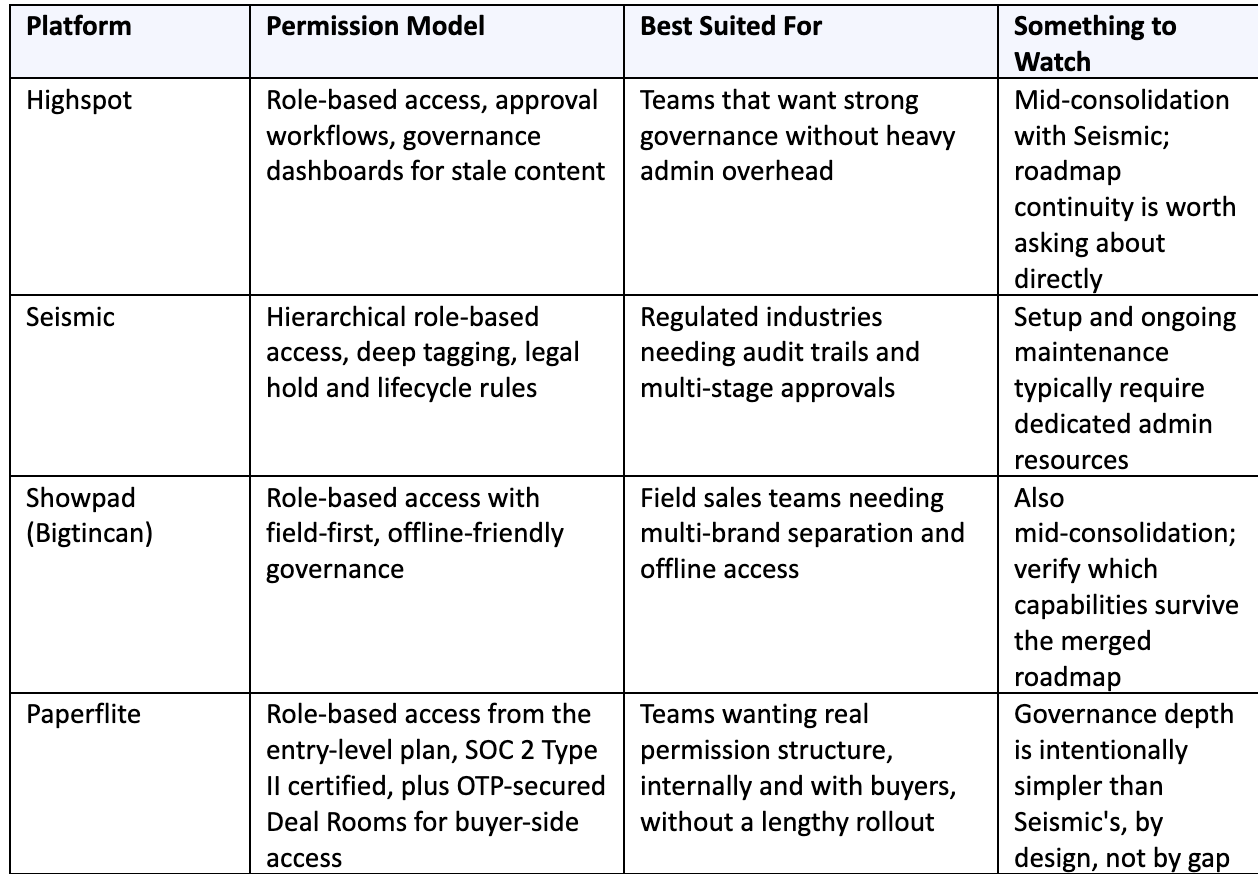
None of this is a knock against the incumbents. A regulated healthcare enterprise with a content ops team dedicated full time to governance genuinely benefits from Seismic's depth. A fifty-person B2B SaaS company trying to get permissions right, on both the internal and buyer-facing side, without hiring an administrator for the platform itself is solving a different problem entirely, and that's the gap the next section gets into.
The speed-to-value platforms
Not every team needs that level of configuration to get real security. If your priority is getting role-based permissions working correctly in days rather than months, without a dedicated administrator managing the system full time, that's a different evaluation criteria than raw governance depth.
This is exactly where it's worth taking the time to find the right platform for how your team actually operates, rather than defaulting to whichever name shows up first in analyst reports.
Paperflite sits in this category. Role-based access controls are built in from the entry-level plan, not gated behind an enterprise tier you have to negotiate your way into, and the platform carries SOC 2 Type II certification with enterprise-grade encryption as a standing baseline rather than an add-on. For content-heavy GTM teams that need real permission structure without a multi-month implementation, that combination tends to matter more than a deeper hierarchical tagging system they'll never fully use.
This isn't a case of choosing a lighter platform because it's cheaper and hoping nobody notices the gap later. It's a genuinely different design philosophy: build the permission controls most teams actually need directly into the core product, rather than treating governance as a premium add-on that only shows up once you've signed a bigger contract. For a mid-market GTM team scaling from fifty to two hundred reps, that difference shows up in weeks saved during rollout, not just dollars saved on the invoice.
Paperflite's Approach to Enterprise Permissions
Internal permissions get most of the attention in this comparison, but enterprise buyers increasingly ask a second question: how does the platform control access once content leaves your building and lands in front of a buying committee? That's where Paperflite's approach goes further than a typical role-based access model, because permissions don't stop at your own team.
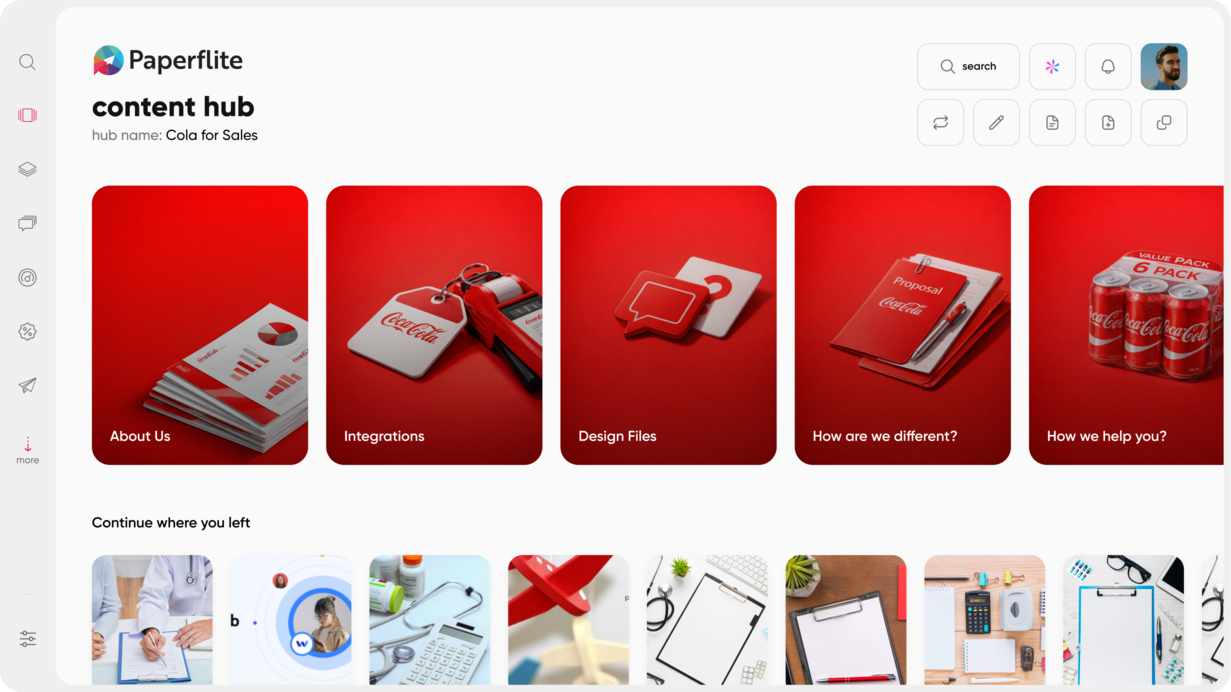
Paperflite's content hub tools give teams a Netflix-like library experience on the front end, with role-based permissions running underneath it. Access can be scoped by team, region, or role from the Starter plan onward, so a new sales hire, a regional partner, and a global account exec can all be looking at the same library and seeing three different, correctly scoped, versions of it.
A few specifics worth knowing:
Role-based access from day one.
You don't need to upgrade to a top-tier plan just to assign who can see what. Professional adds SSO and white labeling for teams that need identity provider sync and branded portals. Advanced and Enterprise layer on deeper CRM integrations and custom platform branding for larger, more complex rollouts.
Security posture as a baseline, not a feature toggle.
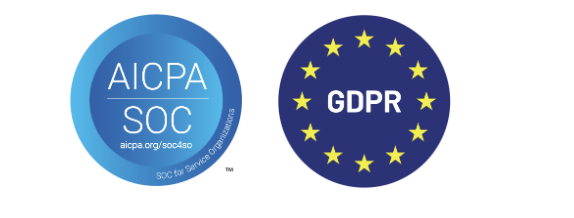
SOC 2 Type II certification and enterprise-grade encryption apply across the platform, which matters if your security team gates every new vendor before a contract gets signed.
Permission-aware search.
SEEK, Paperflite's LLM-powered content search, respects the same permission boundaries as the rest of the platform. A rep searching for “pricing” won't surface a document they weren't cleared to see in the first place, which sounds obvious until you've seen a platform where search quietly bypasses the access rules everyone assumed were airtight.
Deal Rooms extend permission control to the buyer side
Most permission conversations stop at the edge of your own organization. Paperflite's Deal Room takes the same governance thinking and applies it to the buyer-facing side of a deal, which is exactly the part most content hubs leave wide open once a link gets sent out the door.
Every Deal Room requires one-time password (OTP) verification before anyone can view what's inside, so access is never just “anyone with the link.” Deal Rooms are also shared exclusively through direct email invitations to named participants rather than an open, forwardable link, which means you always know exactly who's been let in, and nobody outside the invited buying committee can pass access along without you knowing.
For a workspace that often holds pricing, proposals, and security documentation, that's the same permission discipline this article has been arguing for, just applied to the room your buyers actually live in during a deal.
Our guide on digital sales room and how it compares to a plain content link goes deeper into why this distinction matters once deals involve multiple stakeholders.
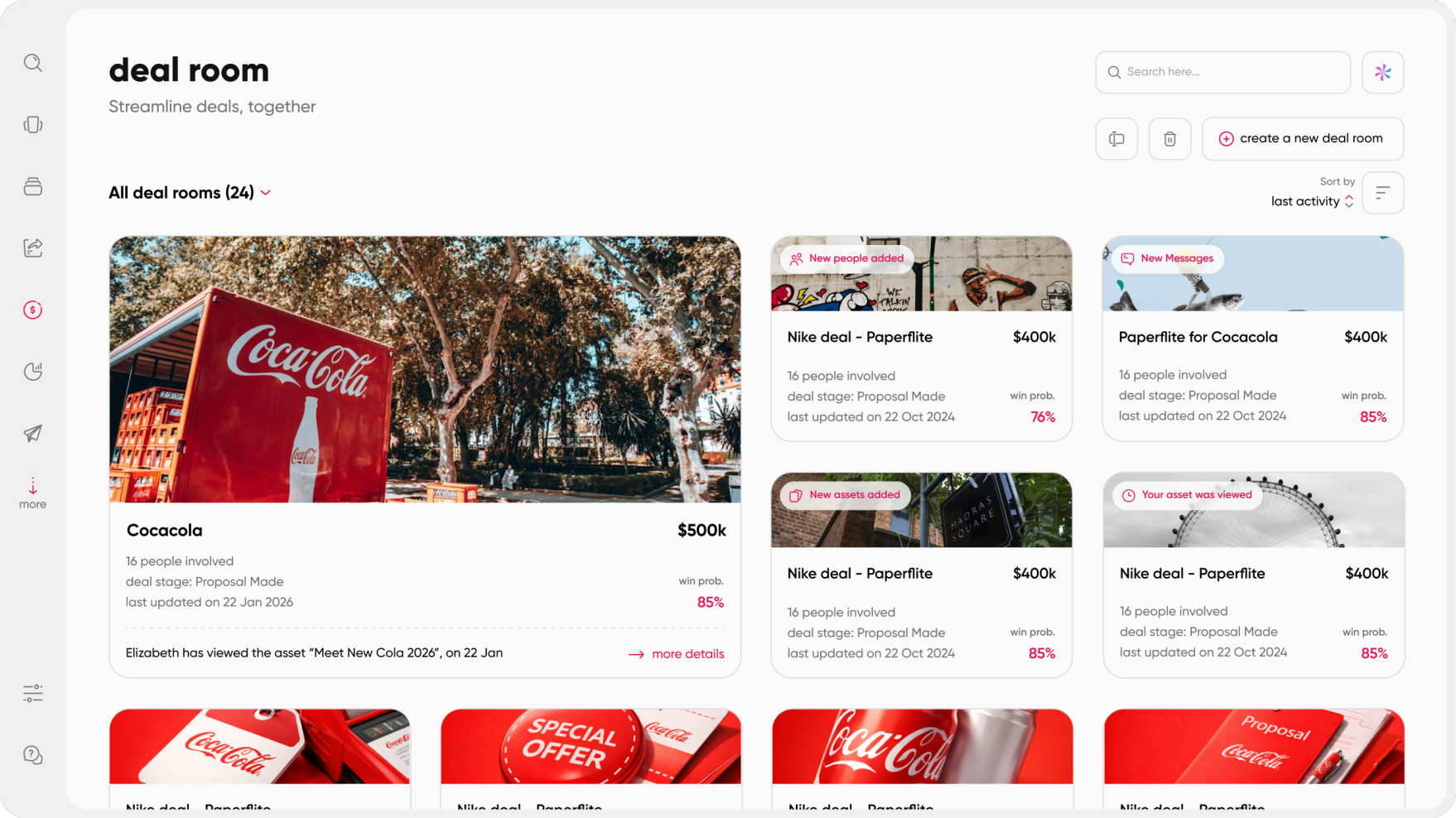
Built for the whole buying committee, not just your champion
A permission model is only as useful as your visibility into who actually holds it. Paperflite's Deal Room shows you the full buying committee instantly: who's engaged, who's missing, and who just joined the deal, so you can extend or narrow access to specific stakeholders as the committee evolves instead of handing one all-access link to a single champion and hoping they forward it to the right people internally.
That visibility feeds directly into deal signal, not just access control. Instead of tracking opens and clicks, Paperflite surfaces depth of engagement, stakeholder spread, and priority signals inside the room, so you can spot risk early and focus your time on deals with real traction rather than ones that only look active.
The same access-controlled room also keeps the conversation itself contained. In-room Q&A ties buyer questions and seller answers directly to the deal context, instead of scattering them across email threads or buried file comments that can end up forwarded well outside the intended audience. Mutual next steps, milestones, owners, and due dates, live in the same permissioned space, so both sides know exactly what's next without that plan leaking into an inbox it was never meant to reach.
For readers looking at the broader feature set beyond permissions specifically, our rundown of 7 must have features of content hub covers what else to check before you commit.
See how Paperflite's permission controls work, from internal role-based access to buyer-facing Deal Rooms. Book a demo
Conclusion
Enterprise permissions aren't a single feature you can check off a list. They're a combination of role granularity, audit visibility, and, maybe most importantly, how much admin overhead it takes to keep the whole thing running correctly as your team grows past the size where a shared folder structure was ever going to hold up. And increasingly, that combination has to extend past your own team into whatever room your buyers are sitting in too.
If your organization needs deep, regulated-industry governance and has the resources to configure and maintain it, Highspot, Seismic, and Showpad have built for exactly that. If your priority is getting real role-based security running fast, internally and with buyers, without a dedicated admin team babysitting the configuration, that's the gap Paperflite is built to fill, from role-based content access to OTP-secured Deal Rooms that keep an entire buying committee contained in one governed workspace. Either way, the question to ask before you sign anything isn't just “does this have permissions,” it's “Who has to maintain them, and how much of their week does that take.”
A practical next step before you shortlist anyone: pull up your current content library and count how many assets would need different visibility rules if you rebuilt access from scratch today. That number tells you more about which permission model you actually need than any vendor comparison page will.
Curious how content-level permissions and content hub tools work together day to day? Our breakdown of Content hub tools: what are they and why do you need them is a good next read.
Frequently Asked Questions
What is a content hub in sales enablement software?
A content hub is a centralized library where sales and marketing teams store, organize, and share content like decks, case studies, and battlecards. Unlike a plain shared drive, it adds search, analytics, and permission controls so the right content reaches the right person without manual folder management.
What are enterprise permissions in a content hub?
Enterprise permissions control who can view, upload, edit, or share specific content based on role, team, region, or relationship to the company. They prevent scenarios like a channel partner seeing internal-only pricing or a new hire stumbling onto content they shouldn't have access to yet.
What's the difference between role-based and attribute-based access control?
Role-based access control (RBAC) assigns fixed permissions to job roles, similar to keys on a keyring. Attribute-based access control (ABAC) grants access based on content tags and metadata instead, similar to a bouncer checking a wristband. RBAC is simpler to set up and audit; ABAC is more flexible for complex, multi-brand organizations willing to maintain a tagging taxonomy.
Which sales enablement platforms support enterprise-grade permissions?
Highspot, Seismic, and Showpad all offer deep, role-based governance built for large, regulated organizations with dedicated admin resources. Paperflite offers role-based access, SOC 2 Type II certification, and enterprise-grade encryption from its entry-level plan, plus OTP-secured Deal Rooms for controlling buyer-side access, aimed at teams that want real security without a lengthy configuration process.
Is Paperflite SOC 2 compliant?
Yes. Paperflite is SOC 2 Type II certified and uses enterprise-grade encryption and role-based access controls to protect customer data across all plans.
Can content permissions be customized by team, region, or partner tier?
In platforms with role-based access control, yes, permissions can typically be scoped by team, region, seniority, or partner relationship. The level of granularity available depends on the platform, so it's worth confirming during evaluation rather than assuming.
How much do content hubs with enterprise permissions typically cost?
Paperflite's published pricing starts at $30 per user per month for the Starter plan, $50 for Professional, and $60 for Advanced, with custom pricing for Enterprise. Highspot, Seismic, and Showpad do not publish list pricing, and typically require a custom quote based on team size and configuration needs.
What happens to content access when a rep leaves the company?
With SSO and identity provider sync in place, access typically revokes automatically the moment a user is deactivated in the connected identity provider. Without SSO, admins need to manually remove access inside the content hub, which is worth confirming during evaluation since it's an easy gap to miss.
How does Paperflite control who can access a deal once it's shared with a buyer?
Paperflite's Deal Room requires one-time password verification for every visit and is shared only through direct email invitations to named participants, not open links. That means access is tied to specific people on the buying committee, not to whoever happens to have the URL.
Does adding enterprise permissions slow down how fast reps can find content?
Not if the platform is built correctly. Permission-aware search should filter out content a user isn't cleared to see without adding noticeable delay, so reps still get fast results, just scoped to what they're actually allowed to access. If search feels slower after permissions are configured, that usually points to a platform architecture problem rather than an unavoidable tradeoff.